18 19
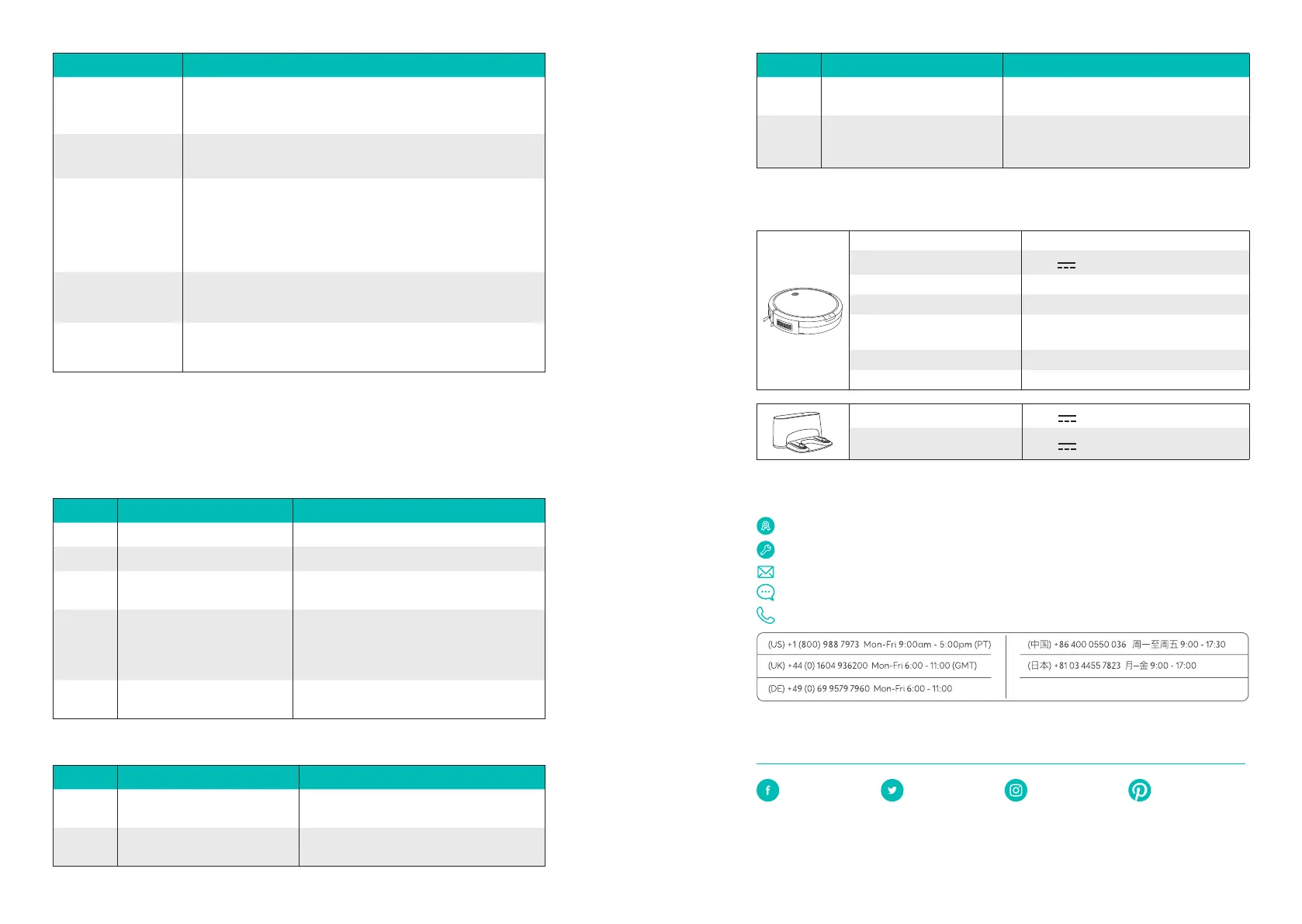
Error Tone Cause Solution
Three beeps
RoboVac’s rolling brush is stuck.
Turn o RoboVac and remove any hair or
debris from the rolling brush.
Four beeps
RoboVac’s bumper is stuck.
Tap RoboVac’s bumper several times to
dislodge any debris that may be trapped
underneath.
Specifications
Product Model T2104
Input
19 V 0.6 A
Battery Voltage DC 14.4 V
Power Consumption 28 W
Battery Type
DC 14.4 V
Li-ion 2500 mAh
Cleaning Time Max. 100 mins
Charging Time 300 - 360 mins
Input
19 V 0.6 A
Output
19 V 0.6 A
Customer Service
12-Month Limited Warranty (additional statutory warranty remains unaected)
Lifetime Technical Support
Email: support@eufylife.com
Live chat: www.eufylife.com
Customer service hotline:
This limited warranty provided by the manufacturer does in no way affect a potential
statutory warranty provided by law.
@EufyOcial
@EufyOcial @EufyOcial
Anker Innovations Limited
Room 1318-19, Hollywood Plaza, 610 Nathan Road, Mongkok, Kowloon, Hong Kong
Problem Solutions
Suction power is weak.
•Check if any obstructions are blocking the suction inlet.
•Empty the dust collector.
•Clean the filter with a vacuum cleaner or a cleaning brush.
RoboVac cannot be
charged.
•Check if the Charging Base is plugged into the outlet.
•Dust o the charging contact pins with a dry cloth.
RoboVac cannot return
to the charging base.
•Remove objects within 3 ft/1 m to the left and right side and
within 6 ft/2 m of the front of the Charging Base.
•When RoboVac is in the vicinity of the Charging Base, it will
return more quickly. However, if the Charging Base is located far
away, RoboVac will need more time to return. Please be patient
as it works its way back.
The rolling brush
does not rotate.
•Clean the rolling brush.
•Check if the rolling brush and brush guard have been installed
properly.
RoboVac’s movements
or travel path are
abnormal.
•Clean the sensors carefully with a dry cloth.
•Restart RoboVac by turning the power switch o and on.
Error Tone
When RoboVac is in trouble, it will emit a series of short or long beeps and the red indicator
on RoboVac will be solid or flashing.
Flashing red indicator light
Error Tone Cause Solution
One beep RoboVac’s drop sensors are dirty. Clean the drop sensors gently with a dry cloth.
Two beeps RoboVac’s power level is too low. Charge RoboVac for at least 5 hours.
Three beeps
RoboVac is hanging over a ledge
or is trapped.
Turn o RoboVac and restart in a new location.
Four beeps RoboVac’s suction fan is stuck.
•Turn o RoboVac, then remove and empty
the dust collector.
•Make sure the suction inlet is not blocked
by any hair or debris.
Five beeps
RoboVac’s infrared sensor on the
bumper is dirty.
Clean the infrared sensor gently with a dry cloth.
Solid red indicator light
Error Tone Cause Solution
One beep
RoboVac’s left/right wheel is
stuck.
Turn o RoboVac and remove any hair or
debris from the left/right wheel.
Two beeps
RoboVac’s side brush is stuck.
Turn o RoboVac and remove any hair or
debris from the side brush.











 To Next Page