12 EN EN 13
Start / Stop Cleaning
• Make sure the main power switch on the bottom of RoboVac
is turned on before use.
1
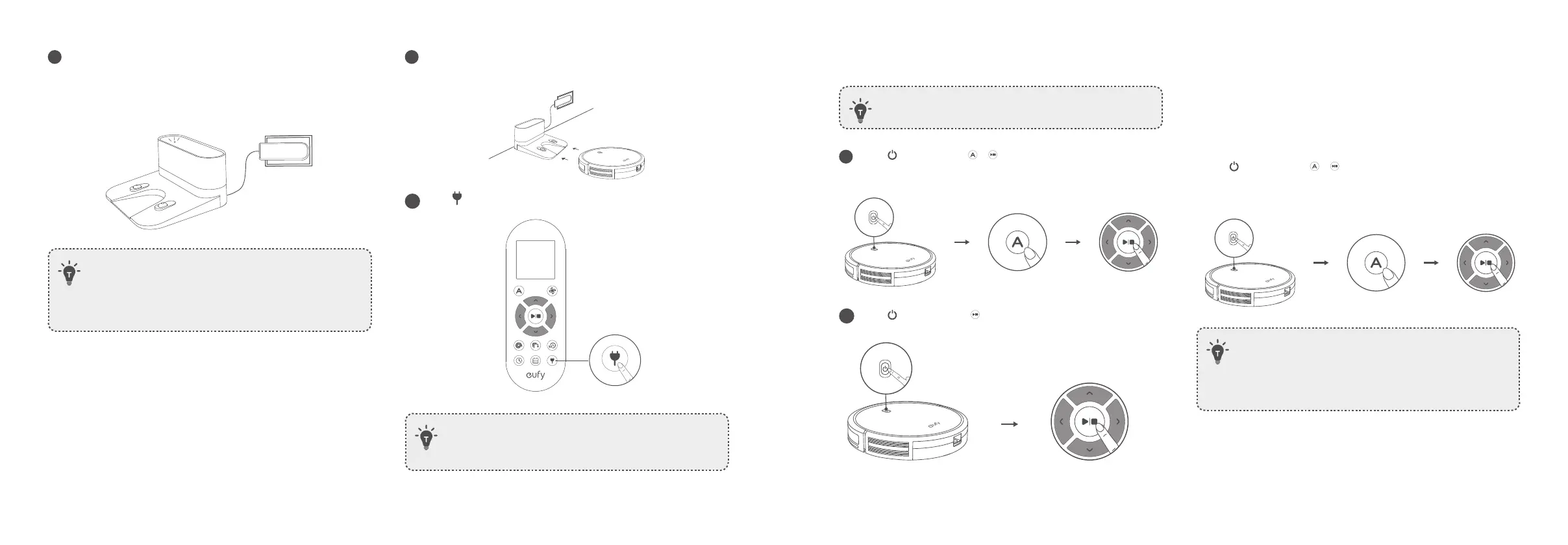
Press on RoboVac or / on the remote control to start
cleaning in Auto Mode.
2
Press on RoboVac or on the remote control to stop cleaning.
Select a Cleaning Mode
A. Auto cleaning
RoboVac optimizes its cleaning path by selecting different cleaning
modes automatically until cleaning is complete. This is the most
commonly used cleaning mode.
- Press
on RoboVac or / on the remote control to start cleaning
in Auto Mode for 11S (T2108) and 11S Max (T2126). You can control
15C Max (T2128) via eufy Clean app.
• RoboVac will return to the Charging Base automatically when
the battery level becomes low or when RoboVac finishes
cleaning.
• By default, RoboVac starts in Auto cleaning mode when it is
turned on.
5
Connect the round connector of the adapter into the power socket
on the Charging Base and the other end into a wall outlet.
• When the Charging Base connects to AC power, the LED
indicator on the Charging Base is SOLID WHITE.
• Install the Charging Base in a location that RoboVac can easily
access. It is recommended to place the Charging Base against a
wall, and on a hard-level surface rather than on rugs or carpets.
• Always keep the Charging Base plugged in, otherwise RoboVac
will not automatically return to it.
Charge Your RoboVac
• RoboVac has a pre-installed rechargeable battery that has to be fully
charged before use.
• RoboVac returns to the Charging Base at the end of a cleaning cycle
or when its battery is running low.
1
Attach RoboVac to the Charging Base by aligning its charging pins
with the charging pins on the base.
2
Press to return RoboVac to the Charging Base.
• Turn off the main power switch if RoboVac will not be used
for a long period of time. To preserve the battery’s lifespan,
recharge at least once every 6 months.



 To Next Page