EasyManua.ls Logo

Eumig MARK 607 D - Projector Setup and Preparation; Pre-Operation Checks; Film Format Selection; Initial Film Loading

Eumig MARK 607 D
12 pages
Print Icon
To Next Page IconTo Next Page
To Previous Page IconTo Previous Page
Loading...
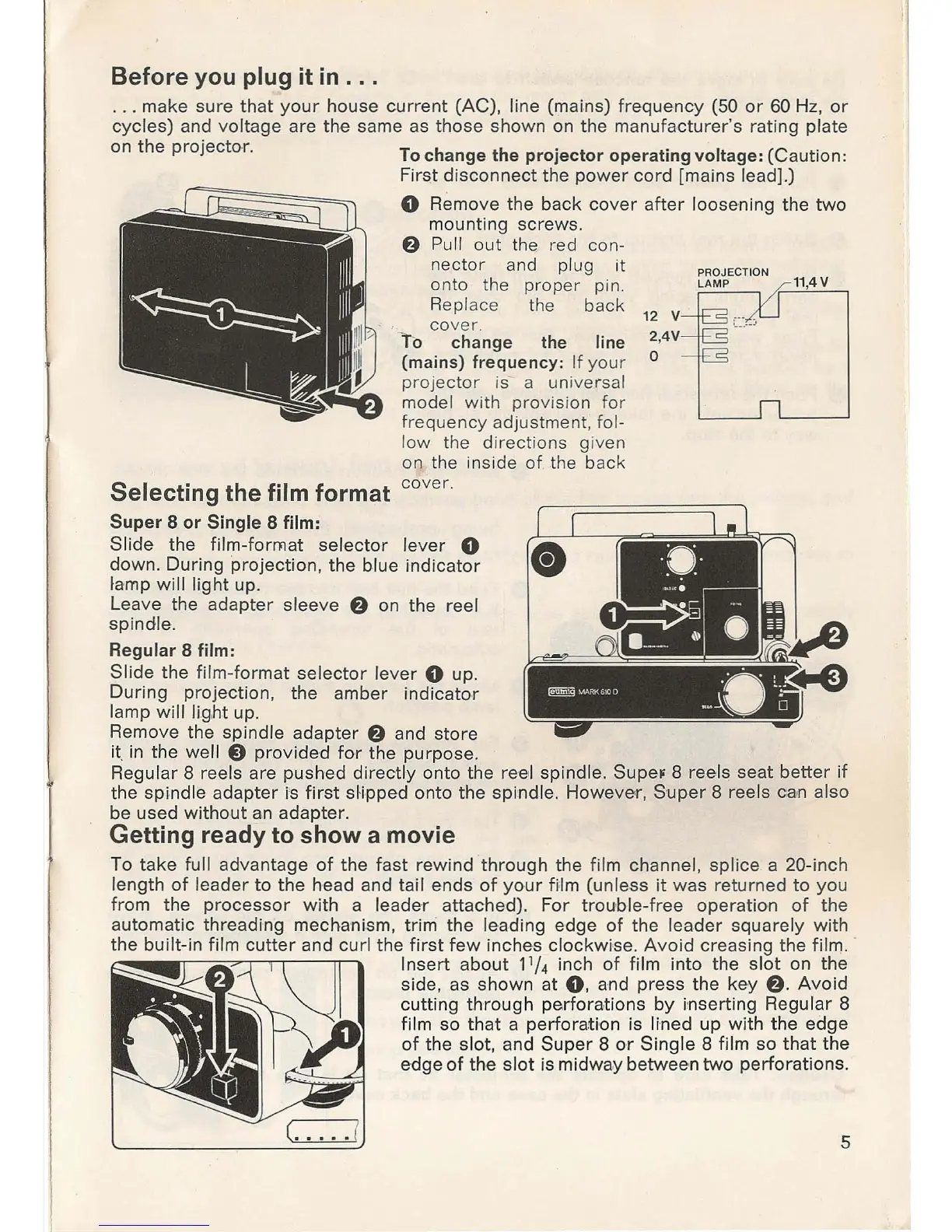
Before you plug it
in
...
. . . make sure
that
your
house
current
(Ae)
, line (mains)
frequency
(50
or
60 Hz,
or
cycles) and
voltage
are the same as
those
shown
on
the
ma
n
ufacturer
's rating plate
on
the
projecto
r.
To change the
projector
operating
voltage: (Caution:
First
disconnect
the
power
cord
[mains lead).)
o Remove the
back
cover
after
loosening the
two
mounting screws.
6 Pull o
ut
the I'ed con-
n
ect
or
an
d
pl
ug it
onto the proper pin.
11
,
4V
Replace t
he
back 12 v
Selecting the f
ilm
format
Super
8
or
Single
8 film:
cover
.
To change the line
(mains) frequency:
If
your
projec
t
or
is- a universal
model with provision
for
fre
qu
ency
adjust
me
n
t,
fol-
low
the directions given
on the inside
of
.th
e back
cove r.
S
li
de the
film-format
selector
lever
0
down.
During
projection
, the blue
indicator
lamp
will
light
up.
Leave the adapter sleeve
6
on
the reel
spindle.
Regular 8 film:
Slide
the film-format
selector
lever
0 up.
During
projection, the amber
indicator
lamp will li.
g.ht
up.
Remove the spindle
adapter
6 and store
it.
in the well e
provided
for
the
purpose
.
2,4V
o
Regular 8 reels are pushed
direct
ly onto the ree l spindle. SupeF 8 reels seat better
if
the
spind
le
adapter
i's
first
sHpped onto the
spind
le. Howeve,
r,
Supe
r 8 reels can also
be
used
without
an
adapter
.
Getting ready to show a movie
To
take
full advantage
of
the
fast
rew
ind
through
the film channel,
splice
a 20-inch
length
of
leader
to
the
head and tail ends
of
your
film (unless
it
was
ret
urned to
yo
u
from the
processor
with
a leader attached). For
trouble-f
ree operation of the
automatic threading mechanism,
trim the leading edge
of
the
leader
squ
ar
ely
with
the built-in film
cutter
and
cur
l the
first
few
inches cl
ockwise
. Avoid creasing the film . .
Insert
about
11/4 inch
of
film into the
slot
on the
si
de
, as shown at
0,
and
press
the
key
6 .
Avoid
cutting
through
perforations
by
inserting Regular 8
film so
that
a perforati·on is lined
up
with the edge
of
the
slot
, and
Super
8
or
Single
8 film so
that
the
edge
of
the
slot
is midway between
two
perforations.
5

Related product manuals