Need help?
Do you have a question about the Eumig MARK 607D and is the answer not in the manual?
Plug projector into outlet, verify mains voltage and frequency match.
Swing up reel arm, place full reel, flip reel guard, place take-up reel.
Move function switch to auto threading position; pilot light activates.
Insert film end into slot until caught by threading mechanism.
Move function switch to forward with lamp position to begin projection.
Ensure apparatus is earthed; disconnect from mains when not in use.
Do not obstruct ventilation slots; disconnect from mains before removing covers.
Guide to connecting mains lead wires (green/yellow, blue, brown) to plug terminals.
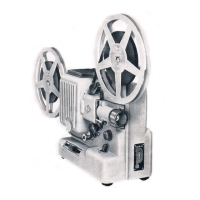
Identifies key components of the projector via numbered labels on a diagram.
Lists accessories supplied with the projector, including power cord, manual, warranty, and film reels.
Ensure mains voltage and frequency match projector rating plate before connecting.
Instructions for selecting Super 8/Single 8 or Regular 8 film formats using the selector lever.
Splice leader, trim squarely, and curl clockwise for automatic threading.
Plug in power cord, swing reel arm, place reel, push take-up reel.
Use auto thread, feed film, move switch to forward, adjust zoom and focus.
Adjust framing lever for line disappearance and tilt control for picture height.
Use slow-motion switch for speeds 12, 9, 6, 3 fps, or 0 for still projection.
Covers fast rewind through film channel and direct reel-to-reel rewind.
Interrupt fast rewind to replay a scene by moving switch clockwise.
Connect cassette recorder with remote-control jack via sync cable for simultaneous start/stop.
Details the Eumig sync cable accessory for connecting cassette recorders.
Clean film guides and channel by removing lamp housing and lens gate.
Carefully clean the lens using a soft cloth and by removing the focusing knob.
Advise on cleaning and storing films properly to maintain quality.
Step-by-step guide to replace the projection lamp, including safety notes.
Recommends adjusting voltage selector for longer lamp life, accepting slight light reduction.
Instructions for replacing the pilot light bulb on the Mark 610 D.
Guide to replacing the drive belt, considering mains frequency.
Accessory to synchronize cassette recorder with projector.
Durable cover to protect projector and store accessories during storage.
Displays film on a small screen for previewing under daylight conditions.


 To Next Page
 General