Dustbin maintenance (weekly cleaning recommended)
DAILY MAINTENANCE AND
SERVICING
Press the box release key to pull out
the box backwards;
1. Open the top cover of the
Dustbin to pour out dust from
the box;
2.
Remove the filter assembly
according to prompt texts on the
assembly;
3. Clean components: clean the
Dustbin and filter assembly;
replace them after cleaning and
drying completely,and check
whether they are installed in
place after the rear cover is
closed.
4.
Filter assembly
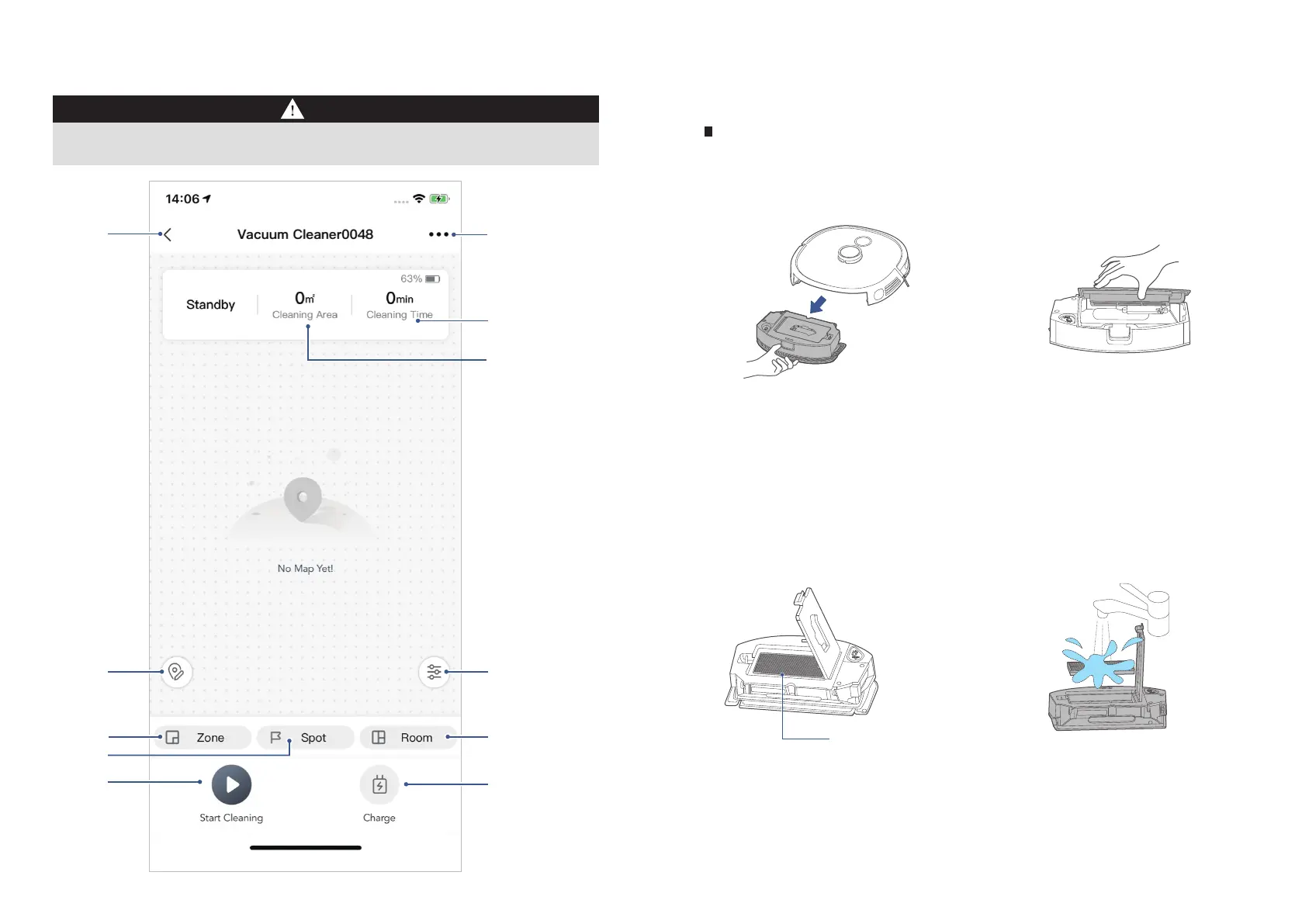
EUREKA ROBOT APP QUICK GUIDE
If the Wi-Fi in your home is unstable, it may cause a certain delay in the related operations of the Eureka Robot
App. (The content of the Eureka Robot App is subject to the upgraded version of App. Please refer to the Eureka
Robot interface for details).
Back to previous
page
Robot
settings
Cleaning time
Cleaning Area
Cleaning time
Select water
Charge
Room
Map
Editor
Zone
Spot
Start
Cleaning
2019
Note: This interface will be upgraded later,this interface is for reference only.
Notes






 To Next Page