21
EN
1. Connection
Have your plug checked (presence of fuses, amps and 30 mA
circuit breaker).
Do not plug several cellars into a multi-socket.
1I. Description
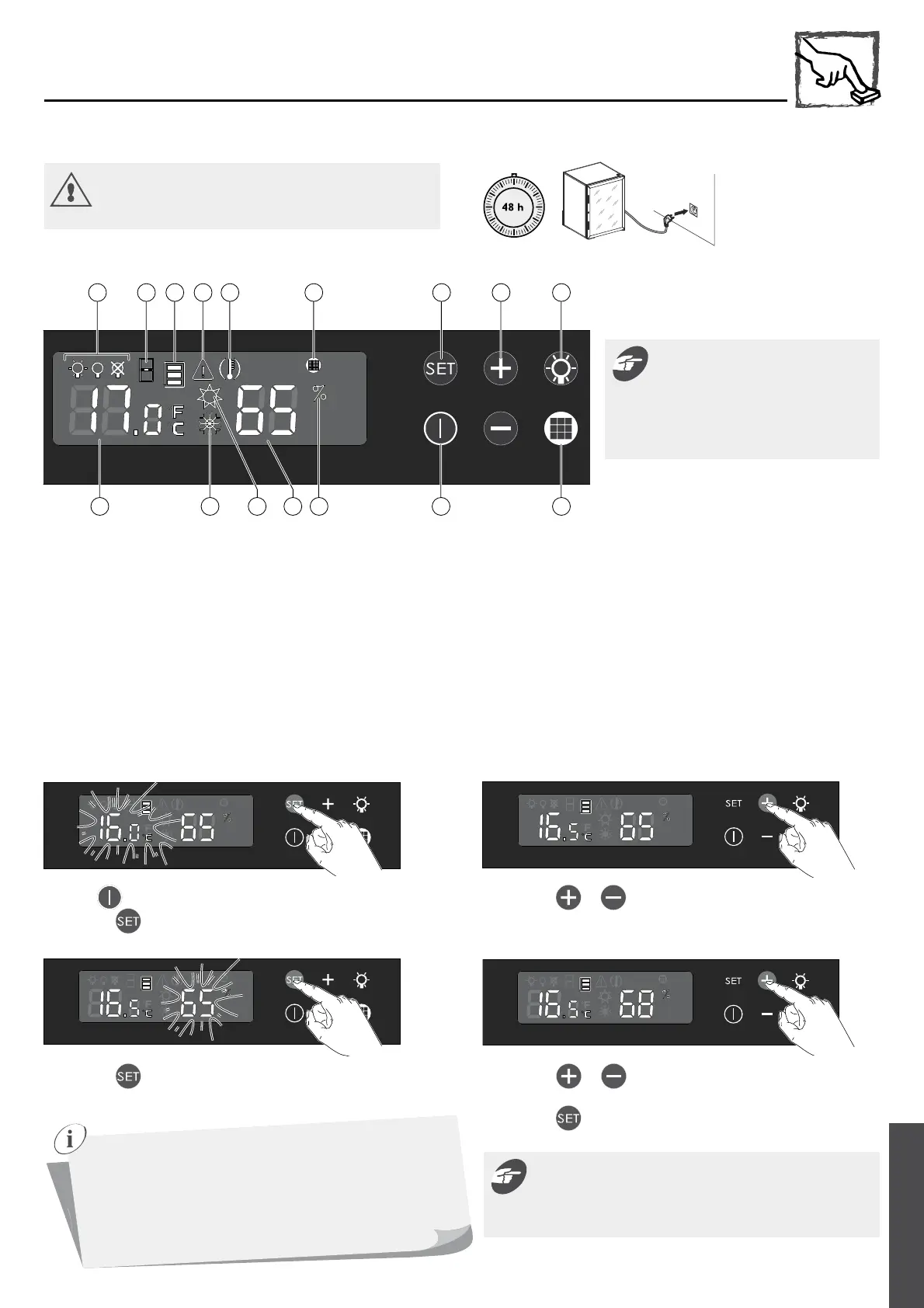
P O L
FEDCBA G H I
N M K J
7 - COMMISSIONING YOUR HUMIDOR
A Lighting mode
B Door open alarm
C Temperature zone
D Fault sensor alarm
E Temperature alarm
F Carbon filter alarm
G Validation and settings access button
H Selection and adjustment buttons
I Lighting mode validation and access button
J Carbon filter counter log access button
K Standby status button
L Threshold humidity alarm
M Relative humidity level display
N Hot circuit indicator light
O Cold circuit indicator light
P Temperatures display
III. Temperature and relative humidity settings
The touch keys are very sensitive. There
is no need to push the keys very hard. A
simple, gentle touch is enough to register
the setting. Think to lift your finger from
the control panel between each touch.
5 sec.
Press the key for 5 s to activate.
1 Press the key about 5 s.
The display starts to flash.
3 Press the button to validate.
The humidity level display is flashing.
2 Press the or keys to set the desired temperature.
4 Press the or keys to set the desired relative humidity level.
(Temperature setting range: 65 – 85%)
5 Press the button to validate.
As for any natural product, cigars require particular care.
They must be protected from extreme temperatures and
stored in a humidified location. The ideal temperature is
located between 15 and 18 °C (59 and 64 °F) and between 65
to 75 % humidity.
Cigar humidor performances vary according to room
temperature and humidity.
The temperature and humidity values read on the display are
the actual levels in the humidor; there is a small delay between
any change or modification in settings and the humidor reaching
your new values set.



 To Next Page