7
JP4
JP5
JP6
JP4
JP5
JP6
12Vdc
24Vdc
24Vca
12Vdc
24Vac
24Vdc
+AC
+AC
+AC -0AC
- 0AC
- 0AC
JP4 JP5 JP6
12Vdc
24Vac
24Vdc
+AC
+AC
+AC -0AC
12Vdc
24Vdc
24Vca
- 0AC
- 0AC
JP4 JP5 JP6
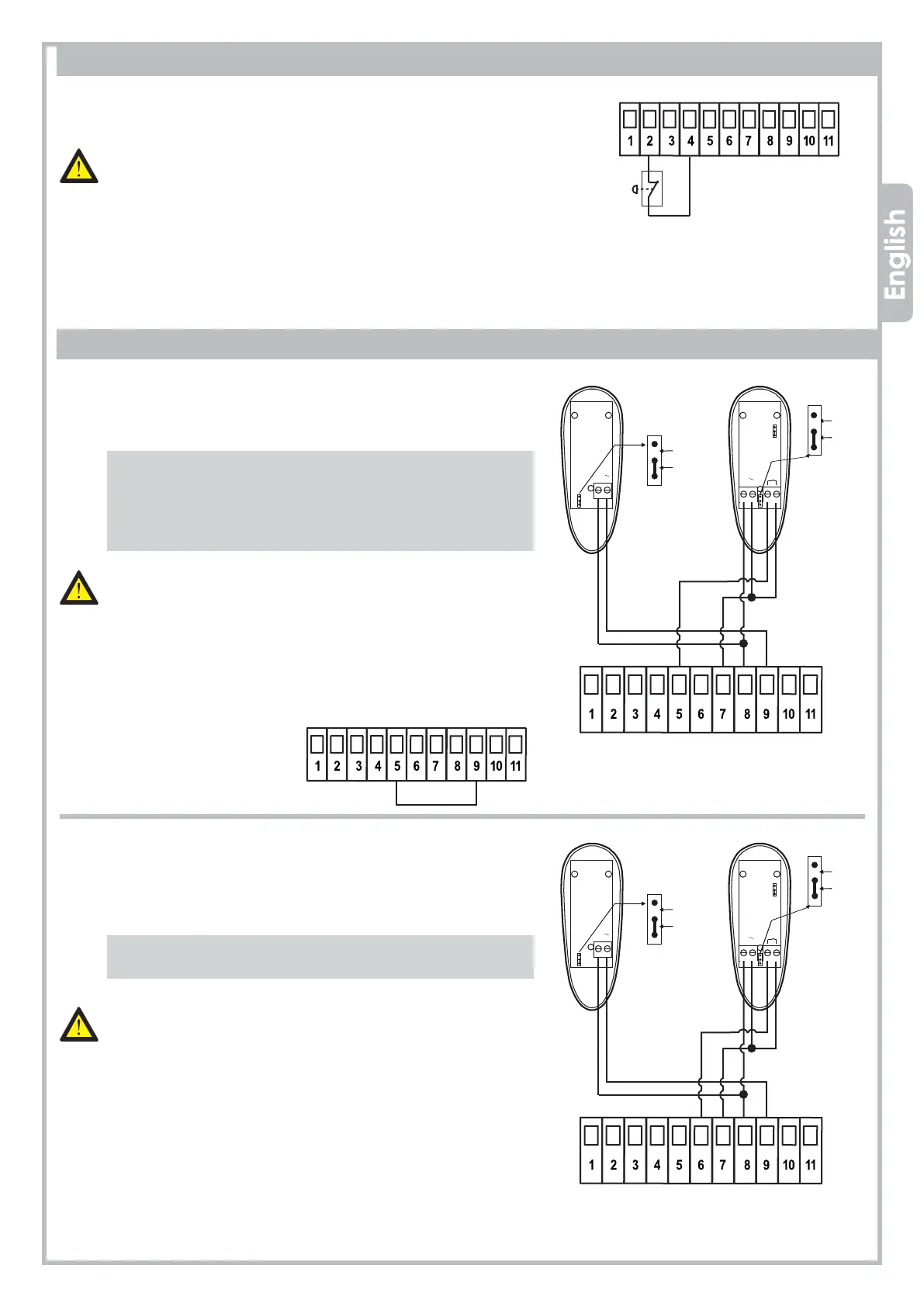
3.6 PHOTOCELLS
3.6.1 Photocells IN CLOSING
Feed the photocells through 7-8-9, terminal JP5.
Wire the photocell contact (N.C. contact) to 5-7, terminal JP5.
An additional photocell set can be wired in SERIES (N.C. contact).
- If the photocell beam is broken during CLOSING,
the gate stops and reverses after 1,5 sec.
- If the photocell beam is broken during OPENING,
the gate keeps on working normally.
The PHOTOCELLS IN CLOSING are important for
the safety of people and objects.
N.B.: To desable the photocell in closing
during installation, plug 5 and 9 together.
3.6.2 Photocells in OPENING
Feed the photocells through 7-8-9, terminal JP5.
Wire the photocell contact (N.C. contact) to 6-7, terminal JP5.
An additional photocell set can be wired in SERIES (N.C.
contact).
- If the photocell beam is broken during OPENING, the gate
stops and reverses for 3 sec
The PHOTOCELLS IN OPENING are important for the safety of
people and objects..
N.B.: Before wiring any PHOTOCELL in OPENING, remove the
jumper between terminal 6 and terminal 9.
EMERGENCY
STOP BUTTON
3.5 EMERGENCY STOP BUTTON
Wire the STOP BUTTON (N.C. contact) to 2-4, terminal JP4.
An additional STOP BUTTON contact can be wired in SERIES (N.C. contact)
The EMERGENCY STOP BUTTON is important for the safety
of people and objects
N.B.: Before wiring any STOP contact remove the jumper between
terminal 2 and terminal 4.
PLUG 5 - 9


 To Next Page