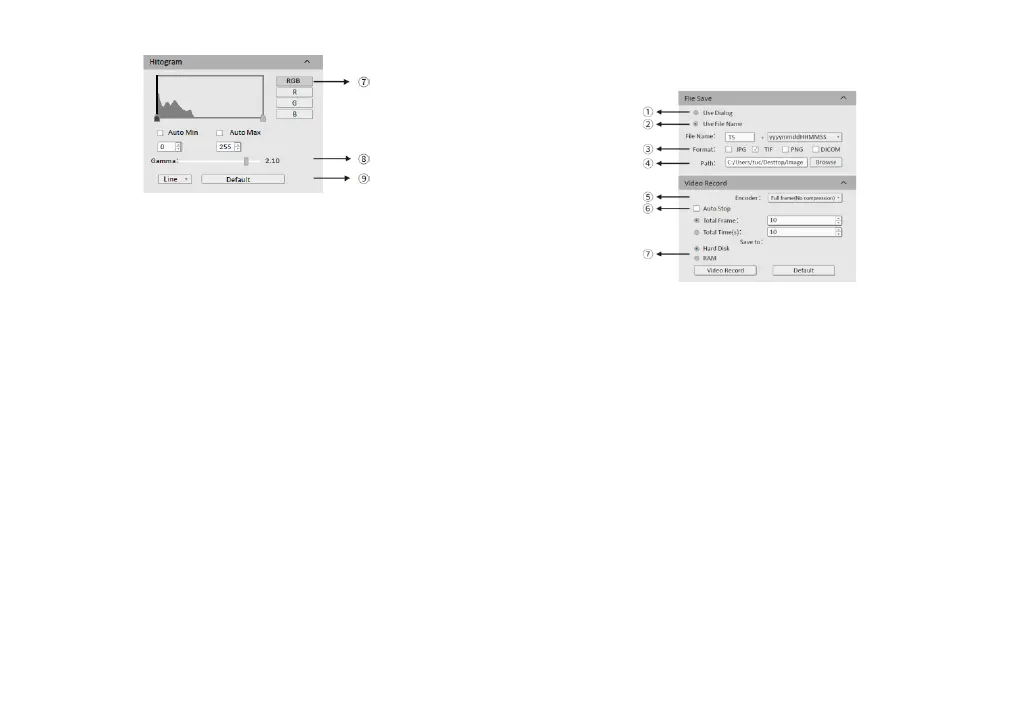
① Select [Use Dialog]: the software will pop up the Dialog to set the picture
save path, picture name and format when taking pictures.
② Select [Use File Name]: A file will be saved with the name "TS" as default,
but the name can be customized. "Customized name + time stamp" is
supported. A name can contain up to 64 bytes .
③ File format: Support JPG \TIF \PNG \DICOM, default to TIF, and can be
checked simultaneously, but at least one of them must be chosen.
④ Under default status, the image file shall be saved to a filefolder specified
in defined [ Path ]; user could modify the saveing path through [Browse].
⑤ The video provides two encoding modes: [Compression] and [Full frame
(No compression). [Full frame (No compression)] is chosen as default.
⑥ Select [Auto Stop], the recording mode is available in [Total Frame] and
[Total Time]. [Total Frame] is chosen as default. Unselect [Auto Stop] ,user
could manually click to stop the current video recording.
⑦ [Hard Disk] In the process of capturing images, the function will
automatically
write the data into disk. Which is suitable for long-term shooting .
[RAM] Save the data into computer memory; after image capturing, write the
data into a disc file. Limited by the size of memory space, this mode is not
suitable for a long time capturing images .
4.3. Image capturing
⑦ RGB channel selection, view the grayscale map of different channels.
⑧ [Auto Min]&[Auto Max] automatically obtains the pixel values o f the
darkest and brightest intervals with even distribution. (Single channel does
not support automatic color graduation).
⑨ Appropriately adjust the gamma value, change the brightness value of the
gray tone of the image, and increase the layering of a monochrome image.
-7- -8-


 To Next Page
 Loading...