Bottom Side Speaker Positioning + Rubber Feet
14 15
POSITIONING
POSITIONING
4. POSITIONING
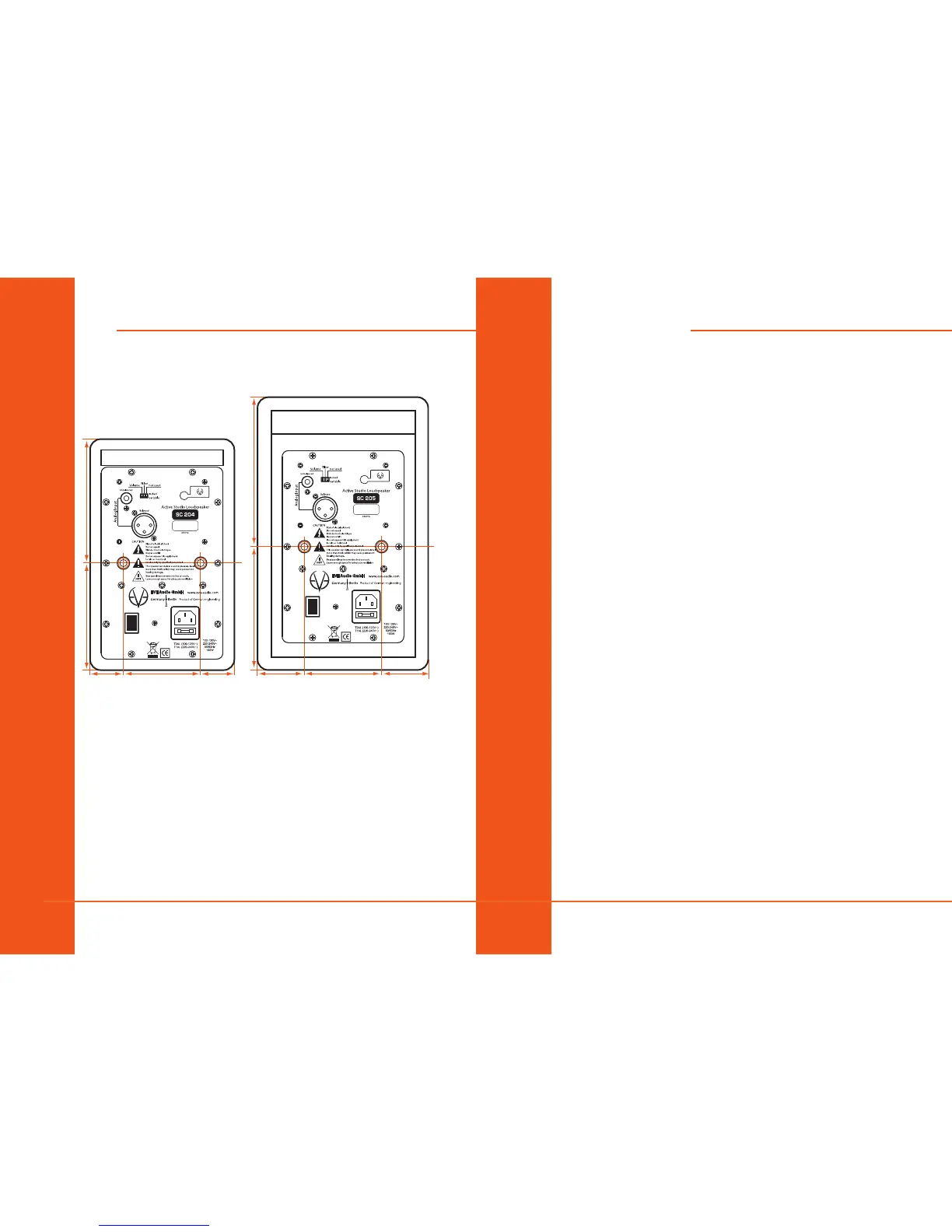
4.1. Wall Mounting
123 mm / 4.84“
107 mm / 4.21“
76 mm / 2.99“34 mm / 1.34“ 34 mm / 1.34“
149 mm / 5.87“
125 mm / 4.92“
76 mm / 2.99“49 mm / 1.93“ 49 mm / 1.93“
0
I
0
I
On the rear panel of your EVE Audio monitors you will nd two wall-
mounting brackets. These are meant to be used with M6 screws. Make sure
that the screws go no deeper than 10 mm (0.3 inches) in the brackets.
4.2. Bottom Side
The bottom of your SC204 and SC205 monitors feature screw threads
for microphone stands. The 3/8” thread allows you to screw the monitor
directly onto a microphone stand. Make sure that the screw goes no deeper
than 16 mm (0.6 inches) in the thread.
4.3. Speaker Positioning + Rubber Feet
Ideally, there should be no objects or obstacles between the loudspeakers
and the listening position. Further, a symmetrical positioning is important.
This applies to the distance between speakers as well as to the walls, ceiling
and oor. In order to have a symmetrical stereo image it is also important to
have symmetrical reections. We recommend to keep a distance of at least
0.5 m (19 inches) to the walls, in order to avoid low frequency boosting.
EVE Audio monitors can also be ush-mounted in a wall, in which case
there should be enough air ow. This is important to keep the electronic
components cool but also to allow for the best performance of the bass
reex port. We recommend to keep at least 2 cm to the sides and top.
The SC204 and SC205 monitors were especially designed to be placed
vertically. Fix the supplied rubber feet to the bottom side of the monitor
and place it on an even and steady surface.
Alternatively, you can place the monitor on a microphone stand (see
“Bottom Side”) or mount them on a wall by means of the M6 brackets on
the rear.
If the room conditions force you to place the SC204 or SC205 monitors in
horizontal position, make sure that the tweeter is pointing to the outside
and that the loudspeakers are angled towards the listening position. In
any case, you should also try placing the tweeters pointing to the inside.
Regardless of the position, always mind the symmetry (both tweeters
should point either to the inside or to the outside)!
Rubber feet: your EVE Audio monitors are supplied with four self-adhesive
rubber feet. Fix them to the bottom of your loudspeakers to place the
monitors safely on an even surface. Furthermore, the rubber feet improve
the acoustic decoupling of the loudspeakers from the surface.



 To Next Page