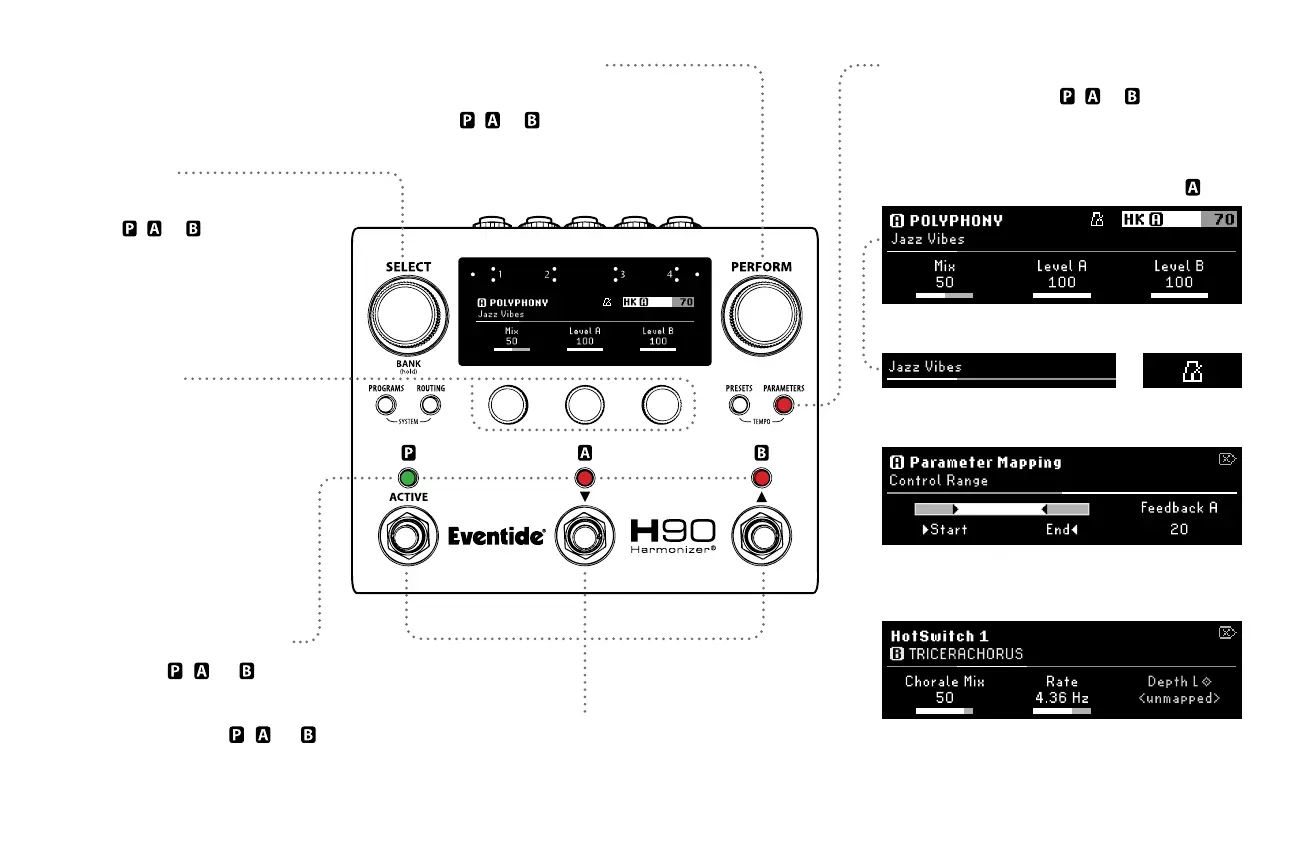
Parameters
Parameters Button
Press to cycle through , or
parameter groups.
Select Knob
Turn to scroll through pages of
selected
,
or parameters.
Perform Knob
Turn to adjust selected
,
or HotKnob value.
Press and hold to map HotKnob.
Quick Knobs
Turn to adjust parameter value.
Press and hold to map the
corresponding parameter to
HotKnob, expression pedal or
external controller.
Footswitch LED Buttons
Press to select , , or parameters.
Press again to Active/Bypass.
Press and hold to map , , or
parameters to HotSwitch 1, 2 or 3.
11
Footswitches
Press any Footswitch to exit Parameters Mode.
Algorithm and Preset name
Tempo SyncPreset name
Press PRESETS and PARAMETERS to toggle Tempo Sync On/O
Flexible Mapping: Map any parameter to a HotKnob,
expression pedal or aux switch.
HotSwitch: Press and hold FS LED Button 1, 2 or 3 to
map any parameter to three independent snapshots.
HotKnob
value



 To Next Page