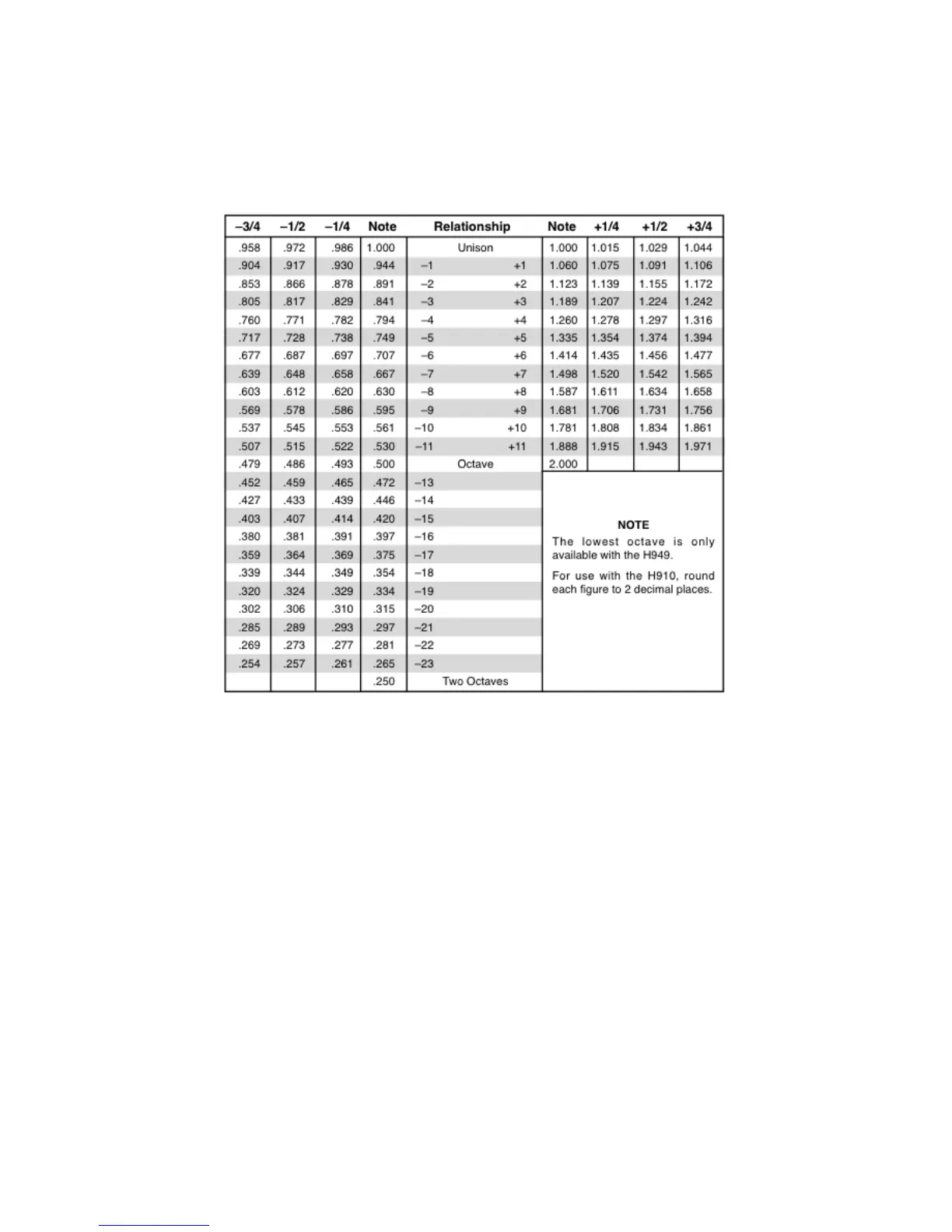
Figure 4.1: Pitch Ratio Readouts for Various Musical Relationships
4.2 Saving and Recalling Plug-In settings
When H910 Harmonizer is installed, a library of settings is placed into the
<user>/Documents/Eventide/H910/Presets folder. In this folder is a series of
.tide files which will show up as options in Eventide’s plug-in preset bar. From
inside the Eventide H910 Harmonizer you can load or save these settings. We
recommend saving your own Clockworks Legacy settings to this folder to ensure
that they are available to any instance of the plug-in you’re working with. You
can also create sub-folders inside the H910 Harmonizer Plug-In Folder if you
wish.
4.2.1 Mix Lock
Located at the top next to the preset save/load buttons is a button called ”Mix
Lock”. Pressing this will enable a global mix value that will be the same on
every preset that is loaded. Meaning that, with Mix Lock on, setting a mix
value of 50% will load every preset with a mix value at 50%.
10



 To Next Page