OPERATING INSTRUCTIONS
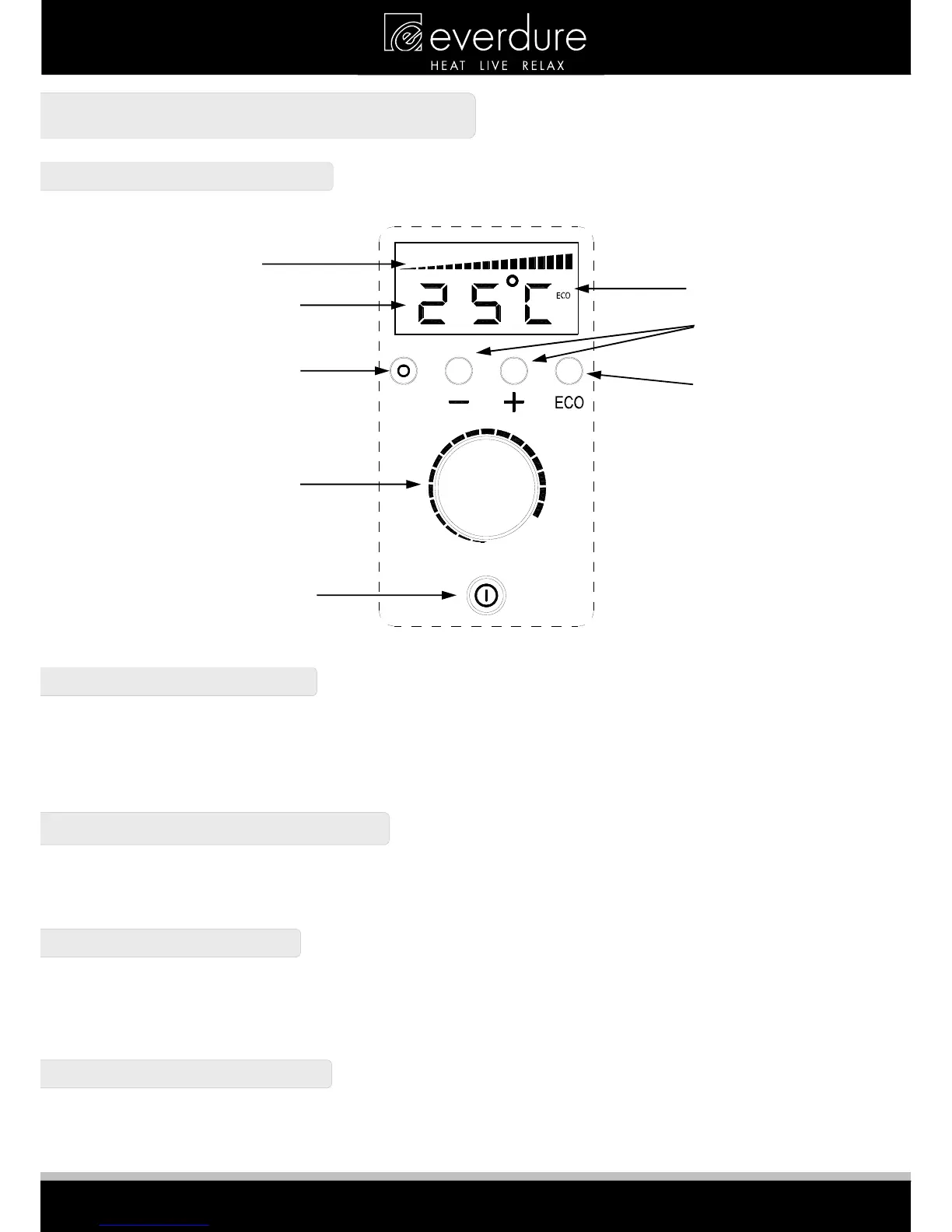
CONTROL PANEL
POWER ON/OFF BUTTON
Make sure the power supply and power switch are on. Press the Power On/Off Button once and the unit will now be active and
the Power Indicator will light up. The display will start flashing the current thermostat temperature setting (default is 25°C) and
then switch to the current ambient temperature. Press a second time and the appliance will revert back to the standby mode.
Note: If the thermostat temperature is set to a level below the ambient temperature, the unit will not run. Once the ambient
temperature falls below the set thermostat temperature, the unit will turn on and start to produce heat.
TEMPERATURE CONTROL BUTTONS
The appliance starts with the thermostat temperature set to (25°C). Pressing the “+” or “-“ will adjust the running temperature
to between 16°C & 32°C. The new thermostat temperature will be displayed (flashing) for a few seconds after the operation is
completed & then the display will revert to the ambient temperature.
POWER CONTROL KNOB
The amount of power used by the heater can be also be adjusted with the Power Control Knob. Increasing the power setting
will allow the heater to heat up faster (but use more power), where decreasing the setting will allow the heater to reach it’s set
temperature over a longer time. A higher setting is best for heating up a cold room fast, where a lower setting is better for
keeping a warm room at the set temperature. The power setting is shown on the power display.
ECO ON/OFF BUTTON
Pressing this button adjusts the thermostat temperature setting to 3°C below what is set (ie if the thermostat temperature has
been left at the default 25°C, the heater will run to 22°C). The ECO display will light up to show it is operational. Turn this
function off by pressing it a second time.
Power Display
Temperature Display
Power Indicator Light
Power Control Knob
Power On/Off Button
ECO Display
Temperature



 To Next Page