LT-101A User’s Manual
Copyright © EVERFINE, Copy or spread without authorization is prohibited.
Chapter 4 Preparations
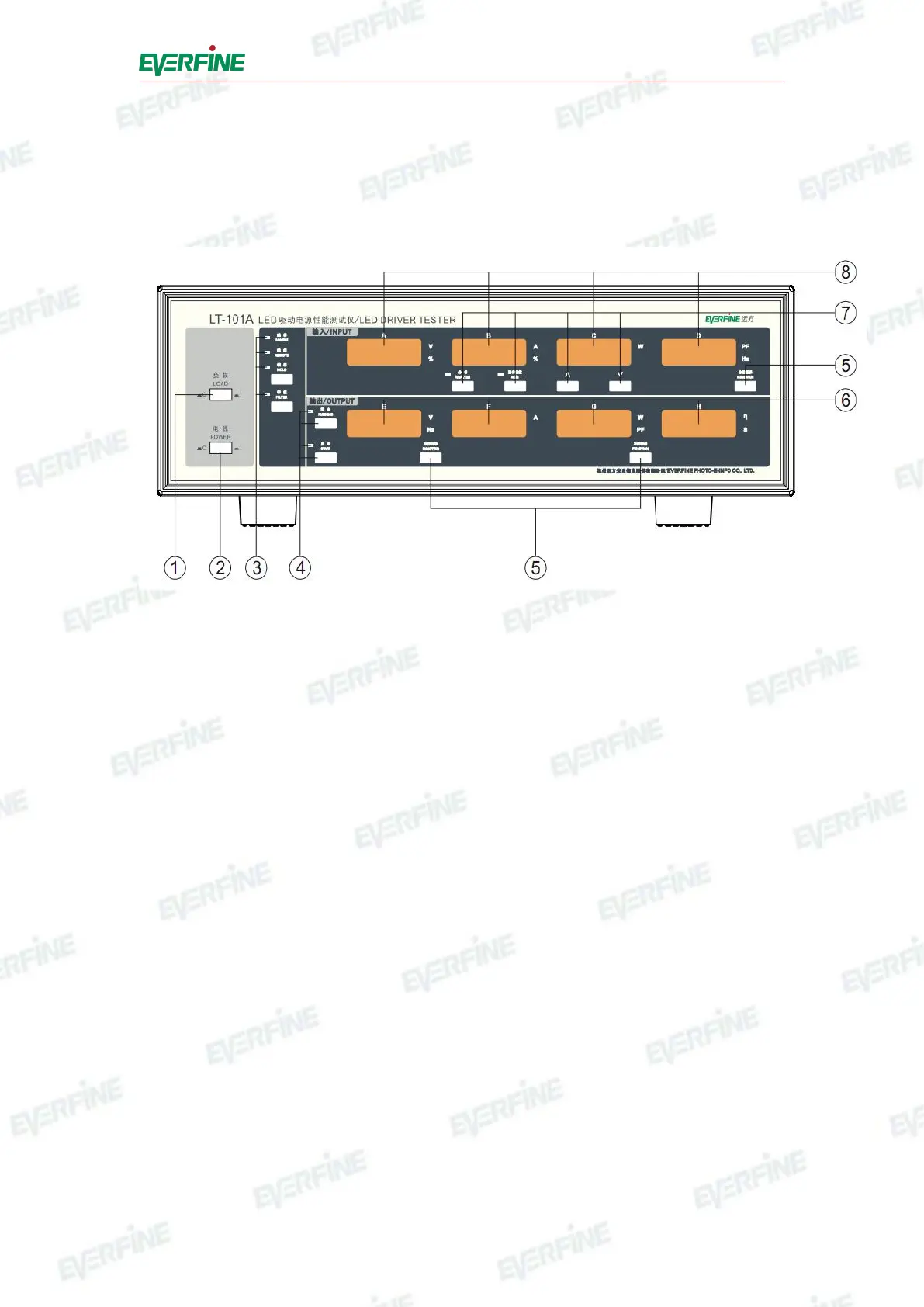
4.1 Panel descriptions
Fig.4.1 Front Panel of LT-101A
○
1
Load switch: The measured input and measured load will be disconnected when
the load switch is turned off and vice versa.
○
2
Power switch:Provide power supply when closed and vice versa.
○
3
Indicators and switches:
"SAMPLE": Flicker shows the instrument is sampling. The instrument will test
one time at each flicker, and the display will refurbish at the same time.
"REMOTE": Flicker shows the instrument is under remote control, the instrument
is testing under the control of the software, and the results will be transferred to the
software.
"HOLD": When the instrument is under continuous measuring mode, press
"HOLD" to keep the displaying value, when the indictor is flickering, the instrument
is under "HOLD" state, press "HOLD" again to release the state, and the indictor will
be off.
"FILTER": The indictor lights means that the instrument is under a narrowband
characteristic test, and the frequency bandwidth of the input/output current is 5kHz.



 To Next Page