Customer Service 1-888-707-1880
or email customerservice@dyaco.ca
10 Dyaco Canada Inc.©2021
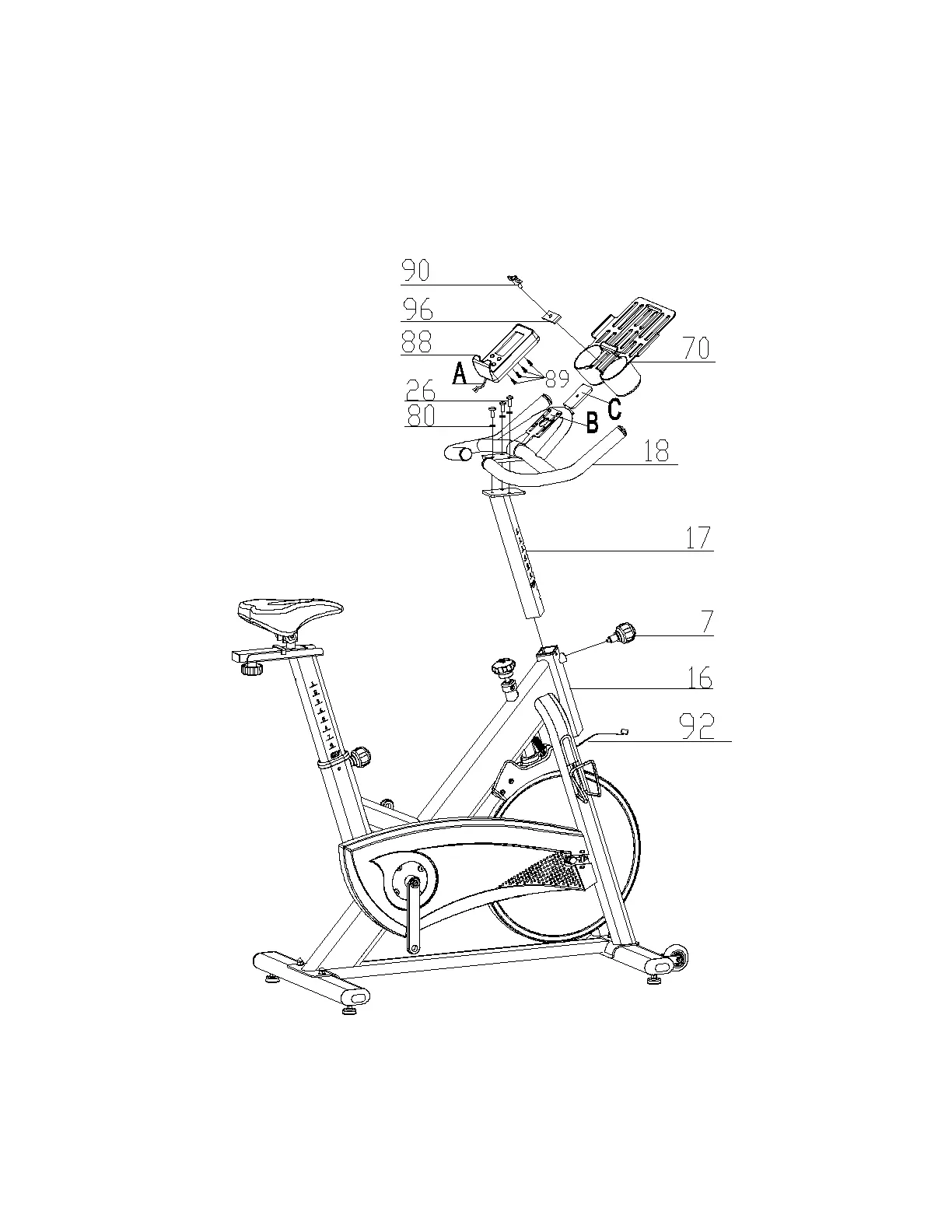
STEP 3
1. Insert the handlebar post (17) to the main frame (16). Secure using a quick release knob
(7) which is pre-assembled on the main frame (16).
2. Attach the handlebar (18) to the handlebar post (17). Secure using 3 spring washers (80)
and 3 Allen screws (26) which are pre-assembled on the handlebar post (17).
3. Attach console (88) onto the bracket (B). Secure using 4 screws (89) which are pre-
assembled on the backside of console (88). Attach sensor wire (92) to console (88).
4. Attach tablet rack (70) onto the bracket (C). Secure using a fixed knob (90) and fixed baffle (96).
Note: The handlebar can be vertically adjustable after your cycle is fully assembled.


 To Next Page