Customer Service 1-888-707-
1880
Dyaco Canada Inc. 2021
Email: customerservice@dyaco.ca
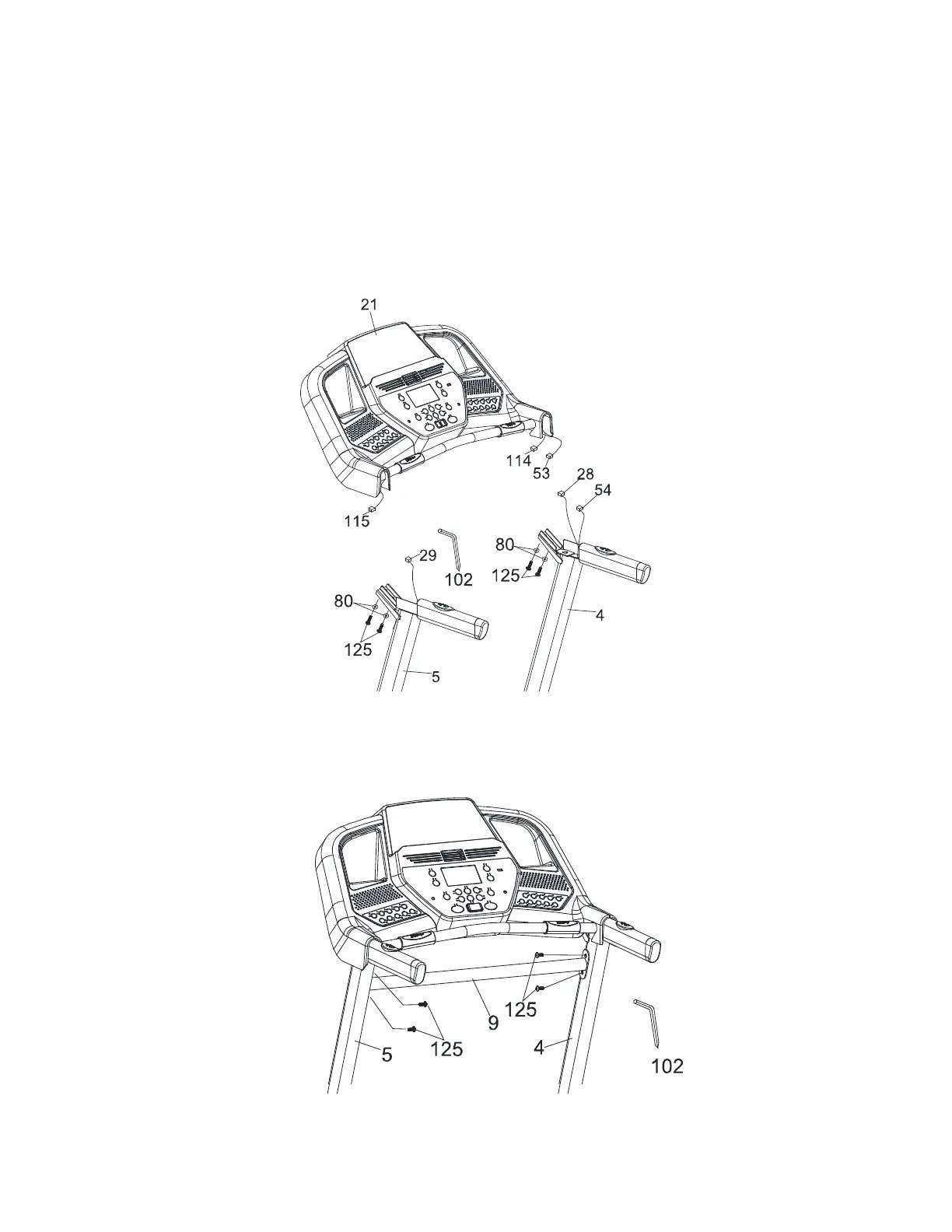
Step 3
1.
Connect the Computer Cable (Middle) (54) to the Computer Cable (Upper) (53).
2. Connect the Speed Adjustment Switch W/Cable (Upper) (114) to the Speed/Hand Pulse
Complex (28).
3. Connect the Incline Adjustment Switch W/Cable (Upper) (115) to the Incline/Hand Pulse
Complex (29).
4. Insert the Console Assembly (21) into the right and left Uprights (4) and (5) and secure with 4
pcs of 5/16" × UNC18 × 3/4" Button Head Socket Bolts (125) with 4 pcs of Ø8 × 1.5T Split
Washers (80) by using the Combination M5 Allen Wrench & Phillips Head Screwdriver (102).
Tip: Avoid pinching wires.
Step 4.
Install the Handrail Support (9) between the left and right Uprights (5) and (4) and use the
Combination M5 Allen Wrench & Phillips Head Screwdriver (102) to tighten 4 pcs of 5/16" ×
UNC18 × 3/4" Button Head Socket Bolts (125).
Your unit is now fully assembled. Ensure all nuts and bolts are firmly tightened prior to use.


 To Next Page