14
Eversense 365 CGM System Quick Reference Guide
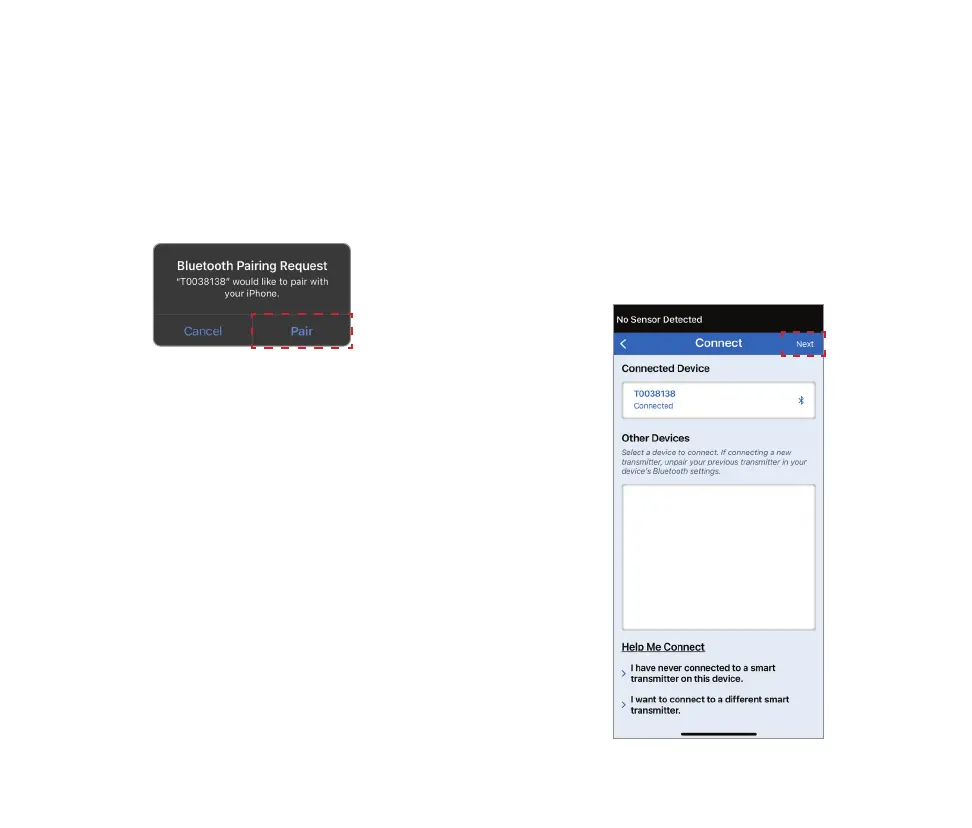
3. A Bluetooth Pairing Request pop-up
screen appears.
• Tap Pair.
4. The smart transmitter serial number
and Connected will be displayed under
Connected Devices once the pairing is
complete. The smart transmitter will
provide intermittent vibrations until
the smart transmitter is linked with the
inserted sensor.
• Tap Next.
Note: If the transmitter detects software
that appears to be invalid trying to
communicate with the transmitter over
BLE, device pairing will be prevented.
Note: The smart transmitter can only be
paired with one mobile device at a time.



 To Next Page