Setting the AUTO-ON TIMER(cont'd)
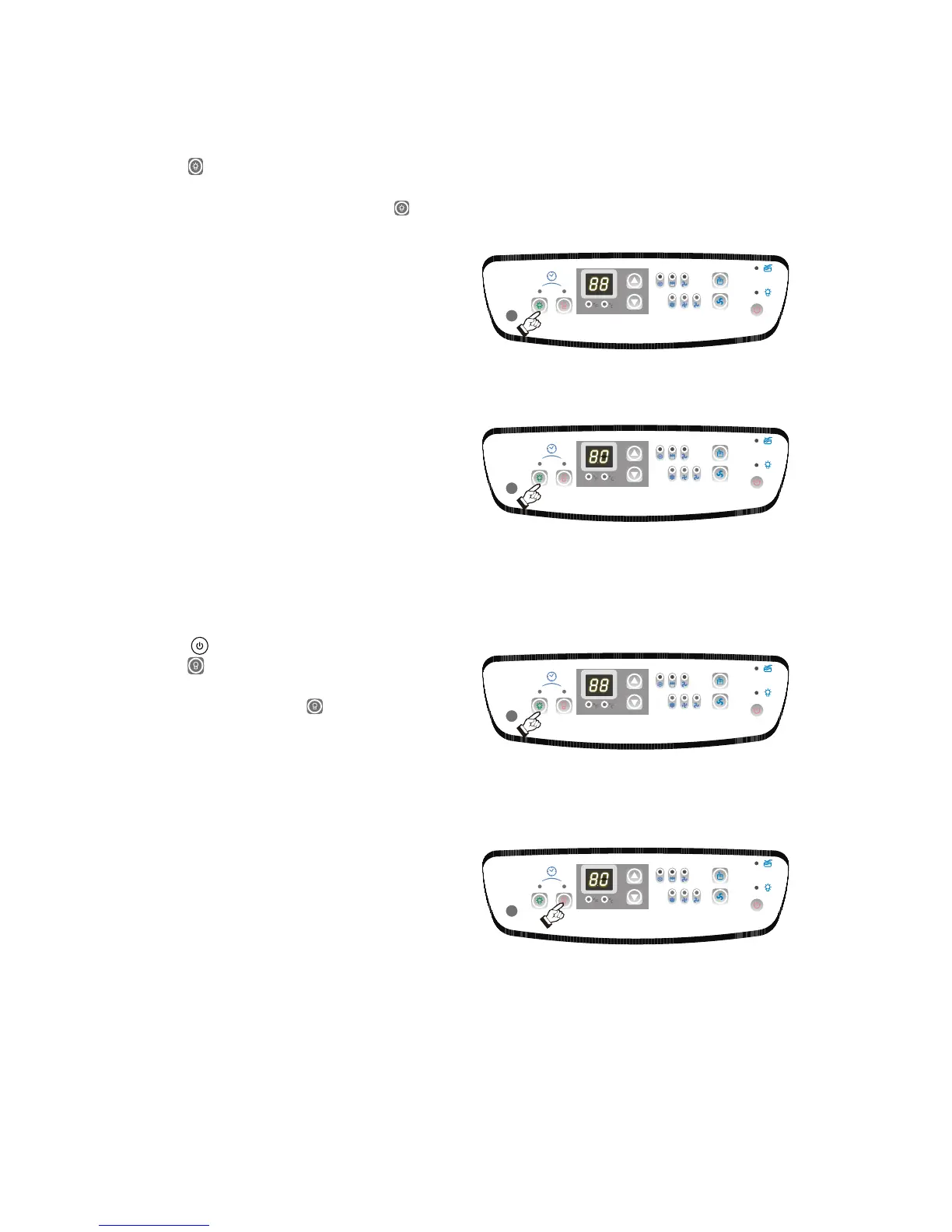
6) Press the TIMER-ON key pad to initiate the
AUTO-ON time sequence Fig. 21. The display
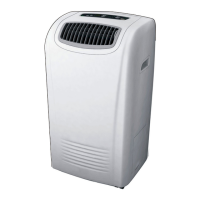
window will indicate the time. Press the key
to select the desired AUTO-ON start time.
Fig. 21a.
7) Each press of the Key pad will increase the
AUTO-TIMED setting in half an hour increments
until the LED window displays 10. Continue
pressing the Keypad, each press will increase
the AUTO-TIMED Setting in an hour increments.
When the desired time is established (the time
will display in the display window for about 5
seconds), then the temperature will immediately
revert back in the display window.
The unit will start automatically when the specified
AUTO-ON time is achieved. To cancel or override
the AUTO-TIMER program, simply turn on the unit
before the AUTO-ON time is scheduled to operate.
You can vary the AUTO-ON time selection
anytime (prior to the program starting) by pressing
the TIMER-ON key pad.
12
Setting the AUTO-OFF TIMER
1) To set the AUTO-OFF timer, the unit must be
turned on ( switch) and operational.
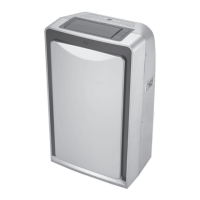
2) Press the key pad to initiate the AUTO-OFF
time sequence. Fig. 22. The display window will
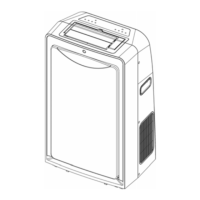
indicate the time. Press the keypad to select
the desired AUTO-OFF stop time. Fig. 22a.
3) Each press of the Keypad will increase the
AUTO-TIMER setting in half an hour increments
until the LED window displays 10. Continue
pressing the Keypad, each press will increase
the AUTO-TIMER Setting in an hour increments.
When the desired time is established (the time
will display in the display window for about 5
seconds), then the temperature will immediately
revert back in the display window.
4) You can vary the AUTO-OFF time selection
anytime by pressing the TIMER-OFF keypad.
The time you selected will appear temporarily
for approximately 5 seconds.
IMPORTANT: The desired AUTO-OFF time will
be registered within a 5 second period (after
pressing the TIMER-OFF keypad).
The unit will stop automatically when the specified
AUTO-OFF time is achieved .
To cancel or override the AUTO-TIMER program,
simply turn off the unit manually, prior to the scheduled
AUTO-OFF time.
Fig. 22
Fig. 21
Fig. 21a
Fig. 22a


 To Next Page