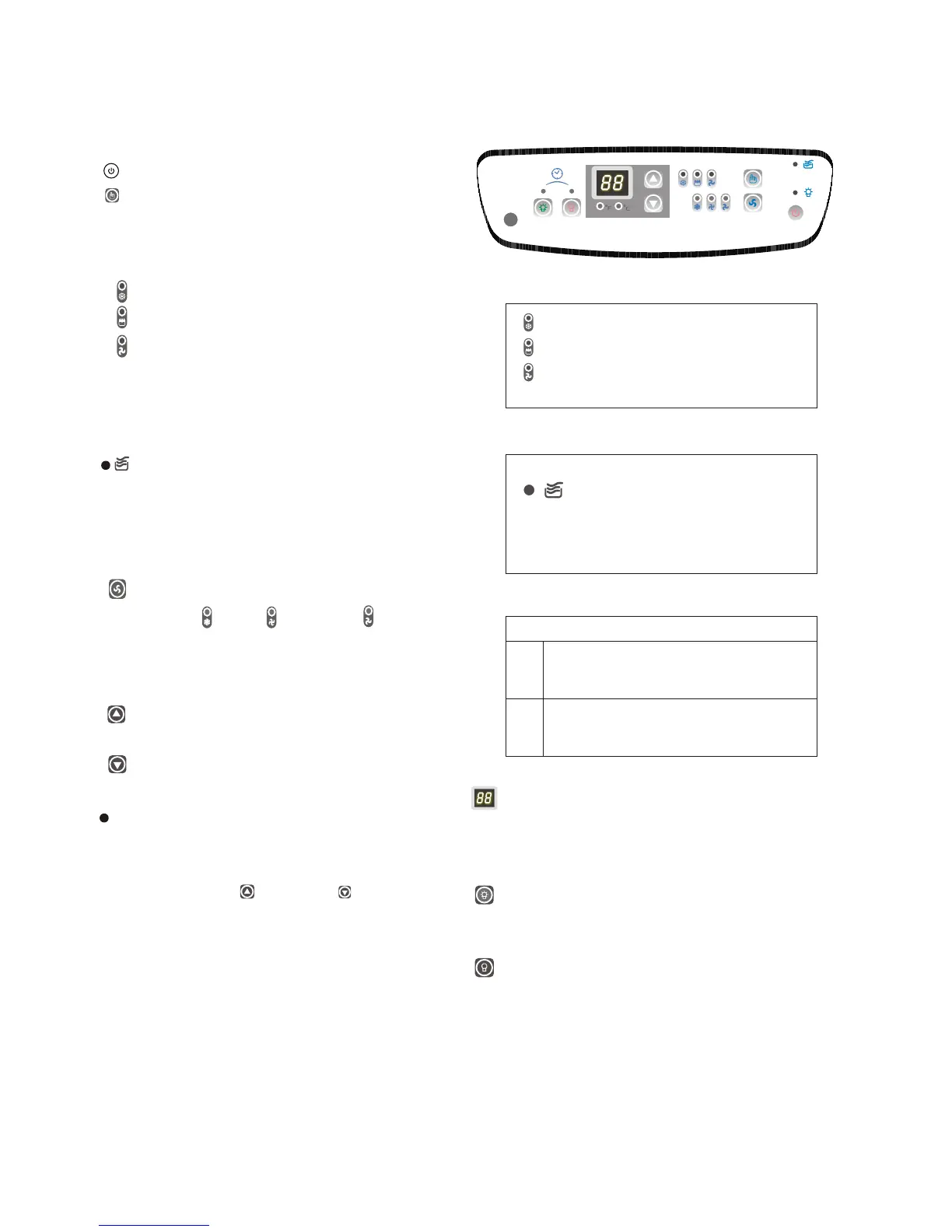
Key Pad Functions Fig.6
Power On/Off.
Selects the appropriate operating mode.
Cool-Dry (Dehumidify)-Fan
MODE Indicator Lights: Illuminates under the
different mode settings. Fig.7.
COOL Mode: Green light
DRY(Dehumidifier)Mode: Green light
FAN Mode: Green light
Green Light : Remains on while compressor is
operating. Green light turns off when desired
temperature is achieved.
Water Full Indicator Light: Flashes red
when the water level of the water tank
exceeds the maximum set level or if the
water tank is not correctly positioned in the
cabinet. Fig. 8.
:Selects High-Medium-Low fan speeds
Fan Options:
Cooling (3 speeds) High-Medium-LOW.
Dry-Dehumidifying (1 speed) High.
Fan (3 speeds) High-Medium-Low.
Fig.6
Fig.7
Fig.8
Green light while cooling
Green light while dehumidifying
Green light while fan only
The LCD window will shows
"P1" and the Water Full
indicator will flash every 0.5
seconds.
Temperature Conversion Chart
O
C 10 11 12 13 14 15 16 17 18 19 20 21
O
F 48 50 52 54 56 58 60 62 64 66 68 70
O
C 22 23 24 25 26 27 28 29 30 31 32 33
O
F 72 74 76 78 80 82 84 86 88 90 92 94
6
Used to adjust (forward) temperature
oo
settings (1 C/2 F increments).
Used to adjust (backward) temperature
oo
settings (1 C/2 F increments).
(High) (Medium) (LOW)
TIMER ON: Used to initiate the AUTO ON start
time program, and adjust Auto-Timer settings.
TIMER OFF: Used to initiate the AUTO OFF stop
time program, and adjust Auto-Timer settings.
LED Window: Shows the setting temperature
and Auto-On/Off time. While on DRY and FAN
mode, it shows the room temperature.
Note: This appliance provides a feature that will allow
you the option of setting temperatures in "Celsius" or
"Fahrenheit". To change the temperature display on the
main unit, press the " " key pad & " " key pad
oo
"simultaneously" to alternate between the C & F
o
scale. Celsius scale allows adjustments of 1 C
increments. Fahrenheit scale allows adjustment of
o
2 F increments.


 To Next Page