EXE Bandwidth Limiting Script
Date Revised: Jan-12-16 Revision 1.0
Compare the PSU currents of different shelves that power the top half of the frame and the bottom half
of the frame (if applicable). The shelves that are current sharing should have similar current
consumptions; if they do not then check the current sharing cable that interconnects the PSU shelves.
EXE NCS-A Connections:
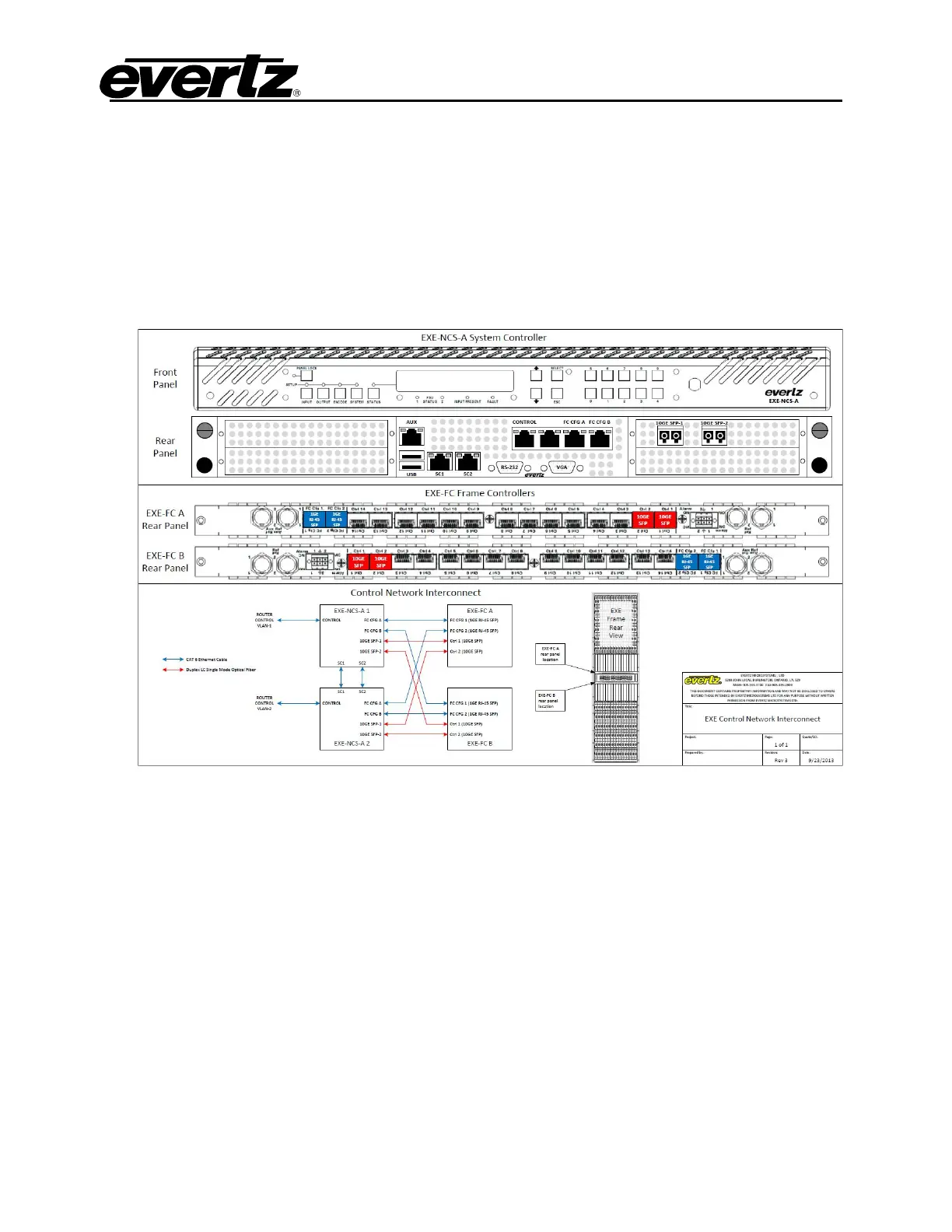
1. Connect the NCS-A to the EXE frame according to wiring diagram, use instructions below as
reference:
a. Connect the NCS’s Control port using a 1GE RJ-45 SFP to a switch or directly to the
controlling PC so that the NCS User Interface may be accessed.
b. Connect the NCS’s FC CFG A port using a 1GE RJ-45 SFP to EXE-FC A on FC Cfg1 using
another 1GE RJ-45 SFP.
c. Connect the NCS’s FC CFG B port using a 1GE RJ-45 SFP to EXE-FC B on FC Cfg1 using
another 1GE RJ-45 SFP.
d. Connect the NCS’s 10GE SFP1 port to EXE-FC A on Ctrl 1.
e. Connect the NCS’s 10GE SFP2 port to EXE-FC B on Ctrl 1.
f. Repeat steps a-e with the second NCS except this time using FC Cfg2 on both FC’s, and
Ctrl 2 on both FCs for the 10Gb fibers (as shown in the reference diagram above).
g. Connect reference input to Ref1 on both FC’s.
Special Note:
The connections listed above require specific SFP types:
a. On EXE-NCS-A , 10GE ports use MO-10GE-SFP-10KM



 To Next Page