Serial
Number
Define
Describe
1
2
3
4
5
6
7
8
9
10
11
12
13
14
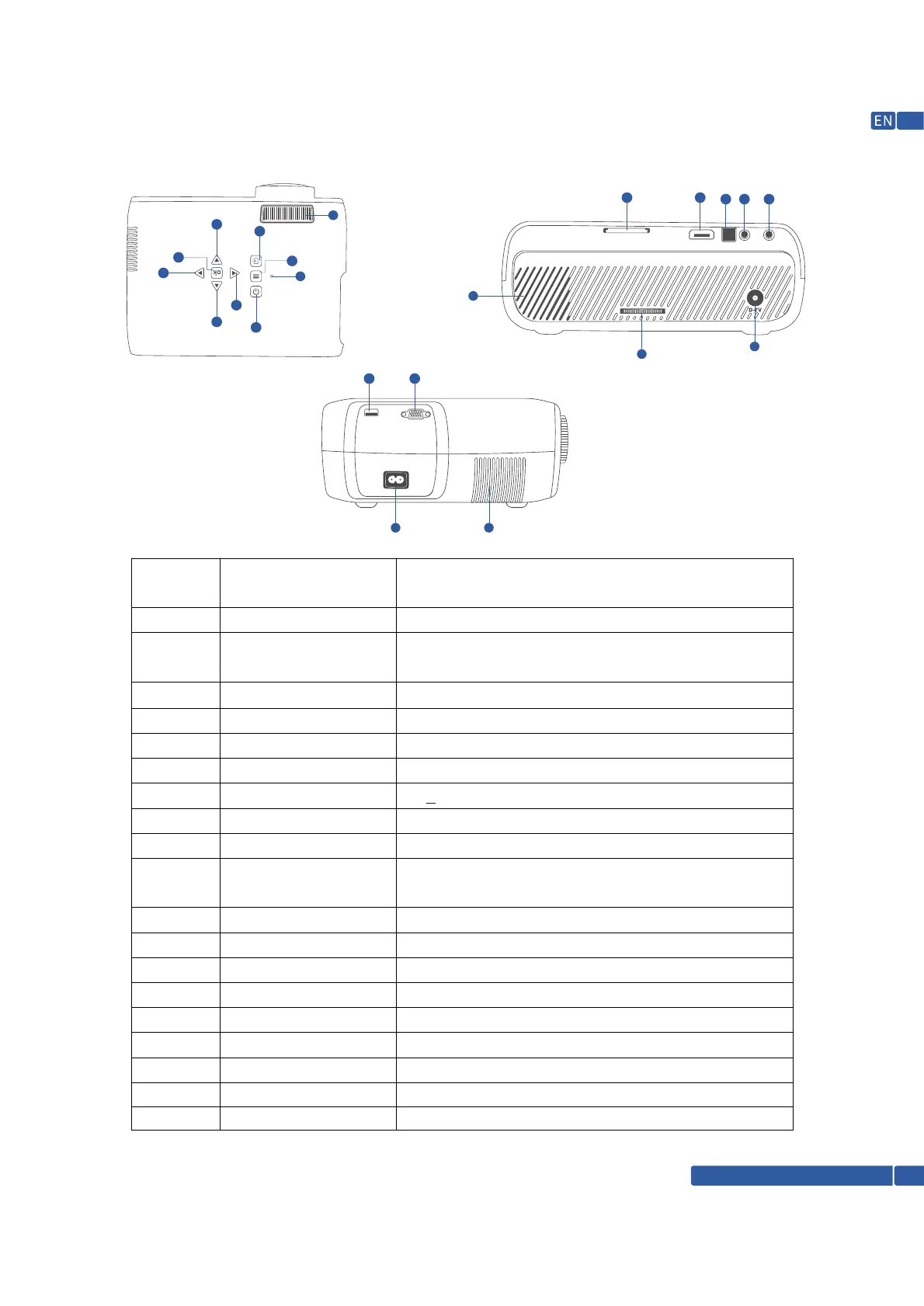
FUNCTION OVERVIEW
on/off
up and down, Left and
Right
ok
menu
Signal source
focusing ring
Keystone Correction
VGA/Computer
HDMI
Compound video input
interface
3.5mm headphone jack
the USB interface
SD card
IR force control head
on/off
multi-function up and down,
left and right
function to confirm
menu display
source display
resolution adjustment
+15 adjustment picture keystone out alignment
Computer input or other VGA output devices
connect HDMI input or other HDMI output device
3-in-1 switching line access composite video
signal
headphone jack or active speaker jack
Connect the USB disk or move the hard disk/mouse
SD card slot
remote reception signal
15
16
17
Speaker Built In Speaker
Power input For main power connection
Air outlet For perfect airflow inside projector
6
1
2
2
2
2
3
5
4
7
8
9
10
11
12
13
14
15
16 17
18
18
D-TV interface
To Connect D-TV Connections
19
Power LED
19
Support @ 1800-121-4480
03
For Standby Status



 To Next Page