Fans and Radiator Installation
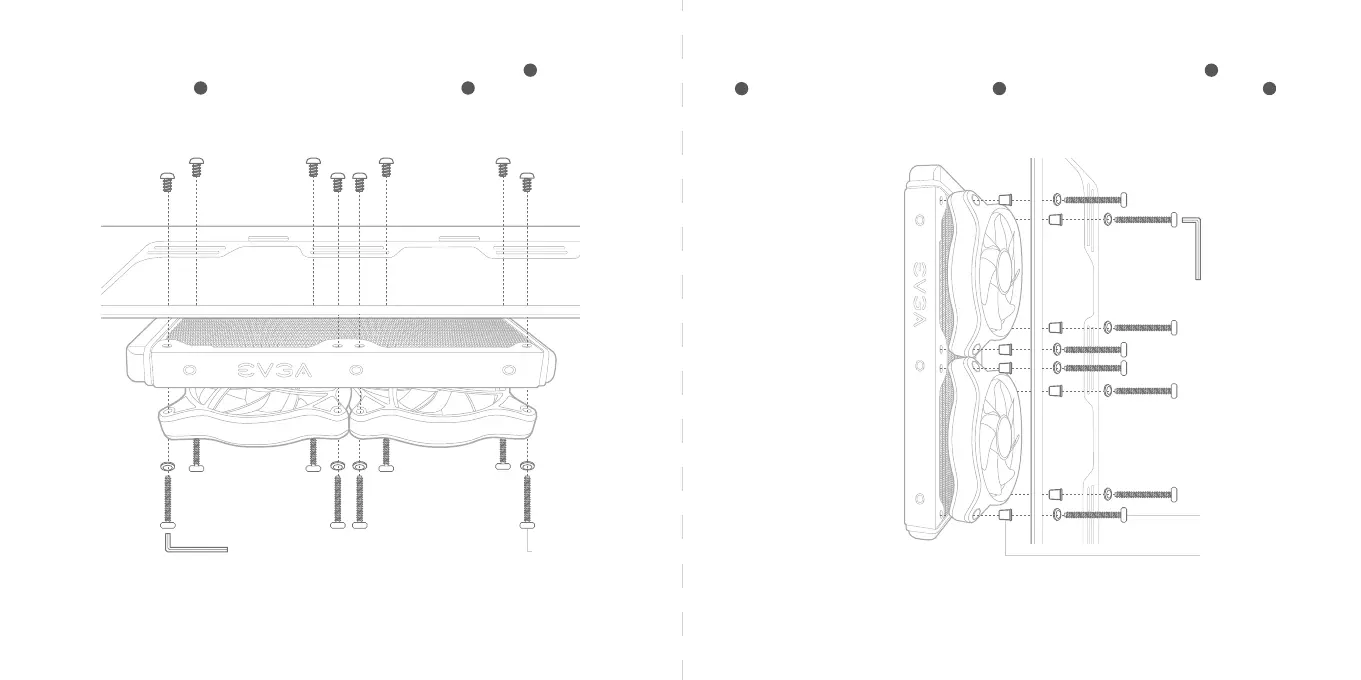
Install fans and radiator according to your system setup and airflow design. Use screws to attach the fan
to the radiator, use screws to attach the radiator to the case, and hex key to fasten the screws.
EVGA recommends that the pump should always be below the highest point of the radiator.
Install fans and radiator according to your system setup and airflow design. Use screws and fan washers
to attach the fan to the radiator, use screws to attach the radiator to the case, and hex key to
fasten the screws.
EVGA recommends that the pump should always be below the highest point of the radiator.
*Warning – The CLCx Cooler is not a passive cooler. Fans must be installed to the radiator for proper
operation of the CLCx Cooler, and failure to do so may cause irreparable damage to the pump and other
connected hardware.
*Warning – The CLCx Cooler is not a passive cooler. Fans must be installed to the radiator for proper
operation of the CLCx Cooler, and failure to do so may cause irreparable damage to the pump and other
connected hardware.
*Install to the top of the case
J
K P
J
L
K P
*Install to the front of the case
30mm UNC 6-32
Fan Screw
Sleeve
20mm UNC 6-32
Fan Screw



 To Next Page