5
Remote Control
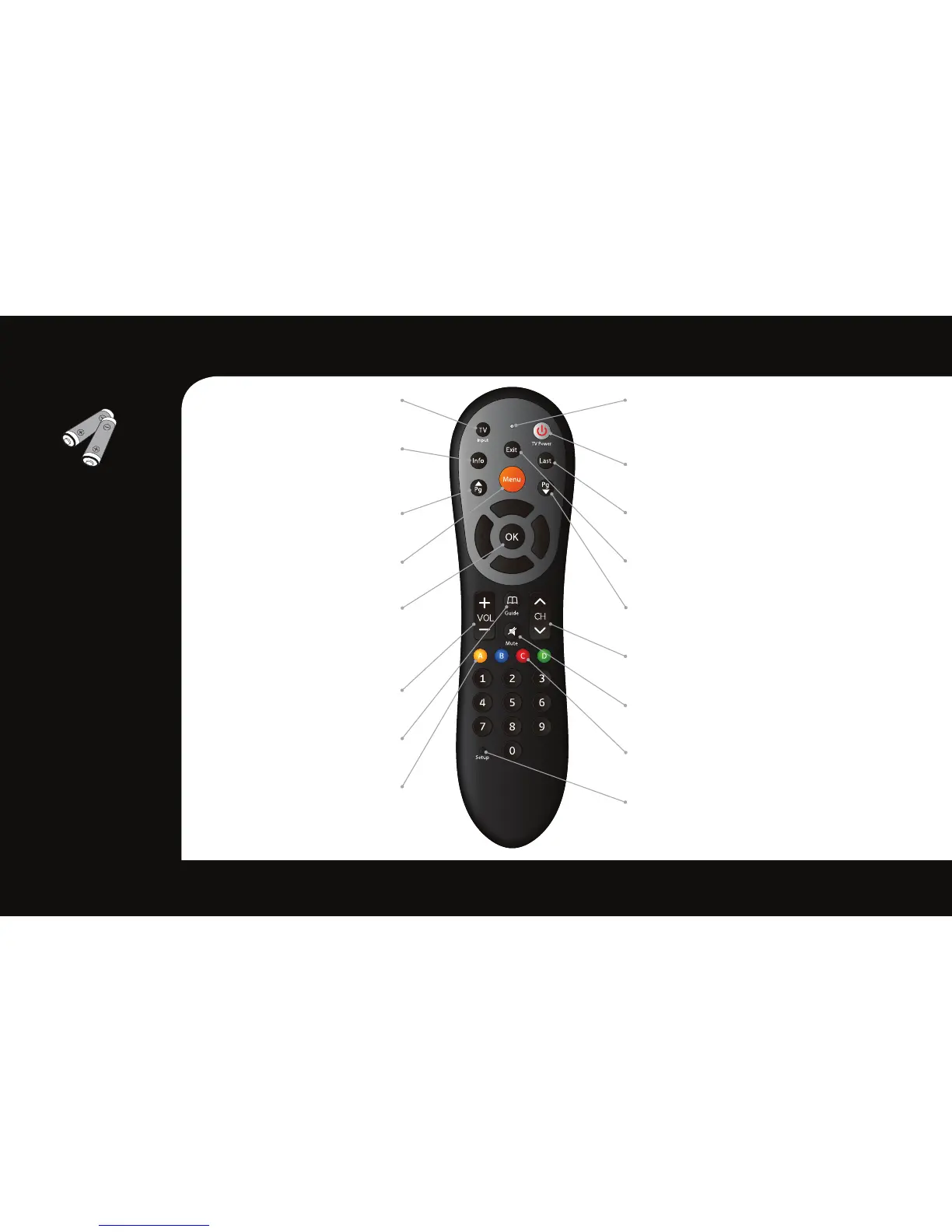
TV Input
*
Toggle TV Input
Info
View the channel name
and number, date and time
Page Up
For future use
Menu
Display the Main Menu
OK
Select a highlighted item within
Menus. Display channel name
and number, date and time
Volume
Audio up & down
Guide
For future use
Yellow A
Toggle to secondary language
(if available)
*TV must be programed with the remote
LED Indicator
Button press and special
command indication
TV Power
*
Turn your TV on or off
Last
Return to the previous channel or menu
Exit
Return to watching TV
Page Down
For future use
Channel
Channel up & down
Mute
Sound on & off
Red C
Toggles through available closed captioning
Setup
Program your remote control to your STB
and TV
NOTE
• Wheninserting
batteries,makesure
thatthepolarity(+/-)
iscorrect.
• TheLEDonthetopof
theremoteisavisual
indicatorthatconrms
theremotehas
powerwhenabutton
ispressed.
• Yourremotemayvary
slightlyfromtheone
picturedhere.
However,basic
functionsshould
remainthesame.



 To Next Page