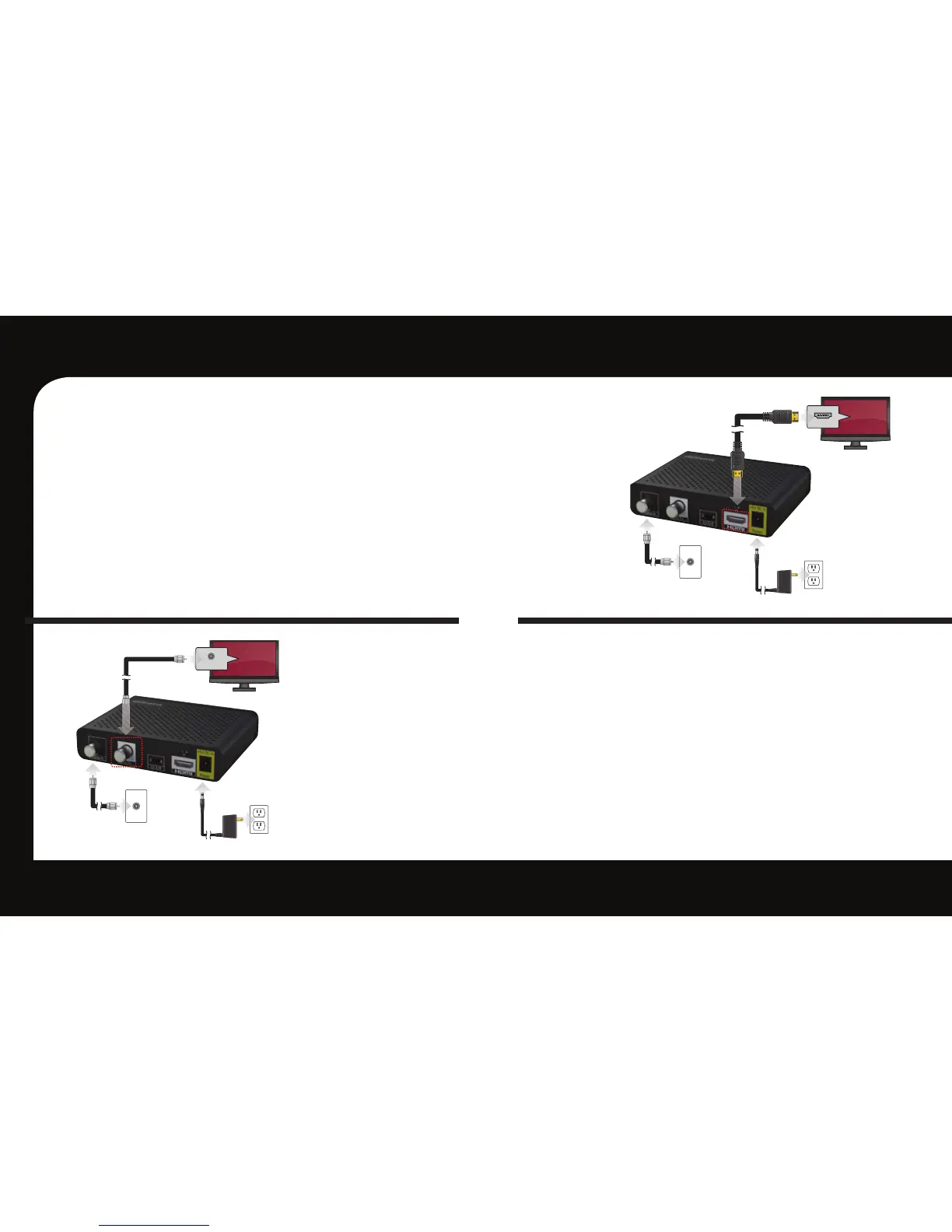
To TV
HDMI (IN)
To TV
To ElectricalOutlet
To Coaxial Wall Outlet
CABLE IN
To TV
To ElectricalOutlet
To Coaxial Wall Outlet
HDMI Connection è
HDMI allows you to take full advantage
of the Evolution Digital HD Set-Top Box
high-definition digital features.
1. Connect the coaxial cable to the
cable wall outlet and the “CABLE IN”
port on the cable box.
2. Connect the HDMI cable to the
“HDMI” port on HD Set-Top Box and
the “HDMI” port on your HDTV.
3. Connect the power cord to the
electrical wall outlet and the “DC 5V
IN” port on the HD Set-Top Box.
Note: HDMI cables carry audio and video to the TV.
SD Coaxial Audio/Video
Connection ç
1. Connect the RF coaxial cable to the
cable wall outlet and the “CABLE IN”
port on the HD Set-Top Box.
2. Connect the smaller RF coaxial
cable to the “RF OUT” port on the
HD Set-Top Box. Connect the other
end to the input port on the TV.
3. Connect the power cord to the
electrical wall outlet and the “DC 5V
IN” port on the HD Set-Top Box.
Note: Make sure the channel 3/4 switch matches the
channel on your TV. For example, if your cable box is
set to “3”, make sure your TV is on channel “3”.
OR



 To Next Page