57
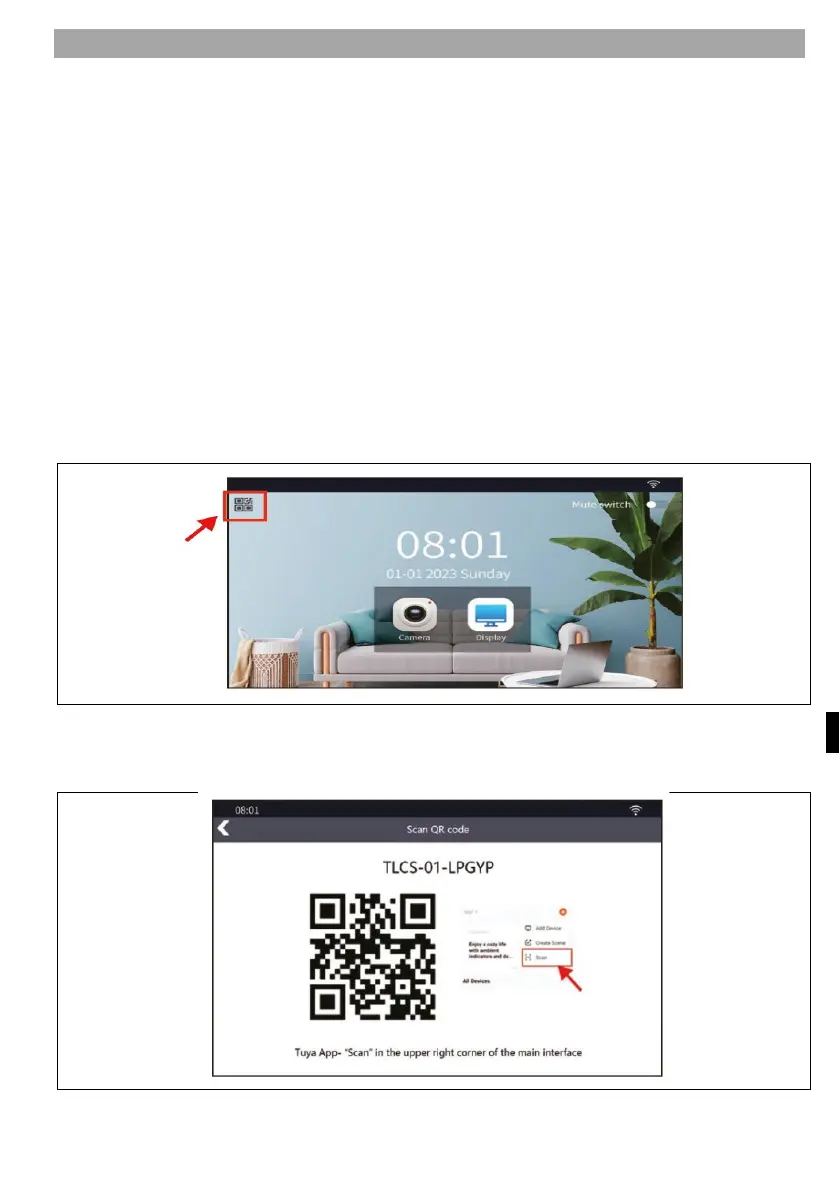
PAIRING THE TOUCH SCREEN WITH AN APP
1) Power on the indoor screen monitor, it will turn on automatically.
2) Select Go to WIFI Settings Interface.
3) Open "WLAN", click on *add network' to go to the WIFI search interface.
4) Select the 2.4G/5G WIFI you use at home , enter the password and press the
*
Connect" button.
5)
A
fter successfully setting back to the WIFI setup interface, it will get the IP
address.
6)
O
pen the Tuya app on your mobile phone and click on the "+" in the top righ
t
c
orner and then click on *Scann
7)
S
can the QR code you get by clicking on the QR icon in the top left corner of th
e
m
onitor and add the device.
8) Press the "Done" button in the app, adding the device is complete.
1
) Press the QR code in the top left corner of the screen
2
)
S
can the QR code using the Tuya app



 To Next Page