5
EVOFLAME MANUAL ISS. 3.1EVOFLAME MANUAL ISS. 3.1
EVONIC - 104 INSTRUCTION GUIDE TEMPLATE ISSUE 1EVONIC - 104 INSTRUCTION GUIDE TEMPLATE ISSUE 1
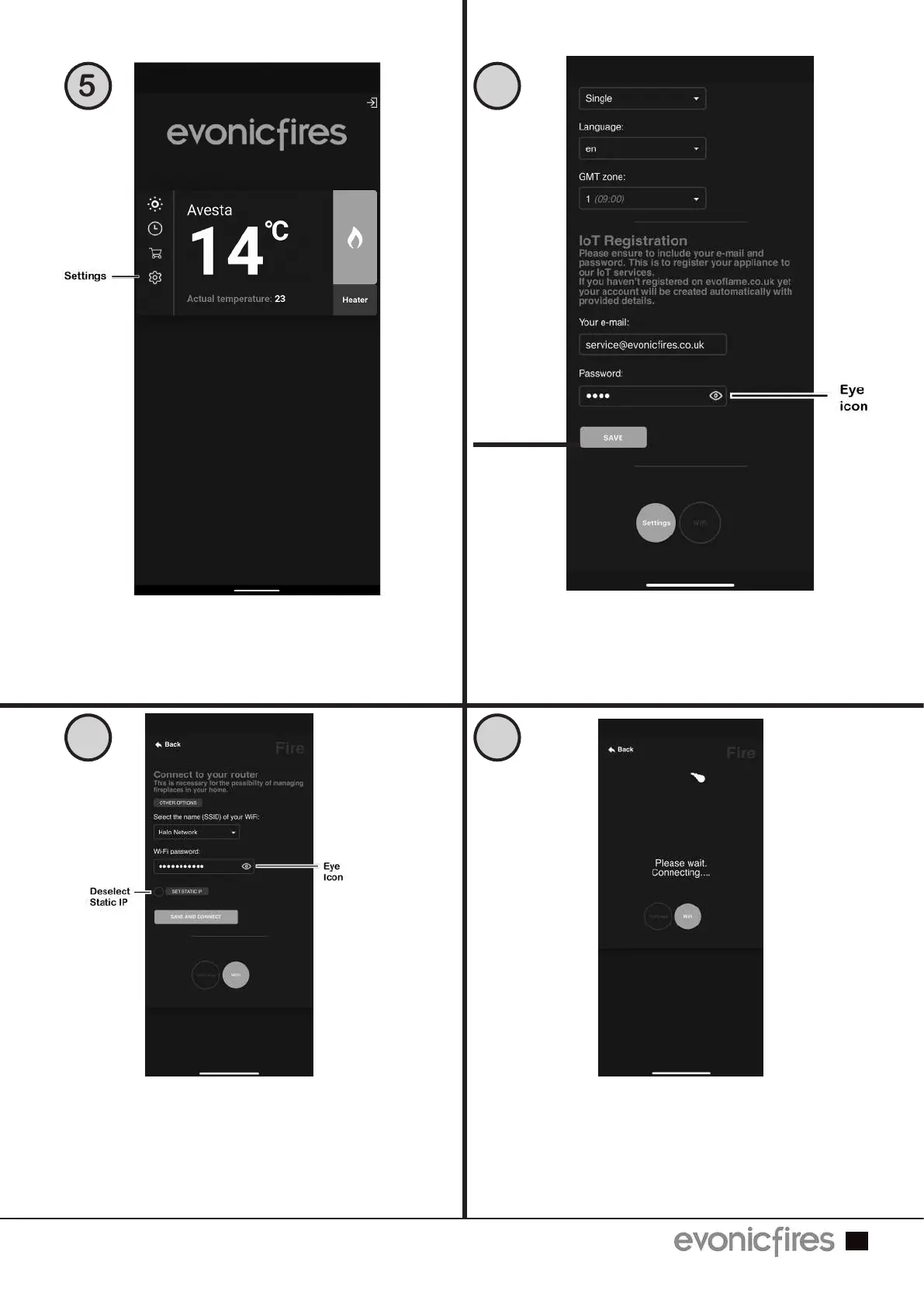
Open the settings panel on the app’s Home
Screen.
Scroll down to the ‘IoT Registration’
section and fill in your email address and
create a password. Press ‘Save’.
Then select the grey WiFi button.
5 6
7 8
Select your router from the drop down box,
and enter your router’s password. Press
the eye icon to double check for mistakes.
Press ‘Save and Connect’.
Only select Static IP if advised by an IT
professional.
The pairing process between your device,
the fire, and your router will now take
place. This may take a few minutes, and
when the app shows ‘Redirect’ you may
see the lighting on your fire change colour.
This is completely normal.
Save



 To Next Page