AirKey system manual version 2.7 |
06/03/2024 | Subject to technical changes and misprints
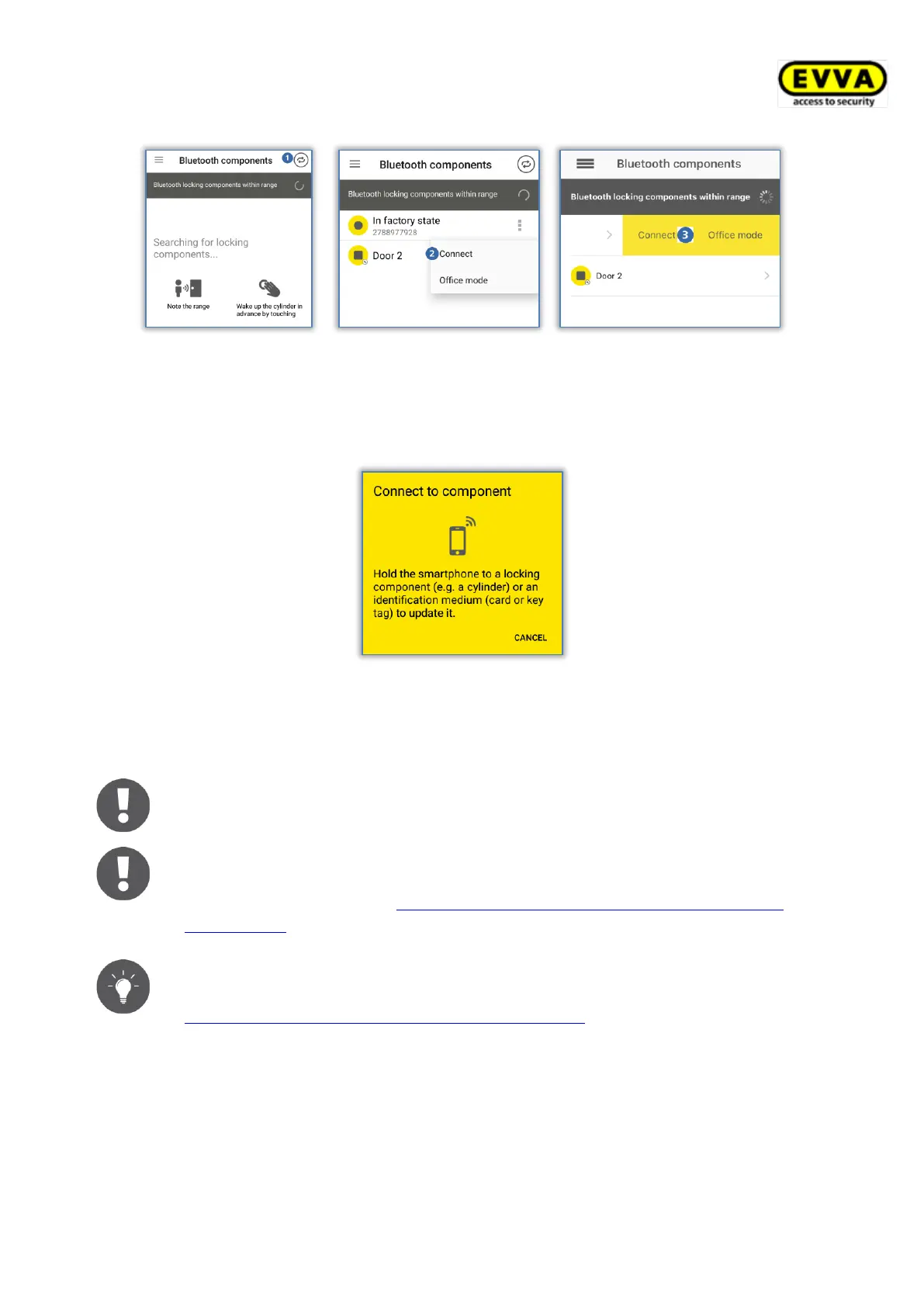
Figure 242: AirKey app – connecting to component (Android NFC / Android Bluetooth / iPhone)
> Follow the on-screen instructions and hold the NFC smartphone to the medium or
locking component; or bring the Bluetooth smartphone into range of the locking
component.
Figure 243: Updating data
Data is updated. Do not remove the smartphone from the components for synchronisation
during transfers. A corresponding message will appear once the process has been completed.
Deactivate the Hands-free mode before connecting to a Bluetooth locking
component. Otherwise, the connection may be interrupted.
Bluetooth locking components can also be updated automatically after each
Bluetooth unlocking. For more information on the "Update after each
unlocking" function, see Default values (for all recently added locking
components).
Regularly update your locking components. This is the only way to ensure
your access control system remains secure and up to date. Please refer to
Access control system operation and maintenance for more information on
updating locking components.
6.12 Special authorisation "maintenance authorisation"
If the special authorisation "maintenance authorisation" has been enabled on your smart-
phone in the AirKey Online Administration, you have been authorised for additional mainte-
nance operations for AirKey components. The maintenance authorisation additionally


 To Next Page
 Loading...