8.8.4 Removing faulty locking components using the AirKey Online
Administration
If it is no longer possible to update the locking component because of a fault, you must
complete removal without replacements in the AirKey Online Administration.
> On the Home screen, select the Cylinders or Wall readers tile – depending on the
component highlighted as faulty.
> Alternatively, select Access control system → Locking components in the main
menu.
> Click the locking component you would like to edit in the overview.
> In the Settings tab go to the Logging and repair options section and click on
Show repair options.
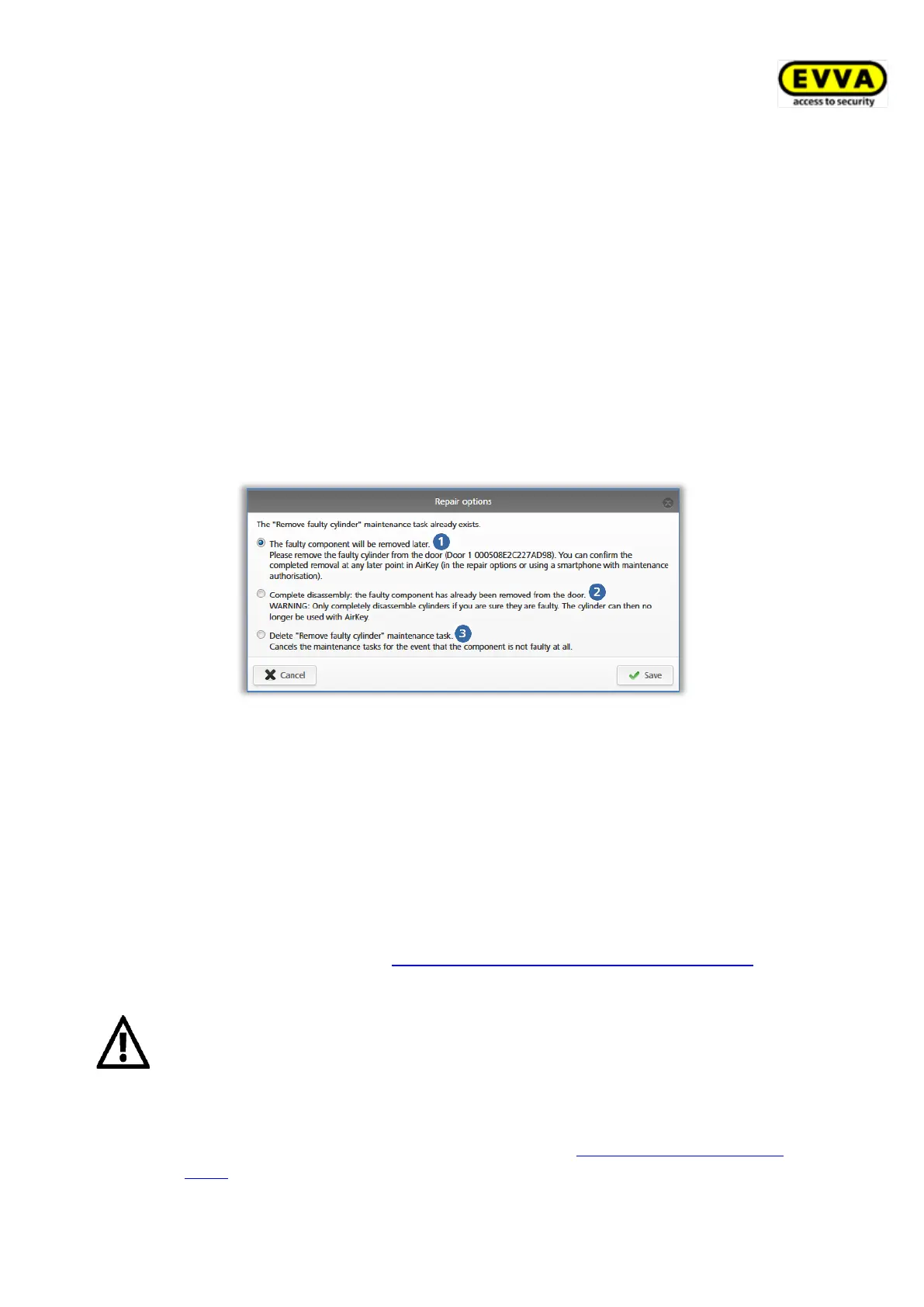
> A dialogue with three options appears.
Figure 297: Removing faulty locking components
> Select The faulty component will be removed later to maintain the current
component status and the locking component remains a part of the access control
system.
> Click the Complete disassembly: The faulty component has already been
removed from the door option to complete the process to remove faulty locking
components without replacement and the locking component is deleted from the
access control system.
> Use the Delete "Remove faulty cylinder" maintenance task to revoke removal
without replacement. Refer to Revoking maintenance tasks for repair options for more
information.
You are no longer able to use the replaced locking components that have
been removed without replacements following this process. For this reason,
exclusively use this function if the locking component is actually faulty and
you no longer require it.
If you would like to remove an operational locking component from your
access control system, proceed as described in Removing locking compo-
nents.


 To Next Page
 Loading...