© 2018 Excel, part of Van Os Medical UK Ltd.
Excel House | Unit 2 Ashbrooke Park | Sherburn in Elmet | North Yorkshire | LS25 6 PJ | sales@vanosmedical.com | www.vanosmedical.com
© 2018 Excel, part of Van Os Medical UK Ltd.
Excel House | Unit 2 Ashbrooke Park | Sherburn in Elmet | North Yorkshire | LS25 6 PJ | sales@vanosmedical.com | www.vanosmedical.com
User Manual | Excel G-Logic
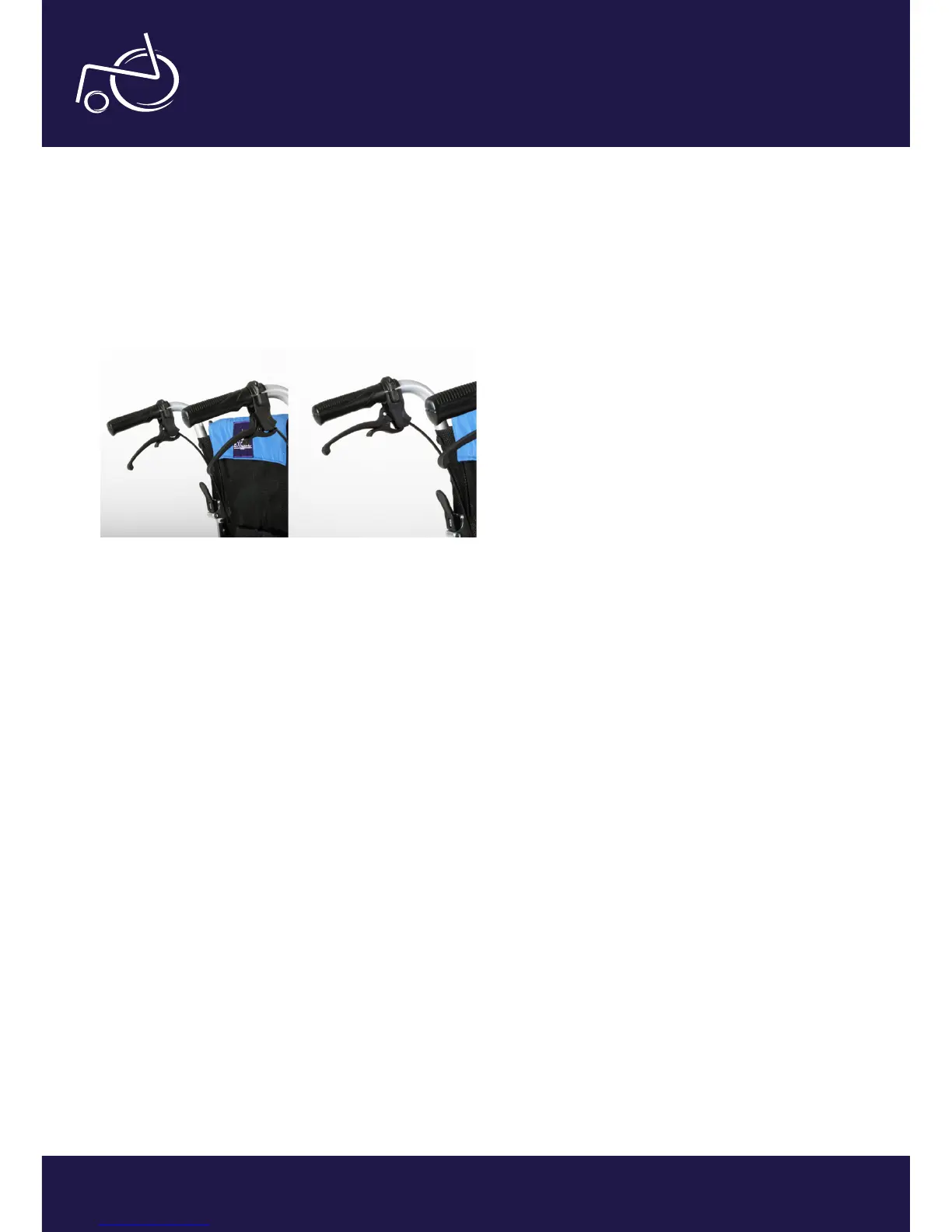
Attendant brakes
The push handles of your G-Logic are designed with attendant brakes as standard (photo 15). As a result, the
attendant can safely control the speed of the wheelchair, as well as simply apply the parking brake when necessary.
The parking brake can be applied by pulling the big lever and nudging the little clip with your index nger. They will
now lock into place, keeping the brake applied even when you let go of the lever. Squeeze the big lever again to
release the brake.
EXCEL G-LOGIC | PHOTO 15
EXCEL G-LOGIC | PHOTO 16


 To Next Page