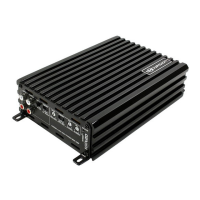
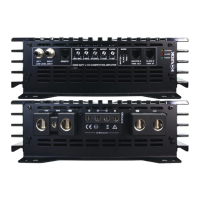
CONTROL FUNCTIONS
1. SPEAKERS
Connect speakers/subwoofers to these terminals. Be sure to check wire for proper polarity.
Never connect the speaker cables to chassis ground.
2. +12 Volt Power
Connect this terminal through a FUSE or CIRCUIT BREAKER to the posive terminal of the
vehicle baery or the posive terminal of an isolated audio system baery.
Warning: Always protect this power cable by installing a fuse or circuit breaker of the appropriate
size within 18 inches (45cm) of the baery terminal connecon.
3.Remote Turn On
This terminal turns on the amplifier when (+)12 volt is applied to it . Connect it to the remote
turn on lead of the head unit or signal source.
4.GND
Connect this cable directly to the frame of the vehicle. Make sure the metal frame has been
stripped of all paint down to the bare metal. Use the shortest distance possible. It is always a good
idea to replace the factory ground at this me with a larger cable equal to the new amplifier power
cable or larger. CAUTION: Do not connect this terminal directly to the vehicle baery ground
terminal or any other factory ground points.
5. RCA input jacks
These RCA input jacks are for use with source units that have RCA outputs. A source unit with
a minimum level of 200mV is required for proper operaon. The use of high quality twisted pair
cables is recommended to decrease the possibility of radiated noise entering the system.
6. REMOTE
Connect the remote controller to control the subwoofer amplifier volume from the driver
seat locaon, for ease of adjustment during playing.
7. Gain Control
The Gain control will match the amplifiers sensivity to the source units signal voltage. The
Operang range is 5V to 200mV. This is NOT a volume control!
8. Low Pass Filter Control (Mono block)
This control is used to select the desired low pass x-over frequency. The frequency can be
adjusted from 40Hz to 220Hz for all bass mono models.
9. Subsonic Filter Control (Mono block)
This control can filter out unwanted low frequency from 10Hz (OFF) to 50Hz. This funcon
will increase the power handling of your woofers.
10. Bass Boost Level switch (Mono block)
This switch can boost bass level by 0dB, 6dB or 12dB. The boost frequency is centered at
50Hz.
3
EXCURSION



 To Next Page