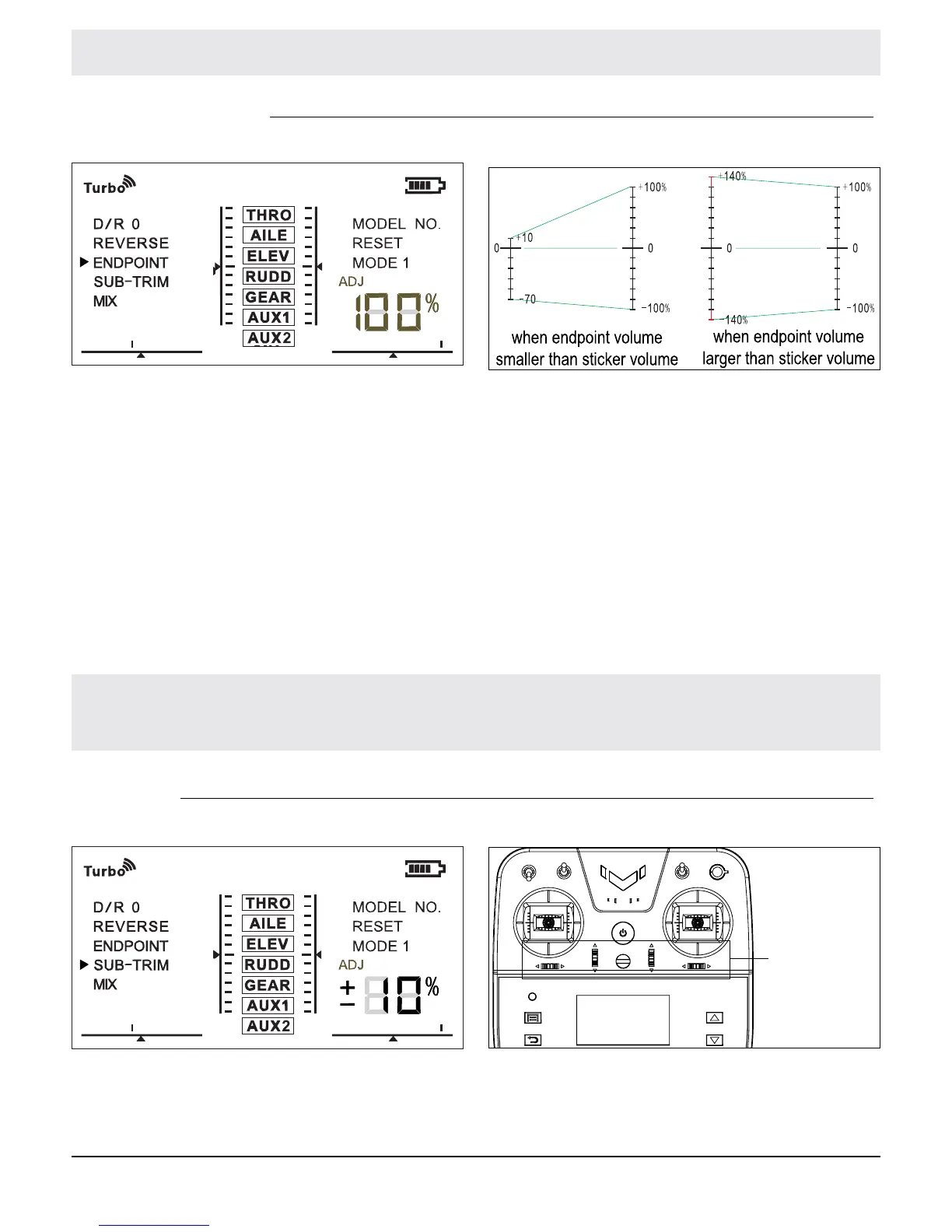
Endpoint function allows to adjust max travel volume from -140% to 0%, 0% to 140%.
Endpoint setting works on Channel THRO, AILE, ELEV, RUDD, GEAR, AUX1, AUX2.
When you set endpoint volume smaller than sticker volume, the travel volume of the
particular channel will be adjusted according to the smaller endpoint. For example, if
you set max endpoint to +10%, when the sticker moves to +50%, the actual volume will
be only +5%.
It is the same case when you set endpoint volume higher than sticker volume, shown
as above illustration at right side.
The setting is based on the current model. When you set D/R under Model No.1, the
setting will only work under Model No.1.
NOTICE: After you nish setting and return back to main menu, next time when you
enter reserve function setting, it will remember the setting status you saved last time.
Endpoint Setting
NOTICE: After you nish setting of endpoint and return back to main menu, next time
when you enter endpoint function setting, it will remember the setting status you saved
last time.
Sub-Trim
Sub-trim function allows to adjust channel servo travel center point from -30% to +30%.
Sub-trim can be accumulated with trimming by adjusting trim buttons on transmitter.
Trim Buttons


 To Next Page