19
PAST 24 HOURS HISTORY DATA
The console automatically stores the weather data of the past 24 hours.
1. Press [ HISTORY ] key to check the beginning of the current hour's weather data, e.g. the
current time is 7:25 am, March 8, the display will show the data of 7:00am, March 8.
2. Press [ HISTORY ] key repeatedly to view older readings of the past 24 hours, e.g. 6:00am
(Mar 8), 5:00am (Mar 8), …, 10:00am (Mar 7), 9:00am (Mar 7), 8:00am (Mar 7)
NOTE:
The LCD will also display the "
" icon, history data records with time & date.
WEATHER ALERT SETTING
Weather Alert can alert you of certain weather conditions. Once the alert criterion is met, the
alarm sound will activate and the LCD’s alert icon will ash.
TO SET ALERT
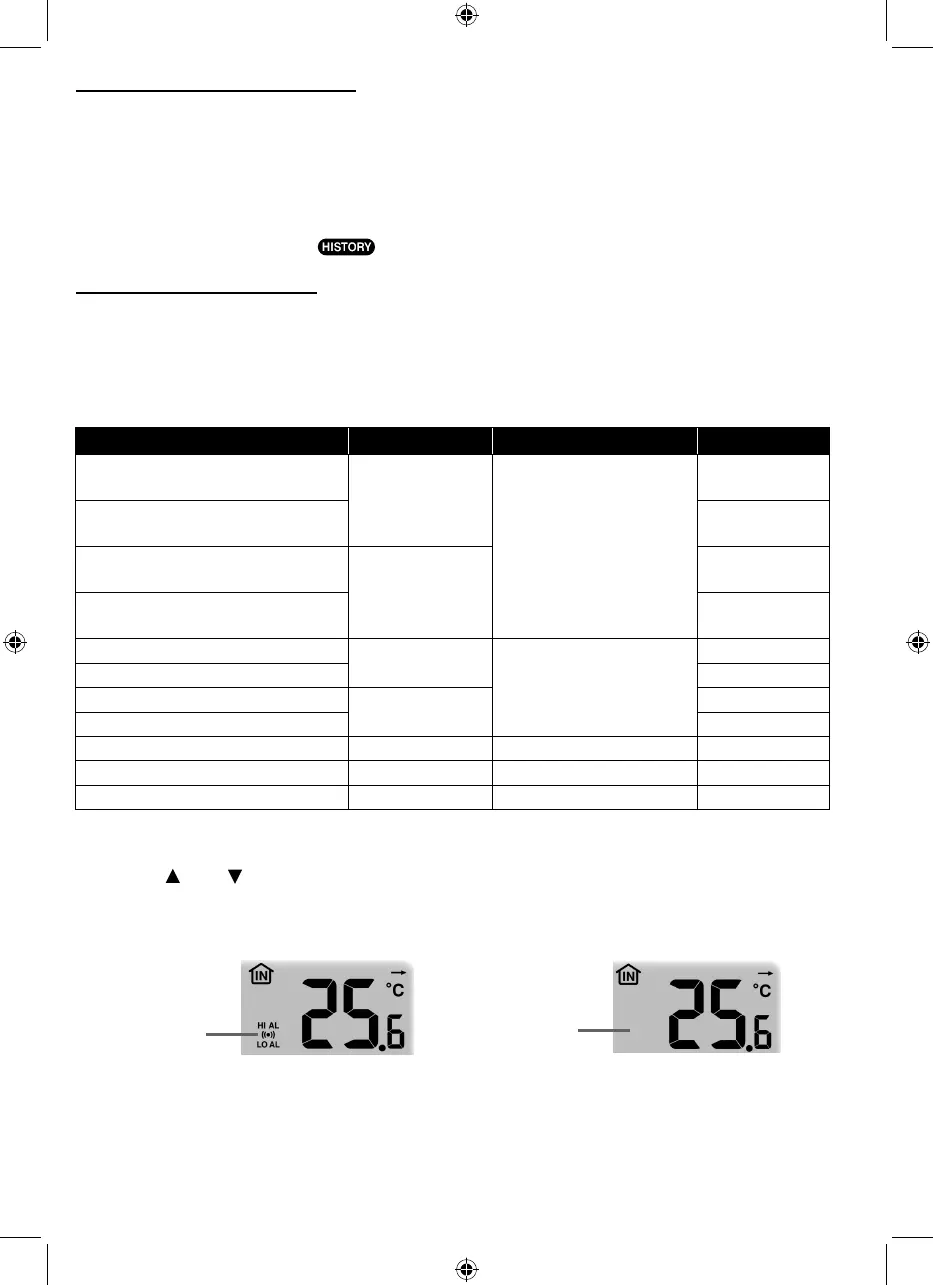
1. Press [ ALERT ] to select and display the desired weather alert reading in the sequence
below:
Alert reading Sequence Setting Range Display Section Default Value
Indoor Temperature High Alert
(current channel)
-40°C ~ 80°C
Indoor / CH
temperature & humidity
40°C
Indoor Temperature Low Alert
(current channel)
0°C
Indoor Humidity High Alert
(current channel)
1% ~ 99%
80%
Indoor Humidity Low Alert
(current channel)
40%
Outdoor Temperature High Alert
-40°C ~ 80°C
Outdoor temperature &
humidity
40°C
Outdoor Temperature Low Alert 0°C
Outdoor Humidity High Alert
1% ~ 99%
80%
Outdoor Humidity Low Alert 40%
Average Wind Speed 0.1m/s ~ 50m/s Wind direction & speed 17.2mm/h
Pressure Drop 1hPa ~ 10hPa Barometer 3hPa
Hourly Rainfall 1mm ~ 1000mm Rainfall 100mm
2. Under the current alert reading, press and hold [ ALERT ] key for 2 seconds to enter alert
setting and the alert reading will ash.
3. Press [
] or [ ] key to adjust the value or press and hold the key to change rapidly.
4. Press [ ALERT ] key to conrm the value.
5. Press [ ALARM ] key to toggle the regarding alert on / o.
6. Press [ ALERT ] key to step to next alert reading.
High /Low
Alert on
Alert off
Alert on Alert o
7. Press any key on the front side to save alert on /o status and back to normal mode, or it
will automatically back to normal mode after 30 seconds without pressing any key.
TO SILENCE THE ALERT ALARM
Press [ALARM / SNOOZE] key to silence the alert alarm or let the alarm automatically turn o
after 2 minutes.



 To Next Page