EXTEL - WAVE 2 - 720321
en - 4
D - INSTALLATION
3
Screen off: Enables touch keys and access to the time and then the menu by pressing again
Menu: OK (selection button).
Call in progress: Access the image settings
4
In call or monitoring mode: Control closing of the control output S1 S2 of the intercom panel.
5 Menu: Back/Exit (back button to parent menu)
4 - PAIRING THE MONITOR WITH THE INTERCOM PANEL
To simplify product installation, the screen and the intercom panel of your kit have already been paired at the
factory. If pairing has not been successfully completed during the production stage, you can do it by following the
steps below.
Note: For example, you can place the 2 products close by on a table or any other flat base. You may get a
feedback effect if the intercom panel and the monitor are too close (screeching noise).
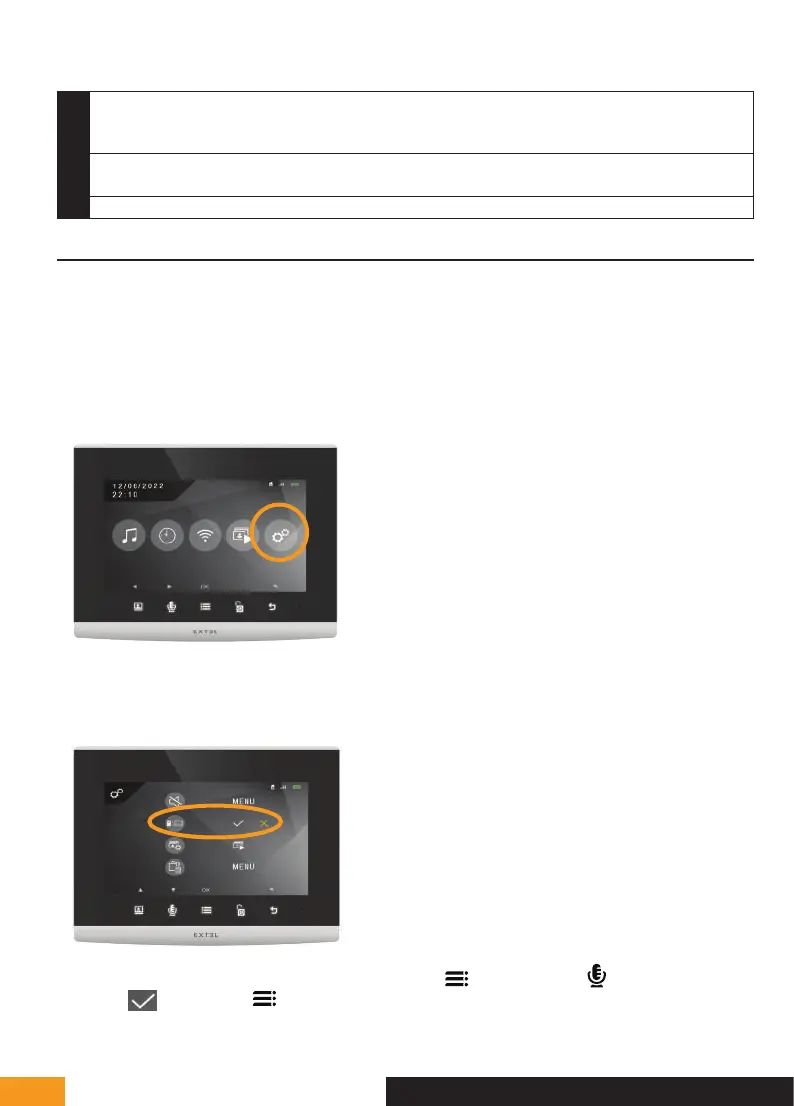
1 - Put the screen in pairing mode
In the menu of your videophone, go to the settings sub-menu
In the settings sub-menu, go to the second line and press the
button. Press the
button once to display
the orange
and press the
button.


 To Next Page