EXTEL - WAVE 2 - 720321
en - 12
E - MONITOR USER MANUAL
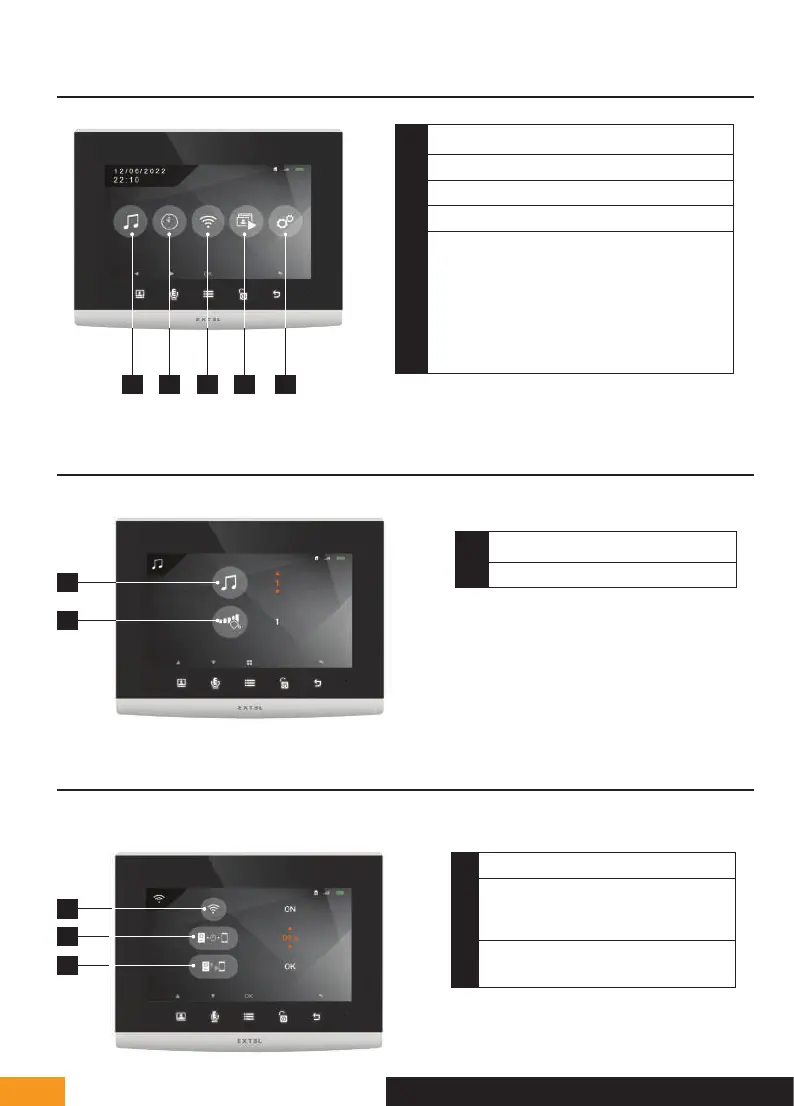
1 - MAIN MENU
1
Sound adjustment (ring tone, volume)
2
Time and date settings
3
WiFi settings
4
Viewing video recordings or photos
5
Advanced settings
- Silent – Do not disturb mode
- Pairing
- Recording mode in absence: video or photo
- Erasing the memory
- Dry contact closing time
- Product reset
1 2 3 4 5
2 - SOUND ADJUSTMENT MENU
1
2
1
Doorbell melody selection
2
Ring volume
3 - WIFI SETTINGS
1 - Main menu
1
2
3
1
Turn the WiFi on or off
2
Adjusting the time between the call to
the intercom panel and the despatch of
the call to the smartphone
3
Access the pairing the videophone with
your smartphone sub-menu


 To Next Page