EXTEL - WAVE 2 - 720321
en - 11
D - INSTALLATION
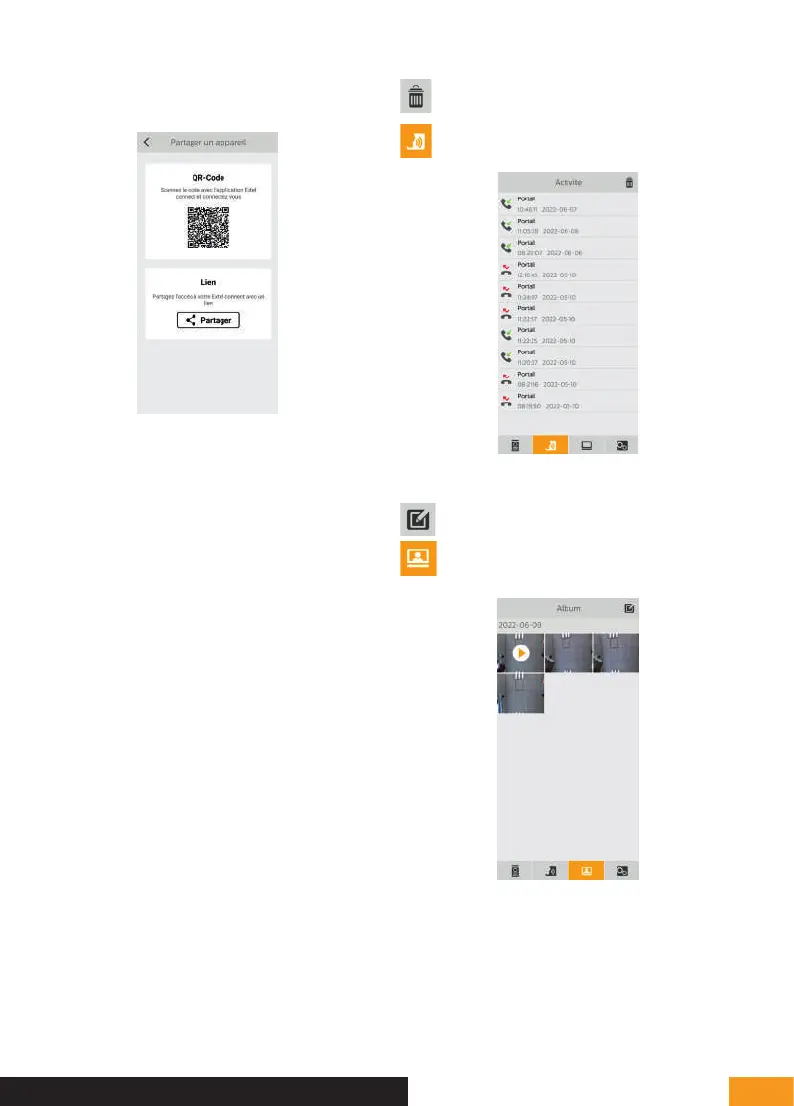
Click on “Inviter un ami” (Invite a friend) to open the
device sharing setting.
• QR Code: this QR code allows your
friends or family to simply connect to your
Extel Wave videophone. See chapter:
“Add a smartphone to a connected videophone”.
• Link: Share your Extel Wave videophone login
details with friends and family.
• Have your friends download the Extel Connect
application.
• Share the link using the messaging service of your
choice by pressing ‘Share’.
• Securely share your password with friends.
• When you click on the link, your friend's Extel
Connect application automatically opens and all
information on the videophone is pre-populated.
• The application asks you to enter the password you
have already set.
• Your friend is now connected to your videophone.
Allows you to delete the call history
Call history
Allows you to edit photos (delete, sort and group)
Groups saved photos in the
phone's memory


 To Next Page