EXTEL - WAVE 2 - 720321
en - 10
D - INSTALLATION
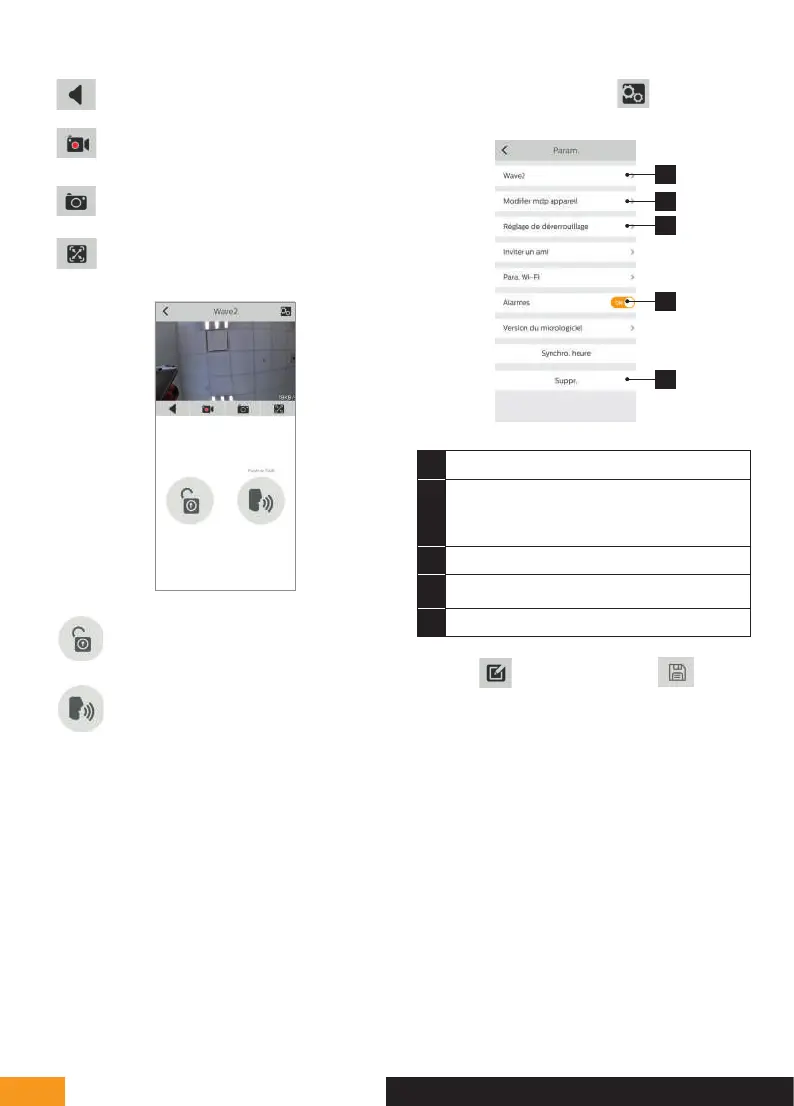
Activate/Deactivate the sound
Take a video (saved in the smartphone's
memory)
Take a photo (saved in the smartphone's
memory)
Full-screen mode
Open the electric strike plate or the gate
Press and hold to speak to the visitor.
To enter the settings, click on in the top right
corner.
1
2
3
4
5
1
Used to rename your videophone
2 Used to change the opening command
password (disabled by default) and video
password
3 Unlocking setting
4
Enables or disables call notifications
5 Used to delete a device from the account
Warning:
is used to modify and is used to
validate.


 To Next Page