

EasyManua.ls Logo

EXTRASTAR EMT757 - User Manual

EXTRASTAR EMT757
5 pages
Print Icon
To Next Page IconTo Next Page
Loading...
© alanwinstanley.com
Page 1 of 5
© 2024 ALANWINSTANLEY.COM All Rights Reserved. May not be reproduced or redistributed in any
way whatsoever without the express written permission of the author. V1.0 02/24
EMT757 PROGRAMMABLE DIGITAL TIME SWITCH
EASY USER GUIDE
At last, here’s the instruction manual they left out of the box! This is an easy-to-read and
comprehensive guide that explains how to use the popular EMT757 time switch.
The EMT757 time switch has been sold for many years, previously in the UK by B&Q under the
Everflourish brand, and currently under the ExtraStar brand found on Amazon. Clas Ohlson also sells
it under their Cotech label.
It’s a versatile 7-day time switch that with 20 individual on-off programmes, a countdown timer that
switches on/off after an elapsed period, and a random burglar-deterrent function. A built-in battery
backup maintains the timer settings when the timer isn’t in use (for months if not years), or when
there’s a power cut. This means you can also set the timer in your hands, without struggling to set it
up in situ, plugged into a mains socket.
I’ve used them for many years and have got to know them very well. The problem for many users is
that the digital display and buttons are pretty small, and the supplied generic instructions take a bit
of digesting (and contain one or two errors), hence I’ve written this guide to make life easy for those
who might be struggling with this popular timer.
Users are warned against controlling electric heaters, irons, cooker rings etc to avoid fire risk (eg
with unattended appliances being accidentally left on, something falling in front of them in the
meantime or being forgotten about).
Question and Answer IconNeed help?

Do you have a question about the EXTRASTAR EMT757 and is the answer not in the manual?

Overview

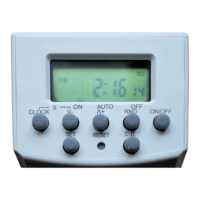
The EMT757 Programmable Digital Time Switch is a versatile 7-day timer designed for controlling electrical appliances. It has been sold under various brands, including Everflourish (B&Q), ExtraStar (Amazon), and Cotech (Clas Ohlson).

Function Description:

The primary function of the EMT757 is to allow users to program specific on/off times for connected appliances over a 7-day cycle. It offers 20 individual on-off programs, providing up to 40 on-off events in total. Beyond basic scheduling, the device includes several advanced features:

  • Countdown Timer ('d' Programme): This function allows the user to set a specific time period (up to 99 hours and 59 minutes) after which the connected appliance will either turn on or off. This is useful for temporary control, such as charging batteries or operating small appliances for a set duration. The countdown timer can be set to either "ON mode" (load is ON, counts down until OFF) or "OFF mode" (load is OFF, counts down until ON).
  • Random Mode: Designed as a burglar deterrent, this mode semi-randomly switches the connected load (e.g., a table light or radio) on and off to simulate occupancy. In random mode, power "off" lasts for 26-42 minutes, and power "on" lasts for 10-26 minutes. This mode operates continuously when activated and overrides any programmed schedules or the countdown timer.
  • Manual Override: The ON/OFF button allows for manual control, enabling the user to set the load to ON or OFF "full-time" regardless of programmed schedules. Repeatedly pressing this button cycles through ON → AUTO → OFF → AUTO → ON.
  • Automatic Operation (AUTO Mode): For programmed schedules to run, the time switch must be set to AUTO mode. The ON/OFF button is used to ensure the timer is in the correct current state (ON or OFF) before selecting AUTO.

Important Technical Specifications:

  • Programmes: 20 individual on-off programmes.
  • Display: 7-day, 12 or 24-hour display.
  • Countdown Timer: Up to 99 hours and 59 minutes, with UP/DOWN functionality.
  • Random Setting: Always on, not timed.
  • Daylight Saving Time Adjust: Manual adjustment.
  • Internal Battery: 1.2V NiMH, non-user-replaceable.
  • Maximum Rating: 2,000W, 8 AMPS @ 240V.

Usage Features:

  • Setting Current Day and Time: The device requires initial setup of the current day of the week and time. This involves pressing CLOCK, then SET to make the day flash, using the V- (DOWN) or ^+ (UP) arrows to select the day, and repeating the SET and arrow presses for hours and minutes. The display can be toggled between 12-hour and 24-hour formats by pressing CLOCK for two seconds.
  • Programming Schedules: To set a programme, the user presses the ^+ (UP) button to display "1 ON," then SET to select the desired day(s) of the week using the V- (DOWN) or ^+ (UP) buttons. Available day selections include individual days, weekdays, weekends, or every day. After selecting the day(s), SET is pressed to move to time setting, where hours and minutes for the "ON" time are set using the arrows. The process is repeated for the "OFF" time.
  • AUTO Mode Activation: To ensure programmes run correctly, the timer must be in AUTO mode. This is achieved by pressing the ON/OFF button repeatedly until "AUTO" appears in the display, ensuring the current state (ON or OFF) matches the desired state before entering AUTO.
  • Countdown Timer Activation: In CLOCK display mode, the countdown timer ('d' programme) can be accessed directly by pressing V- (DOWN) or by scrolling through programmes with ^+ (UP). After setting the ON/OFF mode and duration, pressing the CD button starts the countdown. "CD" will flash in the display. Pressing CD again cancels the countdown.
  • Random Mode Activation: With the timer in AUTO mode, pressing the RND button activates random operation. An "[R]" symbol will appear. Pressing RND again deactivates it.
  • Daylight Saving Time Adjustment: To advance the clock by one hour for DST/BST, press CLOCK and V- (DOWN) simultaneously. An "[S]" symbol will appear. Repeat the action to reverse it.
  • Battery Backup: A built-in rechargeable NiMH cell maintains timer settings during power cuts or when the timer is unplugged, allowing for convenient setup in hand. The battery recharges fully within 2 hours and can last for many months between charges.

Maintenance Features:

  • Reset Function: The RESET button, accessible with a ballpoint pen, clears all timer settings completely. This is useful for troubleshooting or starting fresh.
  • Battery Status: If the display goes blank, it may indicate a failing internal battery. Pressing RESET might restore the clock display temporarily.
  • Battery Replacement: While the internal 1.2V NiMH battery is rechargeable and designed to last for many years, it is not user-replaceable and is difficult to obtain. If the battery wears out, the timer switch should be disposed of as electrical waste.
  • Safety Warning: Users are cautioned against controlling high-power electric heaters, irons, cooker rings, or similar appliances due to fire risk, especially if left unattended or forgotten.

The EMT757 is a robust and feature-rich digital timer, offering flexible control options for various household appliances, with a focus on ease of use and practical functionalities like security and temporary control.
EXTRASTAR EMT757 Specifications

General IconGeneral
BrandEXTRASTAR
ModelEMT757
CategoryTimer
LanguageEnglish