Page 3 of 5
© 2024 ALANWINSTANLEY.COM All Rights Reserved. May not be reproduced or redistributed in any
way whatsoever without the express written permission of the author. V1.0 02/24
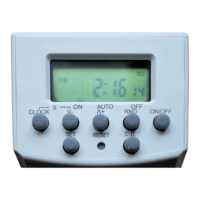
Choose the required day(s) and then press SET to move on to the time display. Use the ˅- (DOWN)
or ˄+ (UP) buttons and then SET button to set the hours and minutes for Programme 1
ON
time.
Then set the OFF time; now press ˄+ (UP) and the display changes to show 1
OFF
time. Repeat the
above to set Programme 1
OFF
time. Finally press SET to confirm to confirm the 1
OFF
time.
Programme 1 has now been set. Press CLOCK to return to the current time display.
IMPORTANT - ON/OFF BUTTON
Pressing this button manually overrides what the timer is doing. Setting it to either ON or OFF sets
the load to ON or OFF ‘full-time’ until you switch it back again. Repeatedly press the button and the
timer display will go through ONAUTOOFFAUTOON.
The ON/OFF button is also used to set the timer into operation correctly. This is very important!
For the programmes to run, the time switch must be set into AUTO mode. The ON/OFF button is
used to tell the time switch what it’s supposed to be doing at the moment – should it be on or off
right now? Press ON/OFF repeated to set the current state it should be in (ON or OFF). Then press
once more for AUTO. The time switch will then run programmes at the relevant time.
Example,
Say it’s currently 6.30 pm and you’ve set Programme 1 to turn a lamp on at 8.00 pm. Therefore the
timer should currently be OFF. So press the AUTO button repeatedly until OFF shows in the display.
THEN PRESS ONE MORE TIME FOR AUTO. The timer will now run automatically as programmed.
Up to 19 more programmes can be set in just the same way, choosing day(s) of the week, and their
on and off times.
Note: keeping V- or V+ pressed down causes all 20 programme times to scroll by, so you can see
easily what’s been set.


 To Next Page