Page 2 of 5
© 2024 ALANWINSTANLEY.COM All Rights Reserved. May not be reproduced or redistributed in any
way whatsoever without the express written permission of the author. V1.0 02/24
Setting the correct day of the week and current time
The time switch arrives showing a random time and day of the week, and needs setting for the
current day and time.
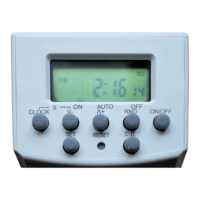
Press CLOCK to show the time and day, then press SET until the DAY OF THE WEEK flashes. Press the
˅- (DOWN) or ˄+ (UP) arrows to go through the days of the week (Monday Sunday) until today’s
day is flashing along the top of the display.
Then press SET once and the HOURS will now flash. Press the ˅- (DOWN) or ˄+ (UP) arrows until
today’s HOURS (time of day) flashes. Keeping either button pressed, causes the hours to fast forward
or backwards.
Then press SET once and the MINUTES will now flash. Press the ˅- (DOWN) or ˄+ (UP) arrows until
today’s correct MINUTES (time of day) is flashing.
With today’s day and time having been chosen, press SET one last time to complete the setting.
To swap between 12 or 24 hour display (eg 7.00 pm or 19:00) display: press CLOCK for two
seconds.
The timer reverts to current CLOCK display after 15 seconds if no buttons are pressed.
If you lose your way, simply press CLOCK to come out of the setting-up.
Setting up a basic timer programme
Twenty programmes are available, so you set the on and off times and days for each – up 40 on-offs
in all. (A misprint in the instructions states there are 140 on-off programmes per week.)
Programmes are shown in the display by their programme number 1
20 and ON/ OFF symbols in
the display. A separate programme called ‘d’ is for the countdown/ up time, described later.
Press once the ˄+ (UP) button to display 1
ON
(Programme 1
on
time) in the display. Then press SET to
select the day(s) of the week you want your programme to use. MON shows first, by default. Use the
˅- (DOWN) or ˄+ (UP) buttons to select the day(s) as follows:
MON SUN (every day of the week)
MON ... FRI (one day of the week only)
MON WED FRI (only)
TUE THUR SAT (only)
SAT SUN (weekends only)
MON TUE WED (only)
THUR FRI SAT (only)
MON FRI (weekdays only)
MON SAT (not Sunday)
MON SUN (every day of the week)


 To Next Page