EasyManua.ls Logo

Extron electronics SW2 USB - Page 9

Extron electronics SW2 USB
39 pages
Print Icon
To Next Page IconTo Next Page
To Previous Page IconTo Previous Page
Loading...
SW USB Series • Introduction 3
100-240V 0.2A
50-60Hz
REMOTE
INPUTS
1
2
3
4
OUTPUT
OUTPUT
L
R
SW6 VGA Ars
USB SWITCHING INPUT
Tx
Tx Rx
RS-232
CONTACT
1
2
3
4
RS-232
PASS THRU
USB OUTPUT HUB
USB 3
USB 1
PC 1
PC 2
PC 3
PC 4
USB 2
USB 4
1.5A MAX
12V
POWER
+
Extron
SW4 USB
USB
USB
RS-232 Loop-through
RS-232
VGA Outputs
VGA
VGA
Out
Annotator
Projector
Control System
with RS-232
Extron
SW4 VGA Ars
VGA/Audio
Switcher
PC
Laptop
Visualizer
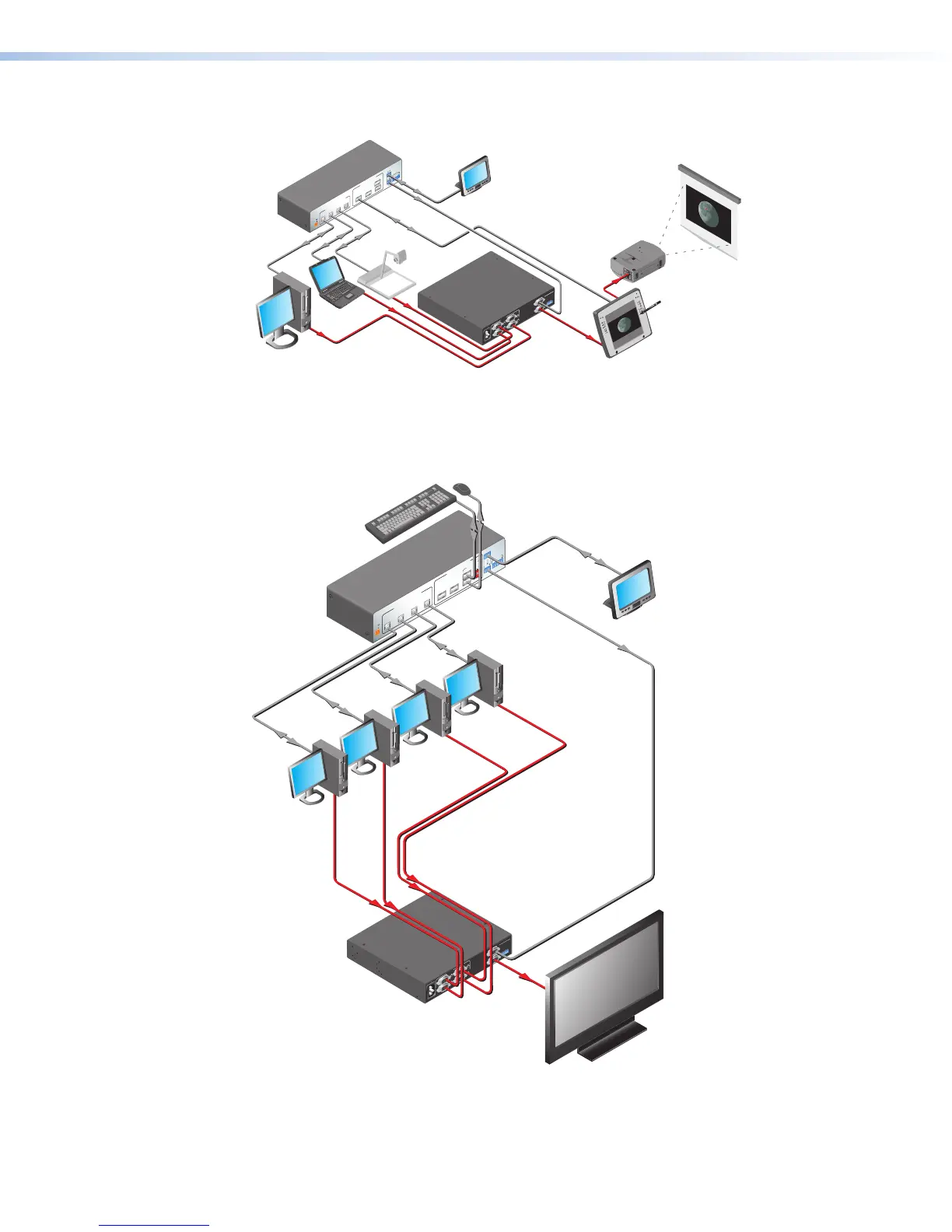
Figure 2. Connection Diagram for an SW4 USB Switcher with an SW VGA Series
Switcher in an Annotator Application
OUTPUT
REMOTE
OUTPUT
L R
SW4 VGA Ars
100-240V 0.2A
50-60Hz
INPUTS
1
2
3
4
USB SWITCHED INPUTS
USB OUTPUTS HUB
Tx
Tx Rx
RS-232
RS-232
PASS THRU
USB 3
USB 1
USB 2
USB 4
1.5A MAX
12V
POWER
+
PC 1
PC 2
PC 3
PC 4
MOUSE
ON
KEYBOARD
ON
OFF
HOST
EMULATION
CONTACT
1
2
3
4
Flat Panel Display
Extron
SW4 VGA Ars
VGA/Audio Switcher
Desktop
PC #1
Desktop
PC #3
Desktop
PC #4
RS-232
Loop
-through
Extron
SW4 USB Plus
USB Switcher
USB
RS-232
RS-232
Control System
Mouse
Keyboard
VGA
Outputs
Desktop
PC #2
Figure 3. Connection Diagram for an SW4 USB Plus Switcher in a
Keyboard-Video-Mouse (KVM) Switching Application

Related product manuals