7
PLEASE REGISTER TO ACTIVATE YOUR PRODUCT’S WARRANTY.
MEMORY CARD INSTALLATION:
TO INSTALL THE SD CARD (Sold separately)
1. Open case door.
2. Insert the SDcard face up into the SDCardSlot until you hear it click into
place. Press it once to remove.
NOTE: It is recommended not to use a card that has been previously used in
dierenttrailcameras or one that has previously been used in a Point&
ShootCamera unless it is rst formatted. It is also not recommended to view
pictures in a Point&ShootCamera as read errors may occur. Always format
brand new SDHC cards; a FullFormat is recommended over a quick format.
ALWAYS FORMAT BRAND NEW AND PRIOR USED SDHC CARDS PRIOR
TO USE IN THE TRAIL CAMERA.
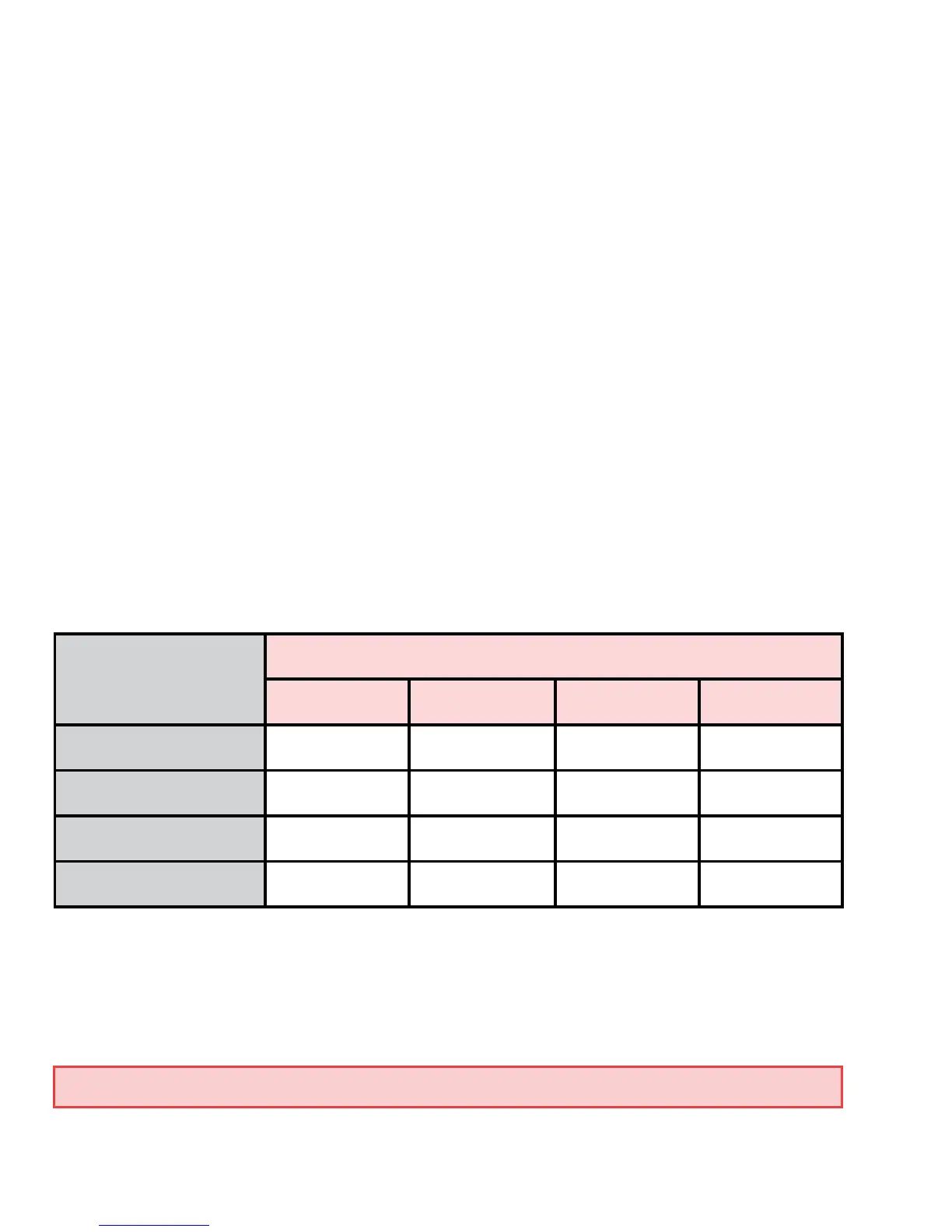
PHOTO SIZE
(Resolution)
MEMORY CARD SIZE = NUMBER OF PHOTOS
4GB 8GB 16GB 32GB
5.0 MP 2381 4762 9524 19048
7.0 MP 1604 3208 6416 12832
9.0 MP 1032 2064 4128 8256
Video(30Sec) 433 866 1733 3466



 To Next Page