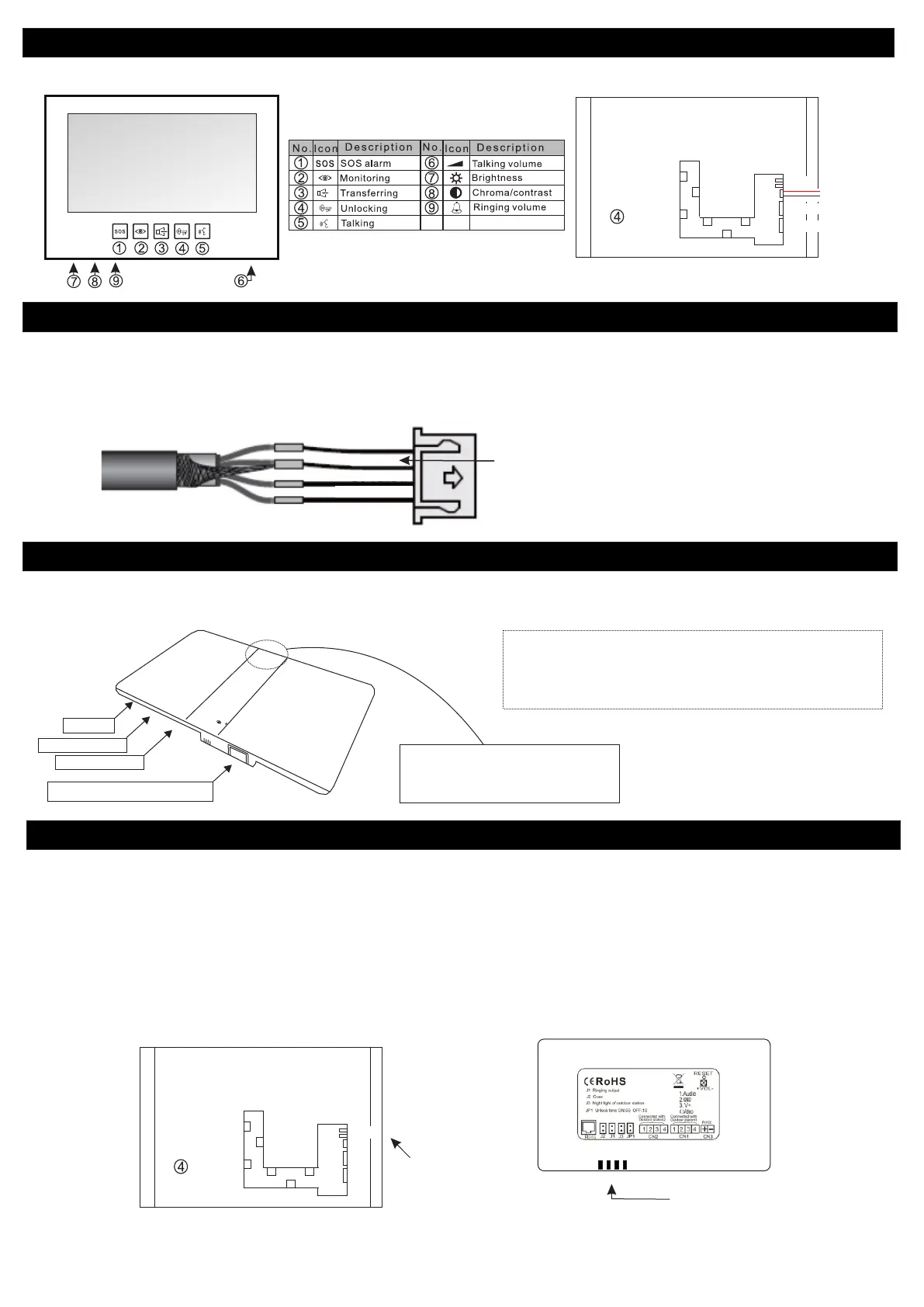
CN 2 (2nd Outdoor station)
CN 1 (1st Outdoor station)
V(+12V)
GND (Negative)
J1 Jumper
J2 Jumper
EV-H7 Indoor Monitor
Front View
Rear View
Page 2
Wiring and Distances for Intercom line
Net Link and WIFI Operational Distance
Yellow (Video)
Red (B+)
Black (GND)
Black (GND) is also connected with the shield at each end of the system
Blue (Audio)
The operational distance of the Net Link WIFI system greatly depends on the router in use, walls in between the two systems and other factors such as
electrical interference. This can be judged quite easily by using your mobile phones WIFI indicator and ensuring you have STRONG signal Strength. The
average distance is around 20m+ but this will vary between installations and sites.
12V DC
RJ 45/CAT5/CAT6 Ethernet Cable
Door Station 1
Door Station 2
- Maximum of FOUR indoor monitors
- Maximum of TWO outdoor units
Recommended Cable Type:
4 Core Shielded .030mm up to 100m distance.
RG 59 Coaxial Cable with 1.5mm Pair up to 200m
Eyevisi n
System jumper settings
Remove the RING jumper (J1) from the NETLINK only to eliminate a dual ringing tone on the outdoor unit. There is no need to remove the ring jumper off any
of the indoor monitors.
If the video displayed on the phone/tablet is dark also remove the COAX jumper (J2) from the netlink.
If the video displayed on the indoor monitor is dark also remove the COAX jumper (J2) from the specific indoor monitor that the problem is occurring on.
If the video displayed on the indoor monitor is dark remove the COAX jumper (J2) from the specific indoor monitor that the problem is occurring on.
Systems with a NETLINK
Systems without a NETLINK
J1 Jumper
J2 Jumper
Rear Of Indoor Monitor
Rear Of Netlink
Jumpers
Jumpers
Led Indicators:
Red LED: Power ON
Green LED Flashing: Outgoing Call
Green LED ON: Connected to Network
Green LED OFF: Not connected to the network
Important !
Note that the door station that is connected to INPUT 1 is the only
door station the can be manually monitored via the APP however
both door stations can be viewed with full communications when the
doorbell is pressed.



 To Next Page