System Icons
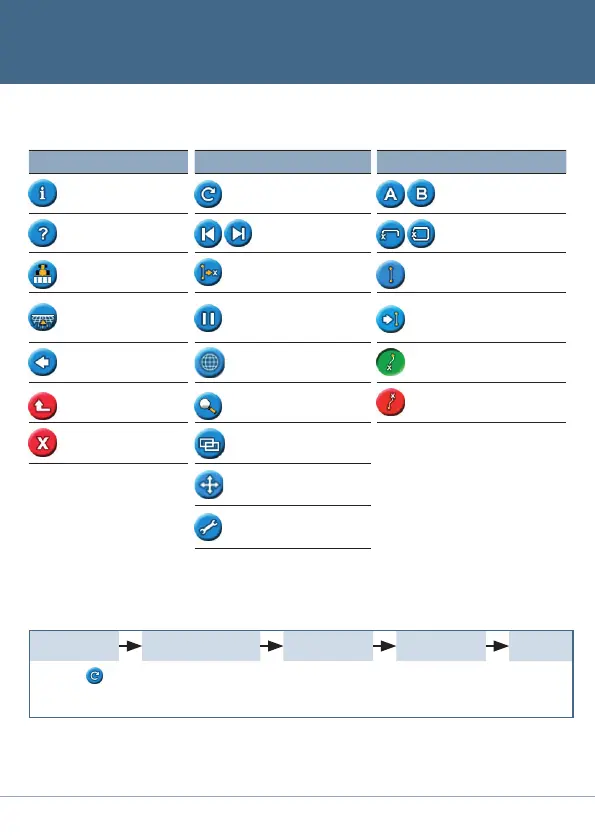
Function (left side) Action (right side) Field (right side)
Icon Description Icon Description Icon Description
Display information tabs Reset guidance
Set Point A and set Point B
Display built-in help
Nudge guidance line left
and right
Start and finish headland
Turn on or off coverage
logging
Shift to here
(Advanced mode only)
Pause curve logging (record
a straight line segment)
Return to map view
(Menu and wizard screens)
Pause, and get guidance
back to the pause
position
Next AB (Switches section
on FreeForm
™
patterns)
Go back to previous screen
(Wizard screen)
Enter mapping mode Recording FreeForm curve
Return to previous menu
(Menu screen)
Change zoom level
Not recording FreeForm
curve
Cancel changes
(Edit screen)
Change views
(Advanced mode only)
Enter panning mode
Go to configuration
menu
Reset guidance
Configure the
implement
Select the
pattern
Map the AB Line Guidance
Selectthe
icon and then
press
o
.
Settheimplement
width,theoverlap/
skip,andtheoffsets.
SeeGUIDANCE
PATTERNS.
Drive and
definethe
guidance line
or headland.
Beginning Guidance in Easy Mode


 To Next Page