Need help?
Do you have a question about the Ezviz C8W and is the answer not in the manual?
Lists all items included in the camera package, such as the camera, power adapter, and cables.
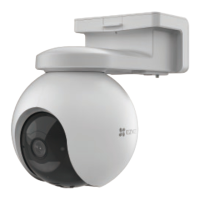
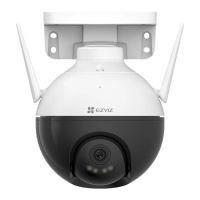
Provides a basic overview of the camera's physical components and ports, including Ethernet, power, and antennas.
Step-by-step guide to connect the camera to the internet using an Ethernet cable and router.
Instructions for connecting the camera to a Wi-Fi network wirelessly via the EZVIZ app.
Guide on how to install a micro SD card for local storage, including initialization steps.
Advice on choosing the best location for camera installation, considering view, signal, and environmental factors.
Instructions for mounting the camera on a ceiling or wall using screws and a drilling template.
Guide on how to mount the camera onto a pole using cable ties for secure attachment.
Instructions for installing the waterproof kit to protect the Ethernet port in outdoor or humid conditions.
Explains how to access and use the live view feature in the EZVIZ app to monitor the camera feed.
Details various camera settings available in the EZVIZ app, such as audio, status light, night vision, and storage.
How to access and view recorded videos from local storage or cloud storage using the EZVIZ app.
Instructions on using the two-way audio feature to talk or listen through the camera via the app.
Configuration of human detection to receive notifications when a person is identified by the camera.
How to activate the alarm and spotlight feature to deter intruders when motion is detected.
Guide on how to integrate and control EZVIZ devices with Amazon Alexa voice commands.
Instructions for connecting and controlling EZVIZ devices using Google Assistant and voice commands.
This document outlines the features and usage of an EZVIZ camera, designed for both indoor and outdoor surveillance. The camera offers various functionalities for monitoring, communication, and security, managed primarily through the EZVIZ mobile application.
The EZVIZ camera is a versatile surveillance device capable of capturing video, detecting motion, and providing two-way audio communication. It supports both local storage via a Micro SD card and cloud storage for video recordings. The device is equipped with an LED indicator to show its status, an Ethernet port for wired internet connection, and antennas for wireless connectivity. It also features a spotlight and IR light for enhanced night vision capabilities. The camera can be integrated with smart home ecosystems like Amazon Alexa and Google Assistant for voice control and broader device management.
The camera offers flexible installation options, including ceiling, wall, and pole mounting. A drilling template is provided to assist with accurate placement. For outdoor or humid environments, a waterproof kit is included to protect the Ethernet connection. Initial setup involves connecting the camera to power and then to the internet, either via a wired Ethernet connection or wirelessly through Wi-Fi. The EZVIZ app guides users through adding the camera by scanning a QR code located on the device or its quick start guide. The LED indicator provides visual cues during the connection process, indicating power status, network connection, and readiness for Wi-Fi configuration.
The EZVIZ app serves as the central control hub for the camera. Upon launching the app, users can access a live view of the camera's feed, take snapshots, and record videos. The app allows for selection of video definition (Ultra HD, Hi-Def, or Standard) and offers pan/tilt functionality to adjust the camera's field of view. Key features within the app include:
The camera offers different night vision modes to suit various lighting conditions:
The EZVIZ camera can be integrated with Amazon Alexa and Google Assistant. This allows users to control the camera using voice commands, such as "show [camera name] camera." To enable this, users need to link their EZVIZ account within the Alexa or Google Home app and ensure "Image Encryption" is turned off in the EZVIZ app settings.
For local storage, a Micro SD card can be inserted into the camera. After installation, the card needs to be initialized through the EZVIZ app's Device Settings interface. The app displays the storage status, indicating capacity, used space, and free space.
The manual provides guidance for common issues:
Within the EZVIZ app, users can restart the camera or delete it from the EZVIZ cloud. Deleting the camera does not remove videos stored in the cloud, which can still be viewed if the camera is added again. The app also provides access to the user guide and device information such as product category, model, serial number, and QR code.
 General
| Number of lenses | 1 |
|---|---|
| Fixed focal length | 4 mm |
| Maximum aperture number | 1.6 |
| LED type | IR |
| Certification | UL / FCC / CE / WEEE / REACH / RoHS / UKCA |
| DC output current | 1 A |
| DC output voltage | 12 |
| Power source type | DC |
| Power consumption (max) | 6 W |
| Mounting type | Wall |
| Product color | Black, White |
| Operating temperature (T-T) | -30 - 60 °C |
| Operating relative humidity (H-H) | 0 - 95 % |
| Security algorithms | 64-bit WEP, 128-bit WEP, WPA, WPA-PSK, WPA2, WPA2-PSK |
| Intelligent Video Surveillance (IVS) system features | Human detection |
| Total megapixels | 4 MP |
| Maximum resolution | 2560 x 1440 pixels |
| Video compression formats | H.264, H.265 |
| Noise reduction technology | 3D noise reduction |
| Built-in HDD | No |
| Compatible memory cards | MicroSD (TransFlash) |
| Cloud services supported | EZVIZ Cloud |
| Maximum memory card size | 256 GB |
| Frequency band | 2.4 - 2.4835 GHz |
| Wi-Fi standards | 802.11b, 802.11g, Wi-Fi 4 (802.11n) |
| Channel bandwidth | 20 MHz |
| Wi-Fi data rate (max) | 72 Mbit/s |
| Ethernet interface type | Fast Ethernet |
| Supported network protocols | EZVIZ Cloud Proprietary Protocol |
| Lens mount interface | M12 |
| Pan range | 0 - 352 ° |
| Tilt angle range | 0 - 95 ° |
| Camera shutter type | Electronic |
| Minimum illumination | 0 lx |
| Sensor type | CMOS |
| Optical sensor size | 1/2.7 \ |
 Weight and Dimensions
| Depth | 158 mm |
|---|---|
| Width | 149 mm |
| Height | 157 mm |
| Weight | 510 g |
| Package depth | 197 mm |
| Package width | 205 mm |
| Package height | 185 mm |
| Package weight | 885 g |

 To Next Page