3
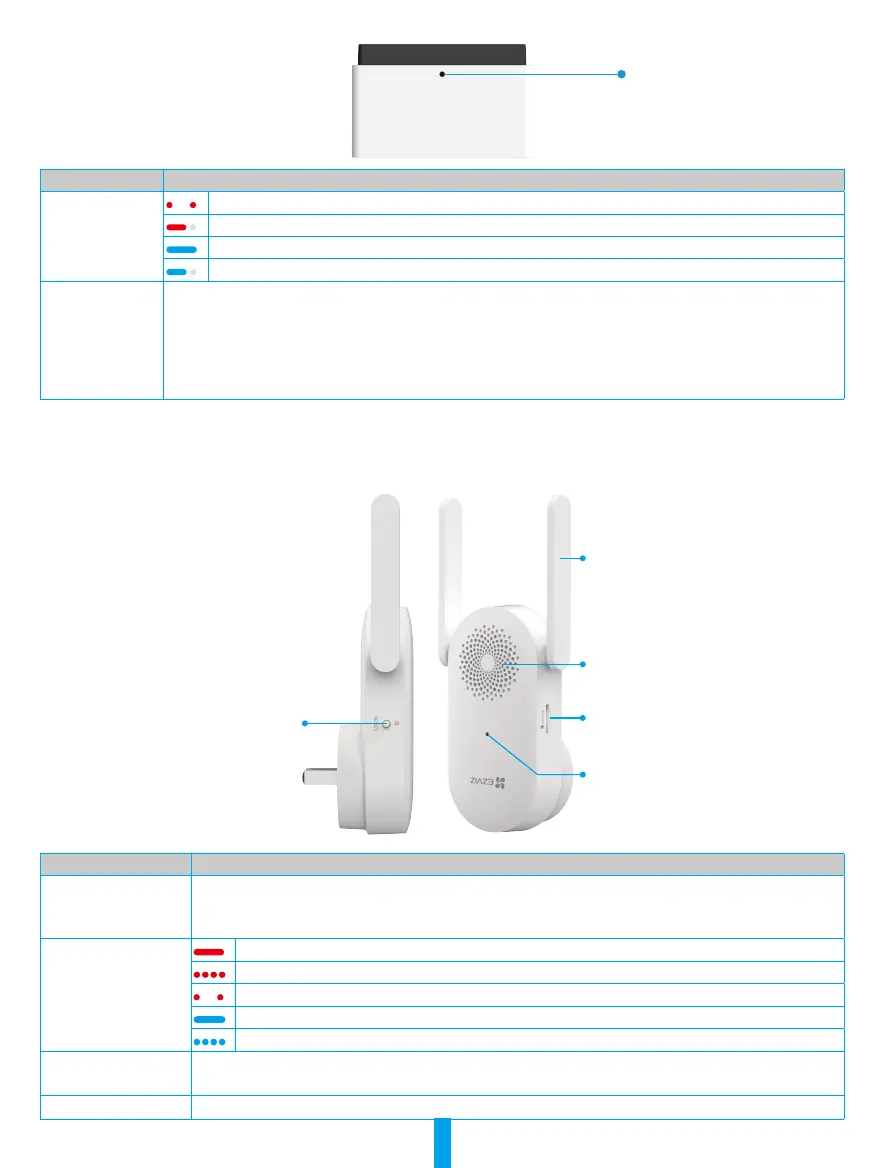
Dismantle Hole
Insert the pin into it to
disassemble the doorbell
Name Description
LED Indicator
Slow-ashing Red: Charging.
Solid Red for 3s and off: Battery power below 20% and the doorbell is awoken.
Solid Blue: Fully charged but still connected to the power adapter.
Solid Blue for 3s and off: Battery power above 20% and the doorbell is awoken.
Power Button • Power on: Press and hold for 2s in shutdown state, the LED indicator is solid blue for 3s and
then goes out, then the device emits a beep sound as a prompt of successfully powering
on.
• Power off: Press and hold for 5s in startup state, the LED indicator ashes red for 3
times and then goes out, then the device emits a beep sound as a prompt as a prompt of
successfully powering off.
Chime
The chime is installed indoors, with functions such as wireless signal repeater, ringing, and video storage.
Antenna
*RESET Button
Speaker
Micro SD Card Slot*
LED Indicator*
Name Description
Micro SD Card
(sold separately)
It is recommended to install a micro SD card, which should be purchased separately:
• Initialize the card in the EZVIZ app before using it.
• Recommended compatibility: Class 10, maximum space 512GB.
LED Indicator
Solid Red: Device is starting up/resetting.
Fast-ashing Red: Disconnected with the doorbell or the micro SD card malfunction.
Slow-ashing Red: Network disconnected.
Solid Blue: Wi-Fi conguration successful.
Fast-ashing Blue: Ready for Wi-Fi conguration/Wi-Fi conguring.
RESET Button • RESET the Chime: Hold for 5 seconds to restart and all parameters are reset to default.
• One-click mute: Press the Button once to mute the chime.
Power Input 100 to 240 VAC, 50/60Hz



 To Next Page