15
out the battery from the device; when taking out the battery, must power off the device.
• Please handle the waste batteries properly and safely, do not put into re, water or soil.
• When your skin or clothing touches the leaked liquid of the waste battery, please washed with clean water to avoid a skin
irritation, and then go to hospital for treatment rapidly.
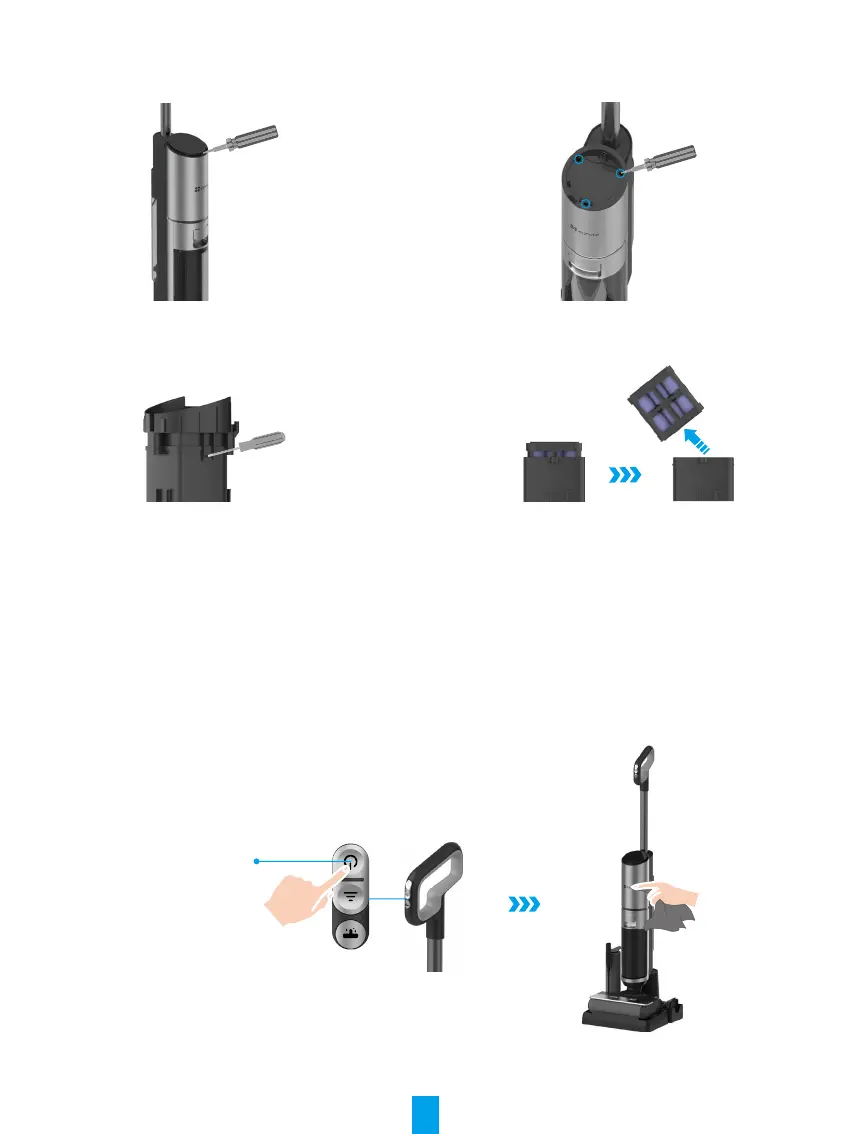
1. Pry off the screen with a screwdriver and remove the wire
connecting the screen.
2. Use a screwdriver to remove three screws in the gure
above, remove the cover and the connected wires, and then
take out the battery box in the tube.
3. Pry the grooves on both sides of the battery box with a
screwdriver and remove the cover.
4. Take out the battery.
Routine Maintenance
In order not to affect the device performance, it is recommended to maintain the components regularly.
1� Product Maintenance-clean the Main Device Body
a. Before cleaning, please let the device stop to work.
b. Wipe and wash with water or neutral detergent, and be sure that wring out the cleaning cloth before wipe the device. (Please
prevent water from entering the interior of the device electrical elements.)
Power Button
2� Clean the Dirt Degree Sensor
a. The dirt degree sensor may be covered by the dirt when there is no obvious dirt on the ground however the icon of


 To Next Page