MANUAL THERMOCOAGULATION - EVRF
Date
Page 22 of 34 Revision N° : 18
5.1 Configuration of the EVRF
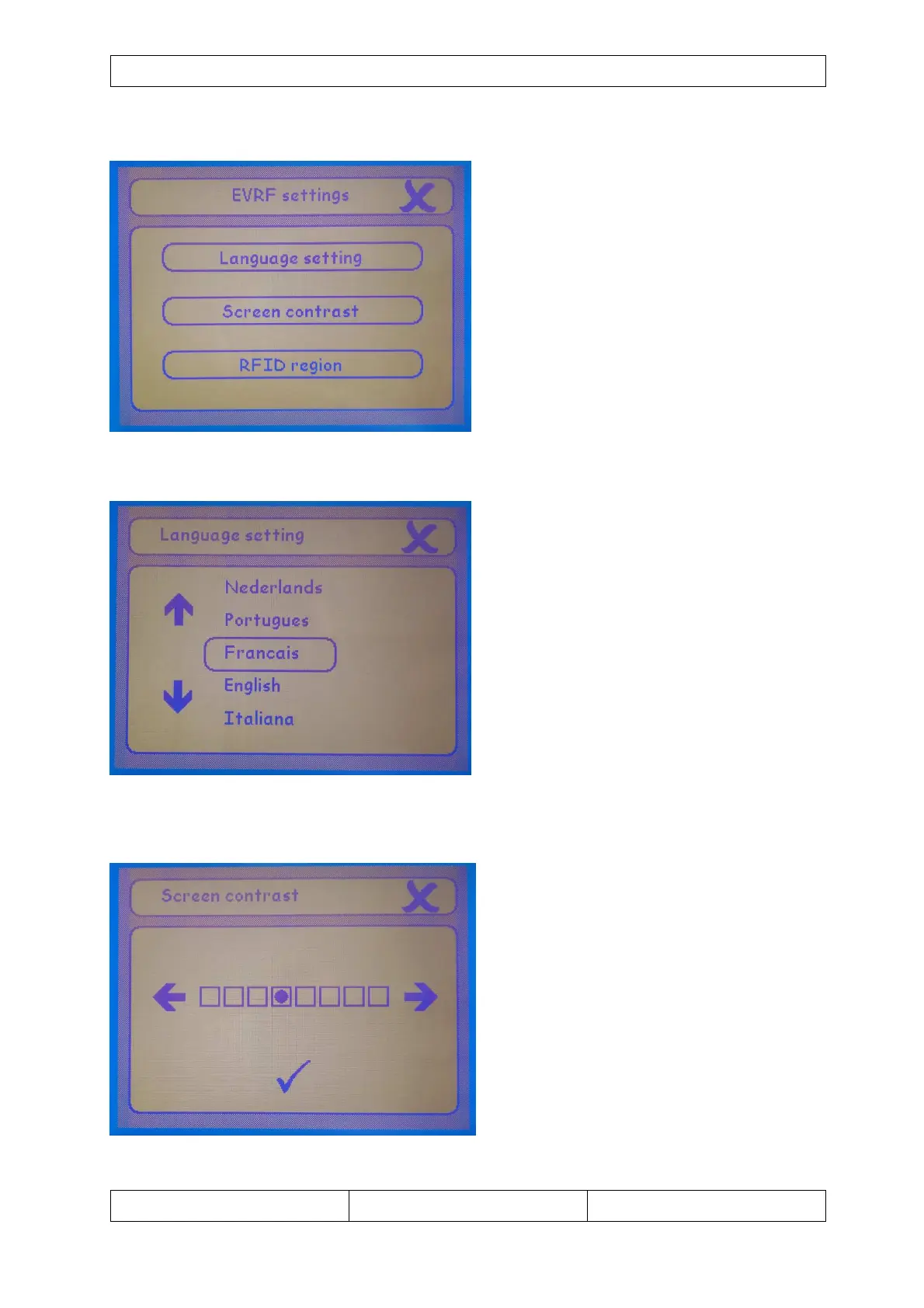
After touching the button in the program
selection screen you end up in the settings
screen.
In this screen you have the option to alter 2
settings: language and screen contrast.
By touching one of the buttons you will be
able to change the selected option.
By touching you go back to the mode
selection screen.
5.1.1 Language settings
If the "language setting" option was
chosen, we end up in the following screen.
Several languages can be selected: French
– English - Italian – Spanish - German -
Dutch.
Choose the desired language with the
up/down arrows and touch the language you
wish. Touch to cancel and return to the
settings selection.
5.1.2 Screen contrast
If "screen contrast" was chosen, we enter
the screen to change the contrast.
Choose the desired contrast settings with
the left/right arrows and touch to accept.
Touch to cancel and return to the mode
selection.


 To Next Page