EN
1
14
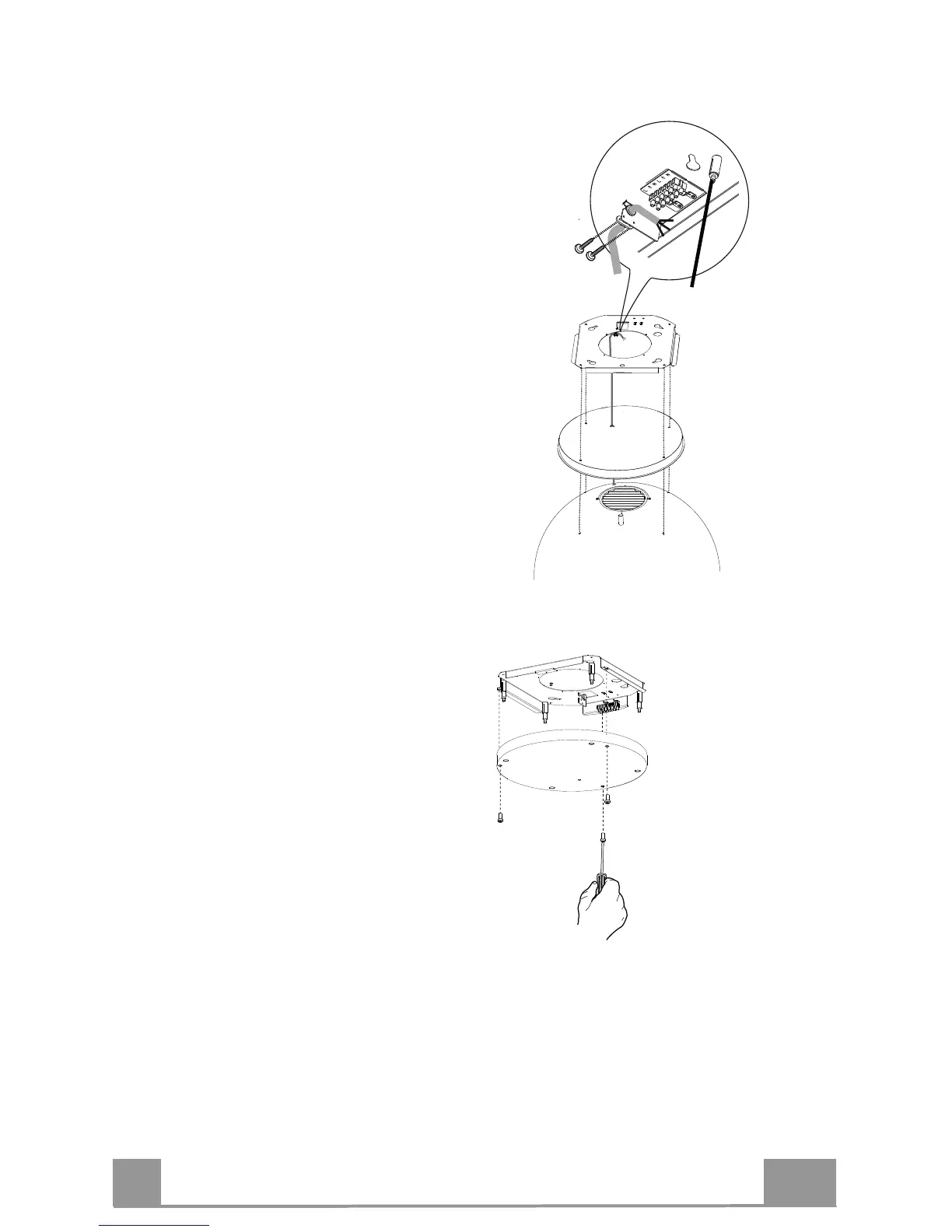
FIXING THE POWER SUPPLY CABLE
! Tighten the power supply cable and
fix it to the bracket on the ceiling-
mounted plate, using the tongue
already mounted and 2 screws.
! Slot the rubber cable raceway already
threaded onto the power cable into the
slot to prevent future damage.
! Connect the Hood to the Mains Power
Supply, inserting a bipolar switch
with a contact aperture of at least 3
mm.
! Remove the Grease filters (see
paragraph "Maintenance#) and make
sure that the Power cable connector
has been properly inserted into the
Suction fan socket.
! At this point it is possible to remove
the tie fixing the power supply cable
to the hood canopy.
FITTING THE PLATE COVER
! Screw the cover back onto the plate
using the screws removed as
described above.
AIR OUTLET – RECIRCULATION VERSION
! Open the lighting unit by pulling on the notch provided.
! Remove the grease filter.
! Make sure that the Activated charcoal odour filter has been fitted.



 To Next Page