17
SHARPENING
Versions with built-in sharpener
To sharpen the blade periodically as soon as the cutting capacity decreases. Please
proceed as per the following instructions:
1. After disconnecting form the mains, clean the blade accurately using denaturized
alcohol to degrease it.
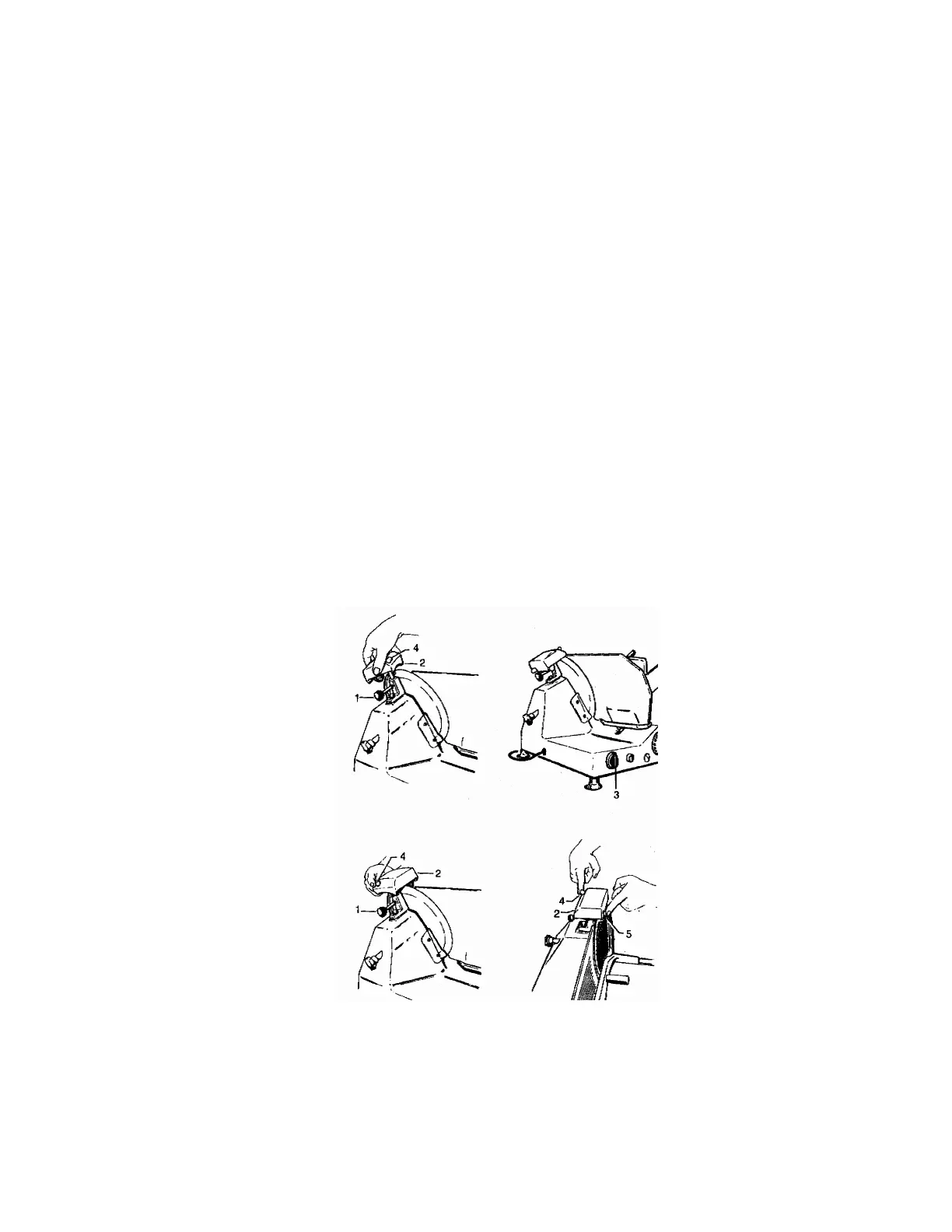
2. Loosen the knob (1) and turn the sharpener (2) by 180° and insert the whells on the
slicer blade. Relock the knob.
3. Operate the switch (3) and press the button (4);
4. Allow the blade to rotate for about 30 to 40 seconds then use the switch (3) to stop it.
Brush a pencil lightly on the external side of the blade to check for a slight spud;
We advise performing this operation with the utmost care as the blade is extremely
sharp.
5. If some spud is found, operate the switch (3) again for 3 to 4 seconds by pressing the
buttons 4 and 5 at the same time.
DO NOT PROLONG THIS OPERATION BEYOND THE FEW SECONDS MENTIONED
OTHERWISE THE BLADE EDGE WILL WARP.
6. After completing sharpening, we advise cleaning the wheels using a small brush and
alcohol.
7. Now return the sharpener to its original position.



 To Next Page