20
EN
STUBBY
Optimize the working life of the battery
• After the Trimmer has been charged for the rst time, do not recharge the Trimmer
between trimming sessions. Continue using it until the battery is completely empty.
• Do not charge for more than 24 hours.
• Do not keep cord permanently plugged in.
• Discharge/run down the battery completely twice a year by letting the motor run until
it stops.
• If the Trimmer hasn’t been used for a long period of time, it must be recharged for a
full 8-10 hours.
• Cordless Trimming
• Charge according to directions. Unplug Trimmer from outlet and remove cord.
• Slide ON/OFF switch ON to begin trimming.
• When nished, turn Trimmer OFF.
Trimming
• Always comb the beard and/or moustache with a ne comb before you start trimming.
• If you are trimming for the rst time, be careful. Do not move the Trimmer too fast.
Make smooth and gentle movements.
• Make sure that the Trimmer is fully charged before you start trimming.
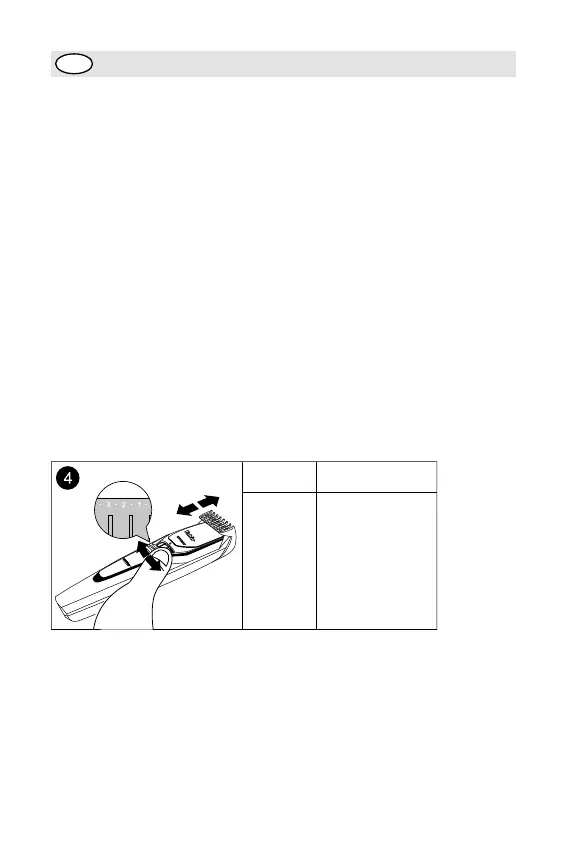
• Beard Trimming Comb must be on Trimmer to use the Zoom Lock.
• Turn the Zoom Lock to the desired trimming length setting (see table). The setting is
indicated in the center of the adjustment ring (g. 4).
Settings
Hair Length
after Trimming
1
2
3
4
5
6
7
8
9
10
3/64 in / 1 mm
5/64 in / 2 mm
1/8 in 3 mm
5/32 in 4 mm
3/16 in 6 mm
9/32 in 7 mm
5/16 in 8 mm
3/8 in 9 mm
13/32 in 10 mm
If you are trimming for the rst time, start by using the comb at the maximum trimming
length setting (#10) to prevent accidentally trimming hairs too short. As you become
familiar with the settings, adjust ring to desired trimming length. Zoom Lock will “click”
into position at each setting.



 To Next Page