2. Quick start
In order to operate the ARZ-Wave roller shutter using one of the controllers, e.g.
ZWK1, ZWK15, ZWP15 offered by FAKRO, it is necessary to:
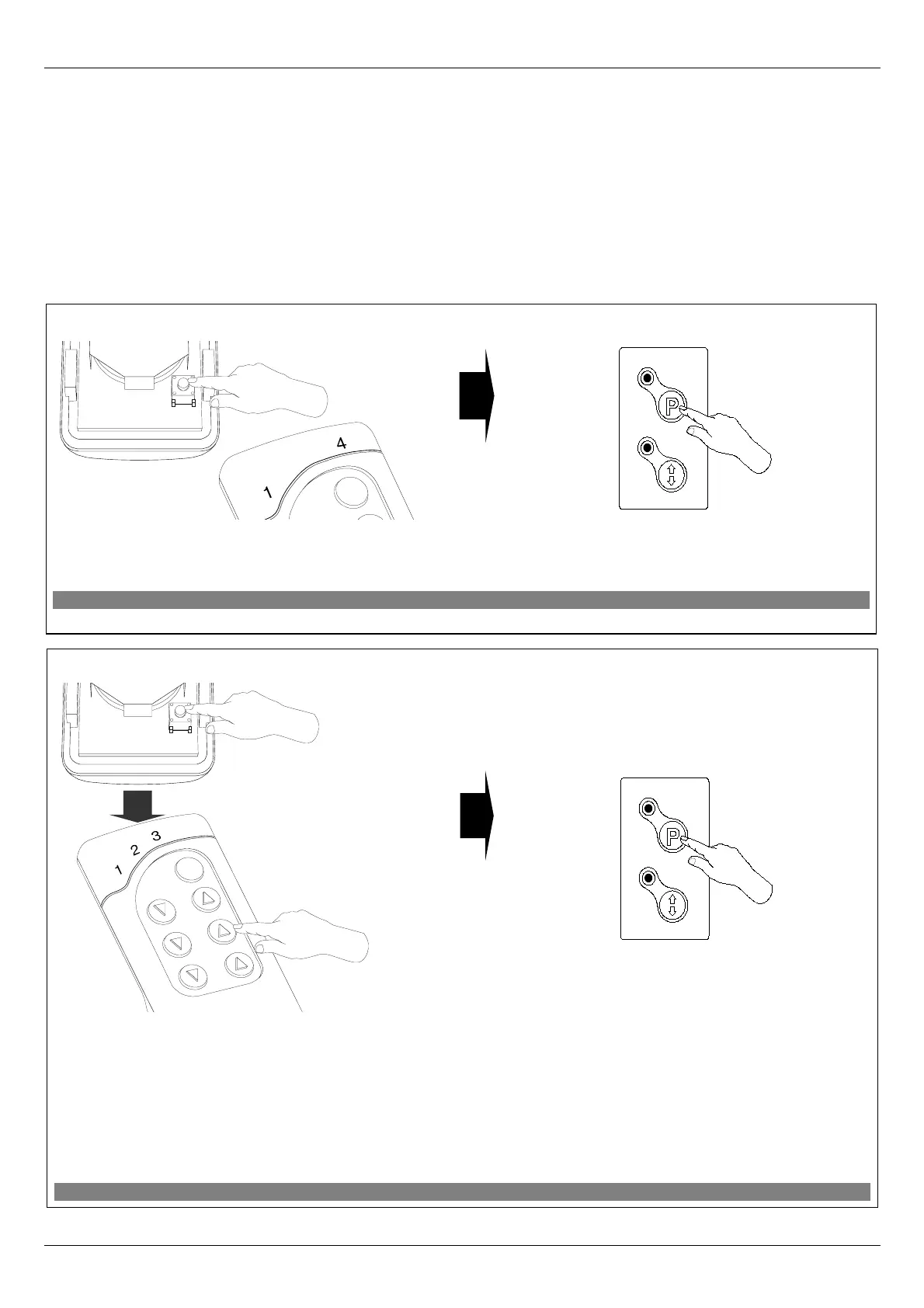
1. Add the device (using “INCLUDE” function) to the memory of a selected controller.
Model procedure is presented in Figure 3;
2. Associate the device with a selected pair of buttons (using “ASSOCIATE” function).
Model procedure is presented in Figure 4.
11.09.19 NC817 4/8 ©2011, FAKRO
INCLUDE
Figure 3: Adding roller shutter to Z-Wave network.
1. Press “In/Ex” button on the controller once. The
controller is signaling readiness for adding a new device to
the network (external LEDs on for 10 seconds).
2. Press “P” button on the device and hold it for 0.5
sec.
ASSOCIATE
Figure 4: Associating roller shutter with selected pair of controller buttons.
2. Press “P” button on the device and hold it for 0.5
sec.
1. Within 1 sec., press:
- “In/Ex” button (1) once and then
- the button from this pair of buttons which is to
operate the device (e.g. 2).
The controller is signaling readiness for device
associating with a pair of buttons on the
controller (three LEDs on for 10 sec.).
x1
x1
x1
2
x1
x1
1


 To Next Page